

I've been a paying customer of ExonHost since 2017. Since the beginning, I've been using their 'Turbo Plus' plan, which was earlier called 'Turbo Diesel+'.
It's what's known as semi-dedicated hosting: it's still technically a shared hosting environment but with significantly higher resource limits (moving it closer to a VPS / dedicated server).
Additionally, since the past 4-5 years, I've also been using their 'Advanced' plan (their standard shared hosting with slightly higher resources).
For this ExonHost review, I've spent countless hours extensively benchmarking both tiers of their shared hosting. I've tested real-world website performance (metrics like TTFB and real-world perceived speed for both frontend pages and WordPress backend).
My first invoice
In the age of a Google HCU classifier that doesn't believe anything at face value, this is my first ExonHost invoice. Just to prove that I've indeed been a paying customer for close to a decade and that I haven't been compensated by them in any way for writing an overly positive review.
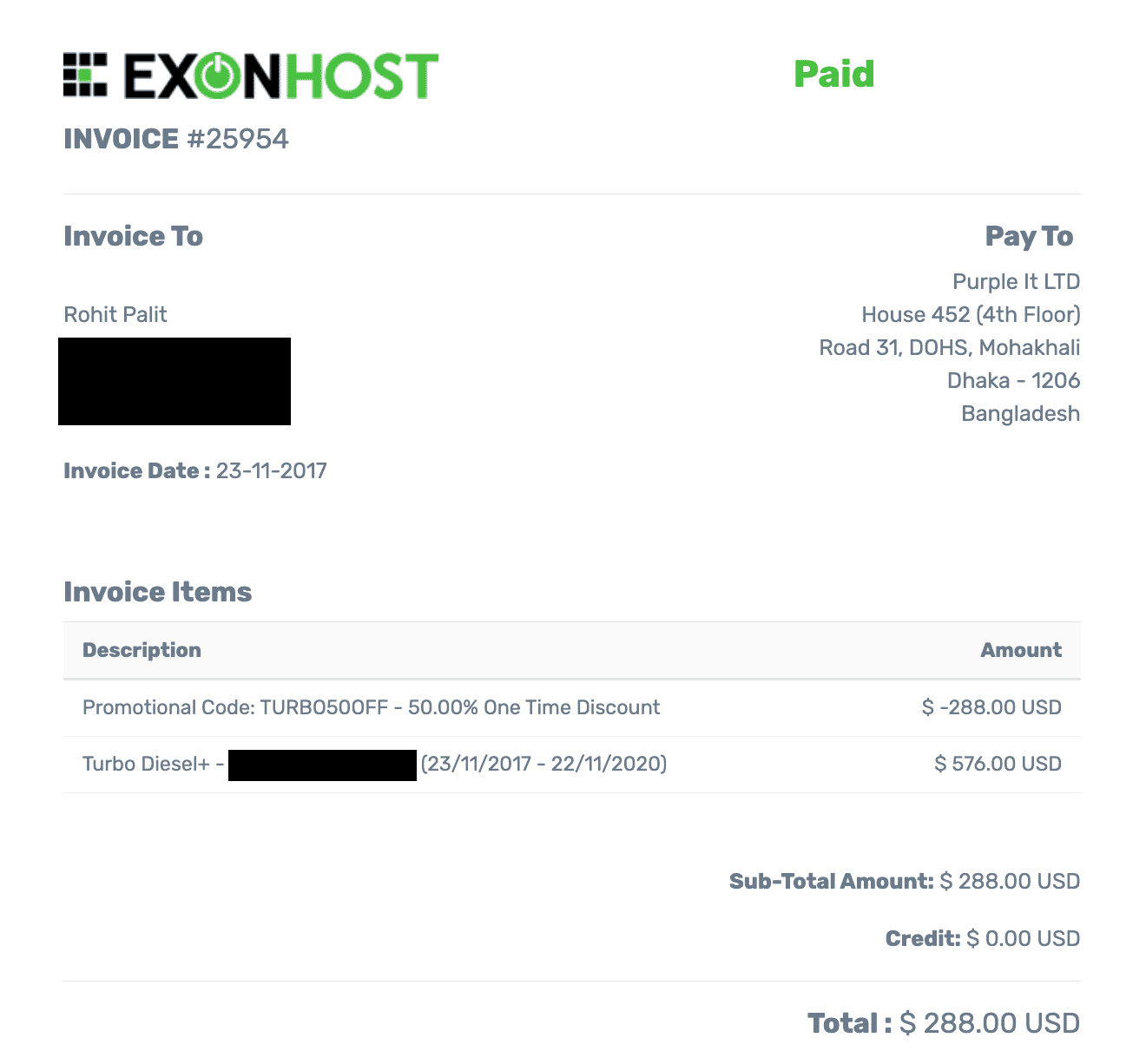
My ExonHost invoice from 2017.
1. Why I prefer 'semi-dedicated hosting'
For their 'Turbo' plans (semi-dedicated tier), there are usually fewer accounts per server, and you can expect way better performance and reliability compared to traditional shared hosting, while still being cheaper and simpler to operate than a VPS.
One anecdote would be living inside a gated apartment complex (semi-dedicated) vs. in a stand-alone villa (VPS). You get better facilities in the former for the price, such as a swimming pool, outdoor/indoor games, 24x7 security, etc. This is possible because a large number of apartment owners are contributing to a common maintenance fund.
The equivalent of such facilities in the hosting space would be things like LiteSpeed web server, CloudLinux (for account isolation), cPanel, various (paid) backup solutions like JetBackup, object caching solutions like Redis/Memcached (hosts like Kinsta do charge a crazy $100/mo for such open-source offerings), security solutions like Imunify360, etc.
If you had to get individual licenses of such offerings, the cost would probably exceed the cost of your VPS itself. However, because the enterprise license costs are split amongst many users (hosted on the same server, albeit largely containerized by CloudLinux & CageFS), you get to enjoy all those at a much more accessible price point.
There's another less talked about benefit of semi-dedicated hosting over VPS hosting with similar resource limits (CPU cores and RAM). In a VPS, the web server itself, whatever control panel you install, and all such components consume resources which count against your allocated resources.
This is not the case for shared hosting environment (semi-dedicated is still technically shared hosting). So, your actual websites get to use the resources allocated to your account and you don't have to worry about things like whether cPanel is a resource hog.
A real incident
I once migrated someone's mission-critical website from a 4GB RAM + 4 Cores VPS to a semi-dedicated plan of the same host. The semi-dedicated plan cost less than half that of the VPS. Same CPU and memory limits. The VPS had Apache while the semi-dedicated plan had LiteSpeed Enterprise.
At first, he was super skeptical because this was a serious site getting nearly 80K monthly visitors and generating a high four-figure monthly revenue at the time. After the switch, and followed by some optimization work done by me, his site became way faster. Especially the WP backend, which lagged like crazy earlier (think 2-3 seconds between each page load). Ultimately, he couldn't have been happier!
2. Literally the fastest CPU (Ryzen 9950X)
When I first started using ExonHost in 2017, they were using era-appropriate Intel Xeon servers along with regular (SATA) SSDs. Later, when AMD EPYC and Ryzen processors, along with NVMe SSDs became more popular owing to significant performance benefits, ExonHost was quick to upgrade their infrastructure.
If I remember correctly, they upgraded their semi-dedicated servers first, followed by their regular shared servers. I could instantly see a radical improvement in performance (both front-end and even more noticeably in the back-end).
I got in touch with Saleh Ahmed, the CEO, and he confirmed that they're currently using AMD's Ryzen 9950X (the fastest single-thread performance you can get on a server, verify on PassMark) for semi-dedicated plans (Turbo Plus and beyond).
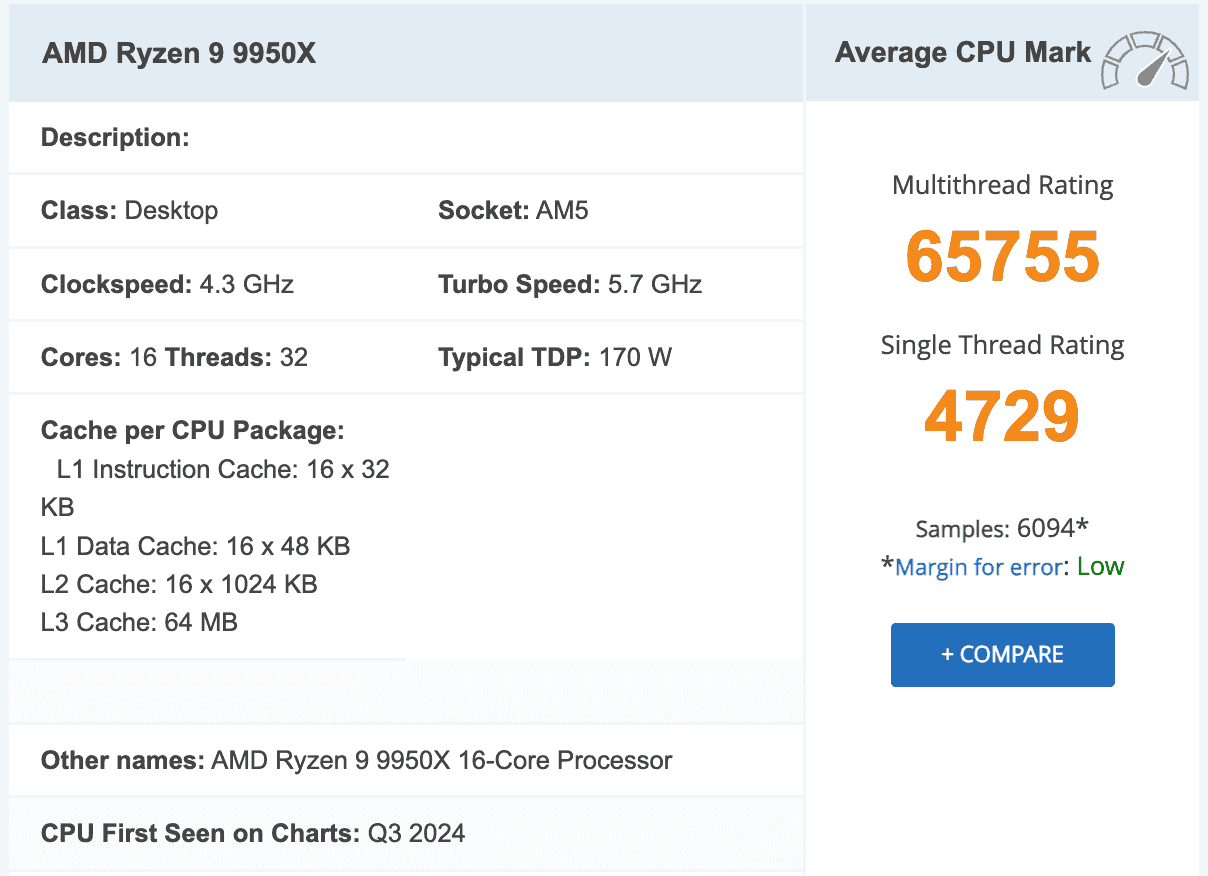
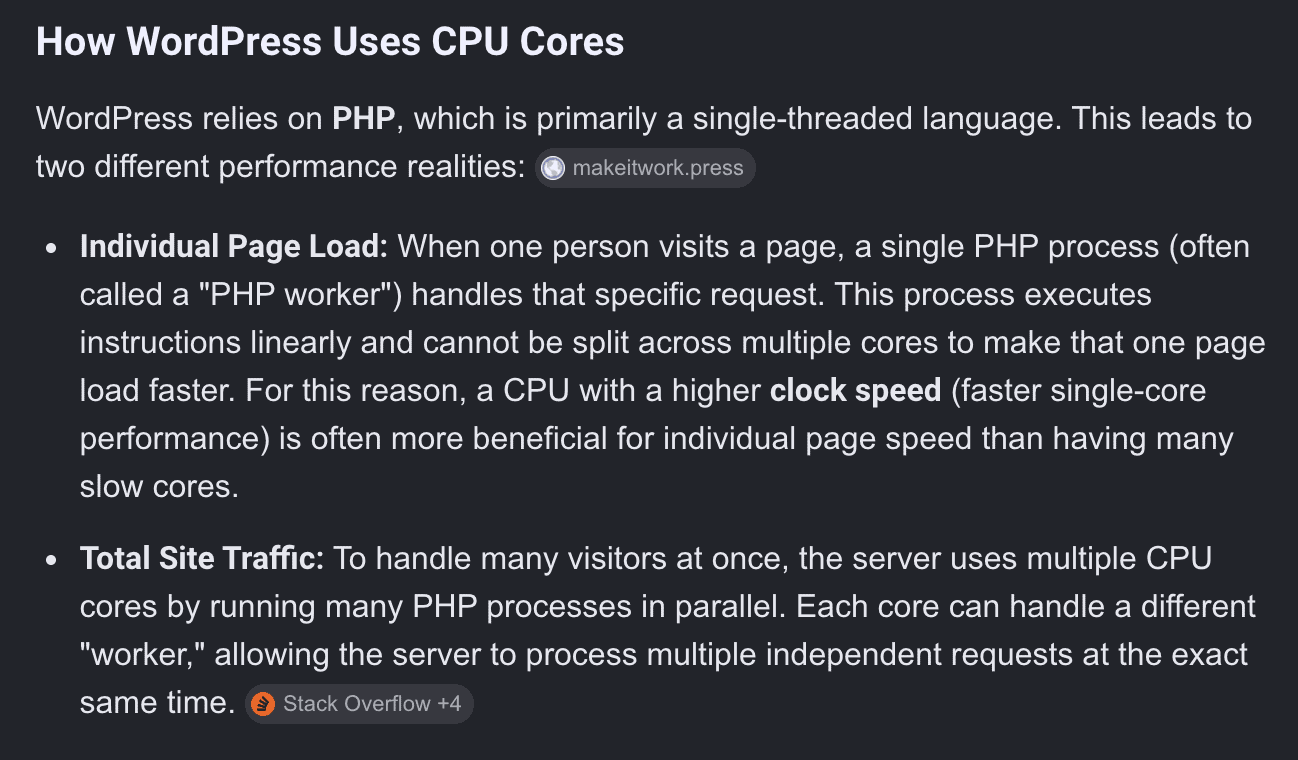
Most common (dynamic) website platforms (including WordPress) are only as fast as the server's single-threaded CPU performance allows them to be.
Here's a summary from Google AI on how WordPress, specifically, uses CPU:
In this aspect, even the Ryzen 5950X (used in their standard shared hosting) is way ahead (single-thread rating of around 3500) of what most other 'semi-dedicated' hosting providers are using currently (AMD EPYC and Intel Xeon Gold). AMD's EPYC 4565P is just as fast, but I haven't seen any provider using it for shared hosting yet.
For example, HostArmada is using AMD EPYC 7713 (single-thread: 2647) and ChemiCloud is using AMD EPYC 9354 (single-thread: 2766) for their semi-dedicated tier plans.
This is exactly why I'm paying for an additional account with ExonHost on their standard shared hosting platform, because the real-world speed (especially for my use case, which is mostly static, cached WordPress sites) is as good as their semi-dedicated hosting (which I'm still also using). I'll demonstrate this in a later section with real performance metrics.
These are my three tips related to web hosting & CPU:
- If you consider the CPU core limit of a hosting plan, it's worth researching the exact CPU model they are using. Otherwise, if host A is offering 4 cores of a CPU with a 4000 PassMark single-thread rating, while host B is offering 6 cores of a CPU with a 2000 PassMark single-thread rating, not only would your sites perform much much better on host A, but you're also getting LESS raw computational power on host B despite the allure of the two extra cores!
- Similarly, don't consider the max. frequency of a CPU. It means very little. Because each year, the actual performance per unit of frequency (MHz or GHz), also known as IPC, increases. So a current gen. CPU's 4 GHz isn't the same as a 5 year old CPU's 4 GHz in terms out actual computing power. This is why you should rely on a frequency-agnostic metric like PassMark's single-thread rating (which actually matters for web hosting!).
- And similarly, don't consider the multi-threaded performance of a CPU when evaluating it for anything other than a true dedicated server (i.e. the whole server along with all of its resources is reserved just for you). Because even an older CPU with more cores can beat newer ones with fewer, faster cores. But on a shared/semi-dedicated/VPS plan, you're allocated a fixed amount of CPU threads / vCPU cores, so the multi-threaded performance of the CPU is irrelevant.
3. And terrible marketing...
You'd imagine putting together such cutting-edge hosting platforms must have cost them a lot of money, so they must surely be promoting it aggressively on their website?
Wrong.
I don't know when was the last time they updated their website, but I couldn't find any mention of the CPU models anywhere. In most prominent places across their website, only 'SSD storage' is mentioned, along with older tech like HTTP/2 and PHP 7:

Excellent at keeping their infrastructure upgraded, terrible at communicating that to potential clients!
And you'll only find the mention of 'Enterprise-grade NVMe SSD' way down their homepage:
4. Server benchmarks
First up, we'll do PHP Vitals, which primarily measures PHP processing performance of the server and displays an overall grade like A+, A, B+, B and so on. WordPress is mostly PHP.
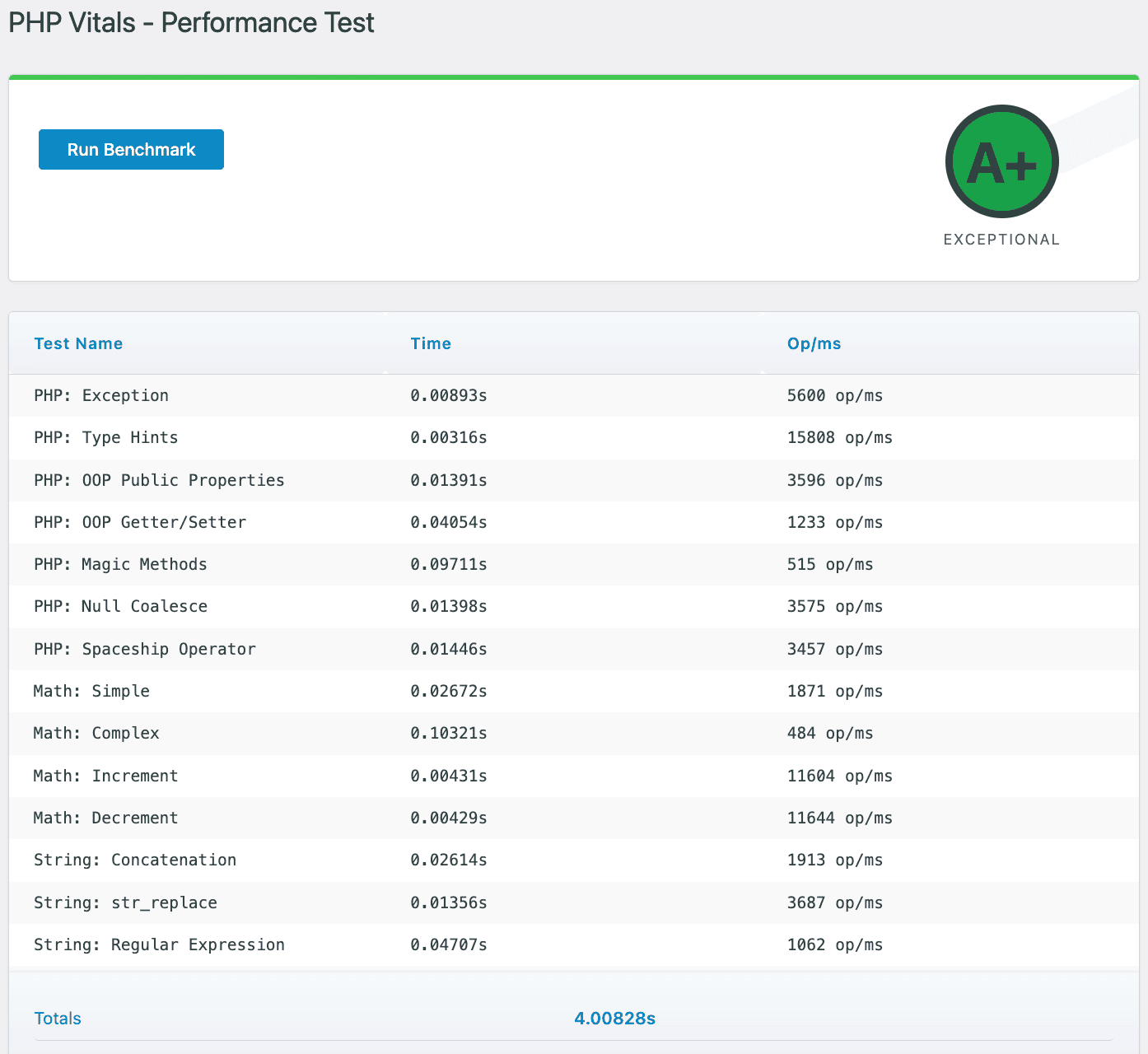
ExonHost Turbo Plus Plan PHP Vitals Score
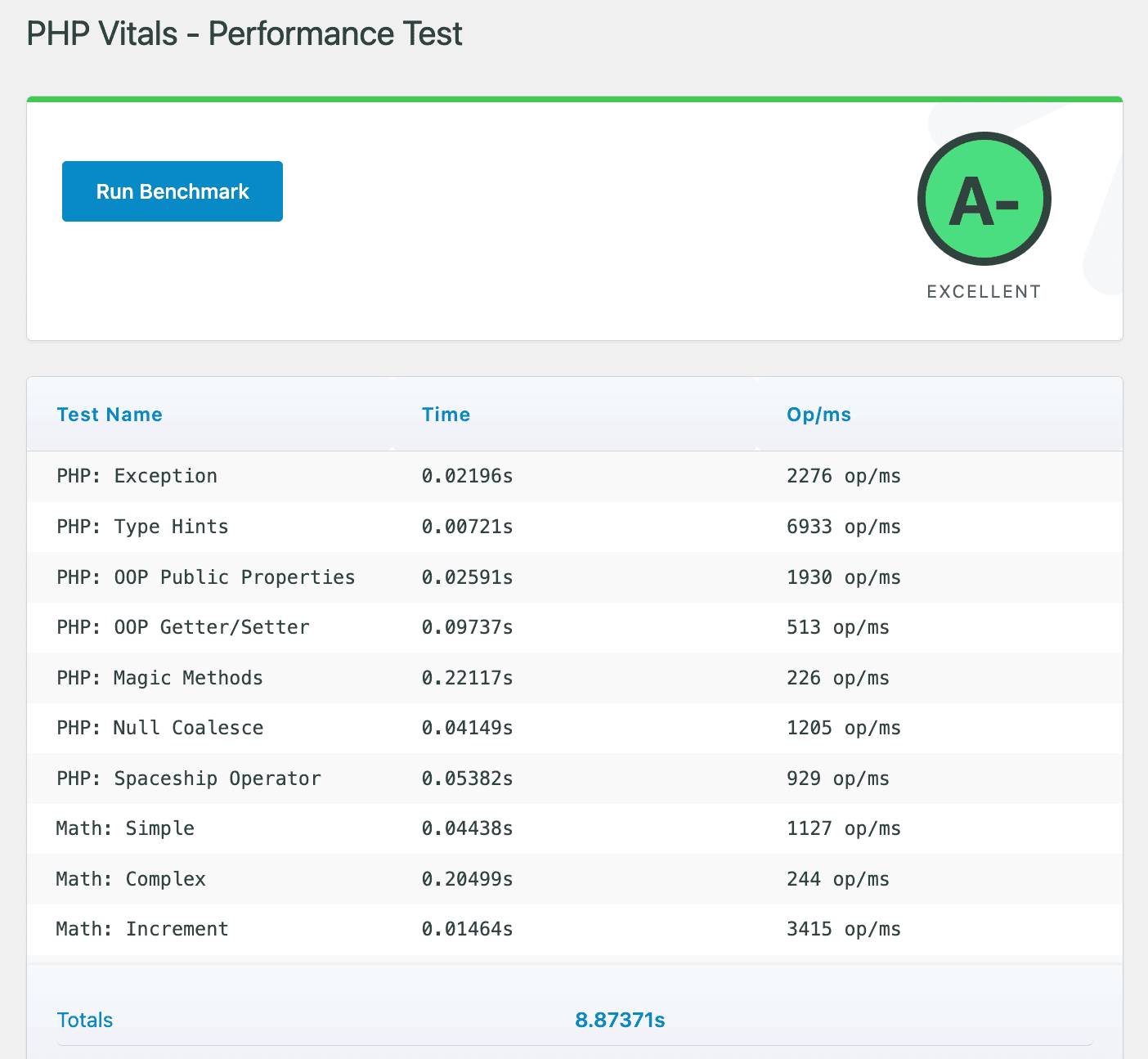
ExonHost Advanced Plan PHP Vitals Score
(click on the images for full size)
Both tests used PHP 8.3, with identical extensions and object caching enabled (Redis). Both servers utilize LiteSpeed enterprise, and a php max_memory limit of 512MB.
'Turbo Plus' got 'A+' (entire test completed in 4 seconds) while 'Advanced' got 'A-' (entire test completed in 8.87 seconds).
These are undoubtedly excellent results.
My 'Turbo Plus' account with ExonHost got recently moved to a new server which uses the cutting-edge AMD Ryzen 9950X processor. Prior to this, my account was placed on a server having a AMD Ryzen 7950X processor.
The difference in single-thread performance rating between those two CPUs (~4200 vs ~4700) isn’t significant enough. So, for a long time I declined when they offered to move my account to another (newer) server having 9950X. If you buy a new 'Turbo' plan from ExonHost now, you’ll likely be placed on their newer 9950X servers.
Similar is the story for my 'Advanced' plan account which has an Intel Xeon W-1290P (single-thread: 3166) vs AMD Ryzen 5950X (single-thread: 3476) on their newer (basic) shared hosting servers. So far, I decided to spare them the migration hassle.
Between those two plans, apart from the CPU (Ryzen 9950X vs Xeon W-1290P), the only major difference is the allocated resources (4 cores + 4GB RAM for 'Turbo Plus' and exactly half of that for 'Advanced').
For a reference point, let's compare these PHP Vitals results with MDDHosting's fastest offering, the 'Plaid' plan (read my detailed review for their exact specs), which costs around $30/mo (on a monthly billing cycle without discounts).
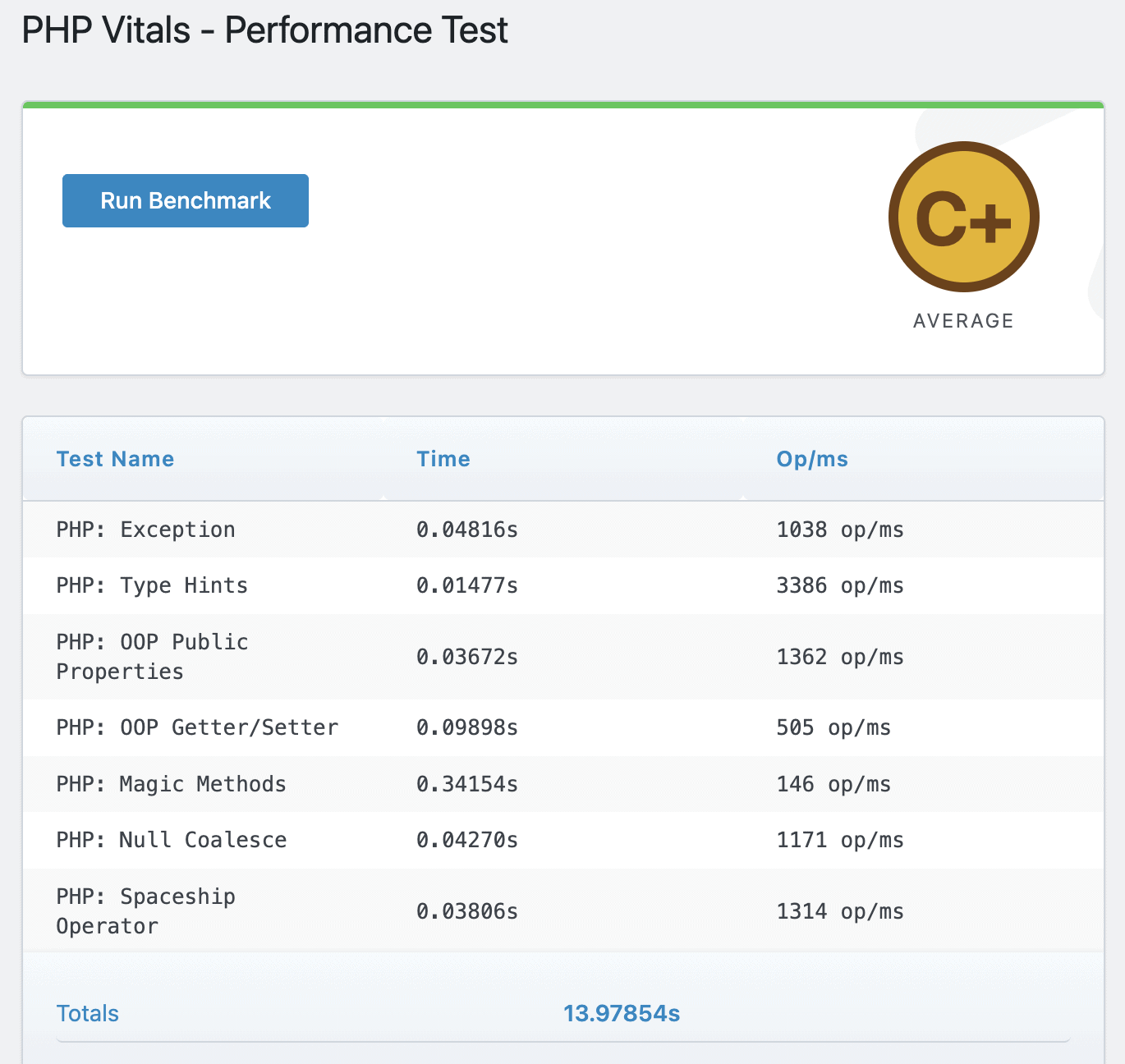
MDDHosting Plaid Plan PHP Vitals Score
MDDHosting's fastest-offering managed to get only a C+, with the entire test taking 13.97 seconds to complete (more than triple the time of Exon's 'Turbo Plus').
Next, we have results from the WordPress Hosting Benchmark plugin by Anton Aleksandrov. This test measures more things than just PHP performance (which is mostly a function of raw CPU firepower).
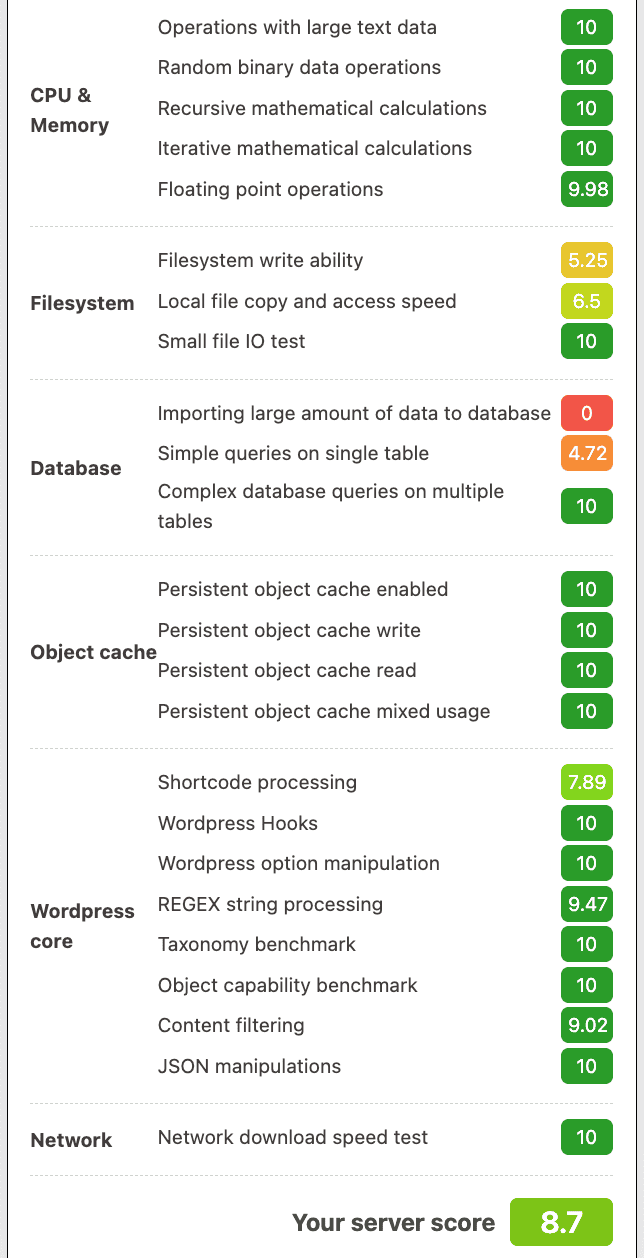
ExonHost 'Turbo Plus' WordPress Hosting Benchmark
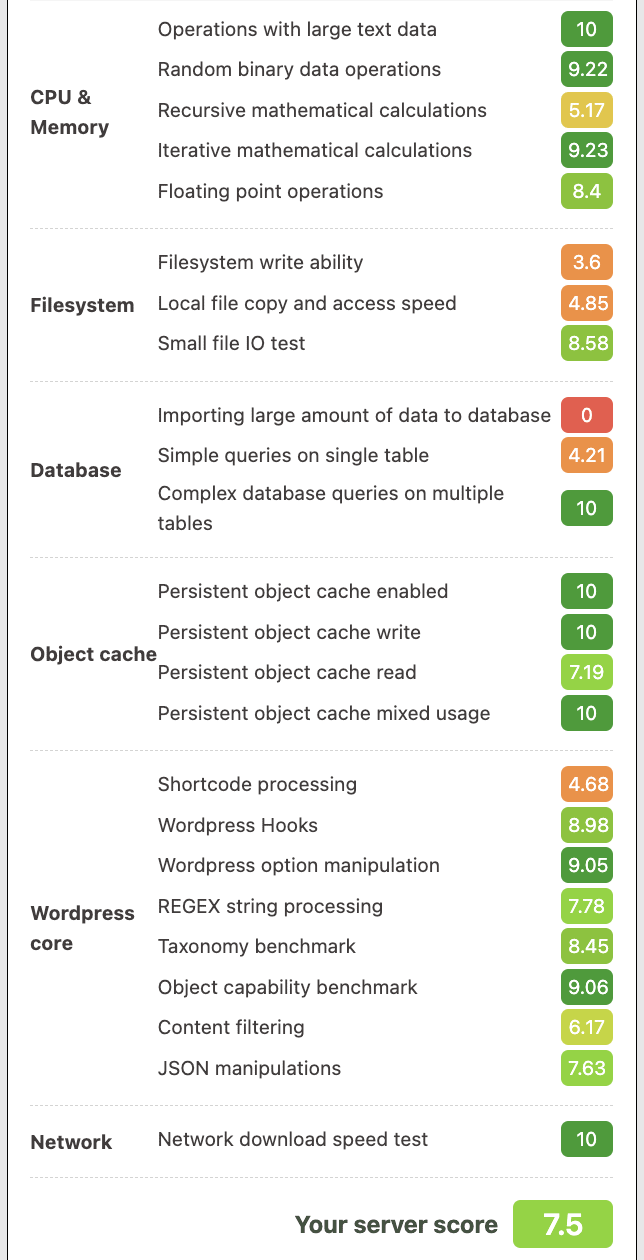
ExonHost 'Advanced' WordPress Hosting Benchmark
(click on the images for full size)
Again, here's the benchmark result of MDDHosting's 'Plaid' platform.
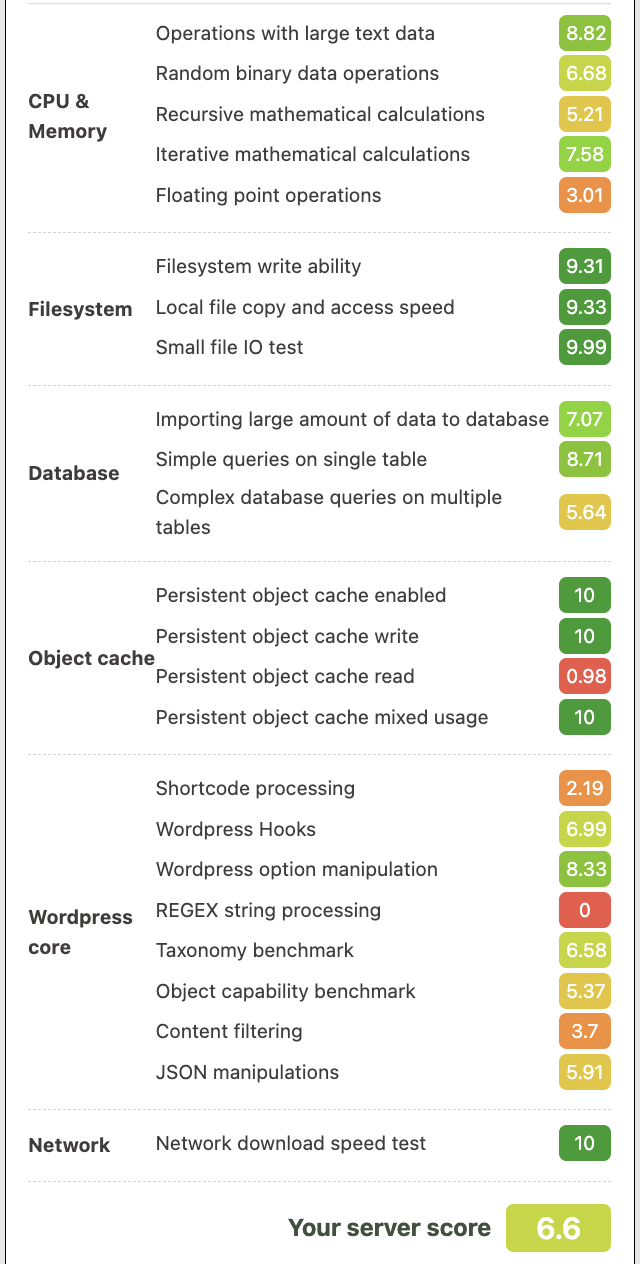
MDDHosting Plaid WordPress Hosting Benchmark
Note: the ‘0’ score in ‘REGEX string processing’ and ‘importing large amounts of data to database’ is likely a result of limits that were put in place to prevent abuse, I wouldn’t take it seriously.
The general pattern was that MDDHosting excelled in the filesystem test while considerably lagging behind in processing power.
The difference between the two ExonHost plans wasn't that big. It was not a huge surprise for me, considering they don't skimp on using a fast-enough modern CPU for even their entry-level shared hosting plans.
5. Real-world loading time testing
For testing real-world website performance, my preferred test is the global TTFB test using FlyingTTFB. This measures the initial server response time from many different locations across the globe (especially useful if you get visitors from more than one particular region).
I’ve used a WordPress site for this test, loading a simple blog post (doesn’t use any page builder).
I’ve performed this test using both their 'Turbo Plus' and 'Advanced' plans, under 3 different conditions:
- Uncached + Cloudflare CDN (for static resources only)
- Cached (LiteSpeed Cache) + Cloudflare CDN (for static resources only)
- Cached (LiteSpeed Cache) + Dynamic (Full-page) Caching enabled (Cloudflare) using the App for CF plugin, where the entire page is served directly from Cloudflare’s global PoPs (bypassing the origin, i.e. ExonHost entirely)
This is what each test means:
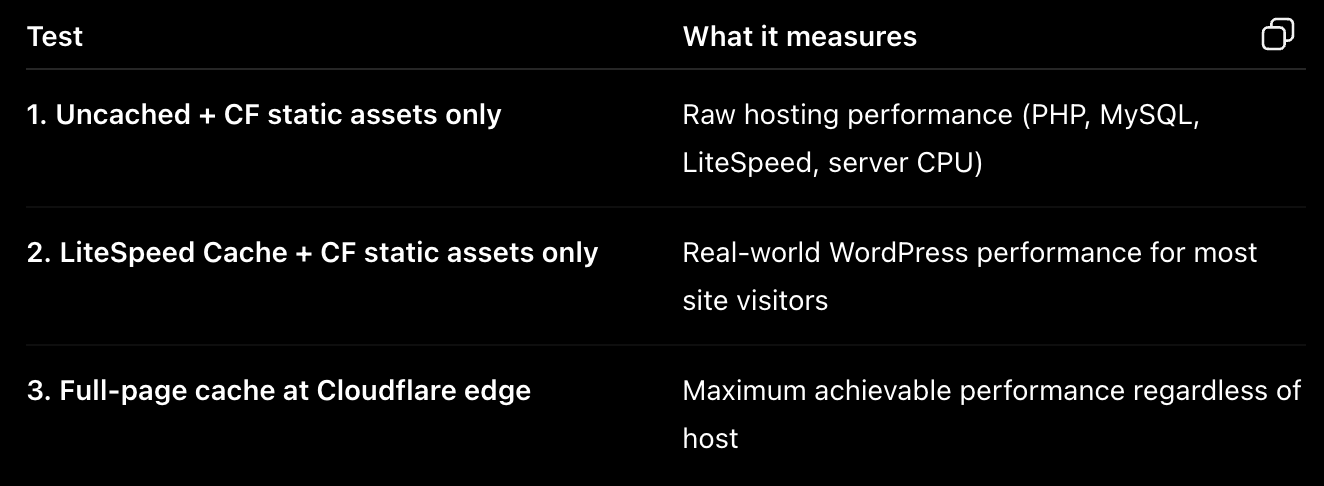
What different TTFB testing methods measure.
TTFB = ‘Time to First Byte’ Response Time in miliseconds (lower is better)
For dynamic sites (WooCommerce, forums etc.), take into account the ‘uncached’ TTFB values. Similarly, for mostly static sites (blogs and other article-based sites), consider the cached numbers (using LiteSpeed page caching).
Lastly, for static sites, the Cloudflare dynamic (full page) caching mechanism shows you what’s possible if static HTML versions of your webpages are served directly from a CF PoP (node) that’s closest to your visitor.
When it comes to gauging the performance of your web host, I wouldn’t give the last one too much importance since it bypasses the origin (in this case, ExonHost) almost entirely.
Here are the results. Click on the images to view them in full size.
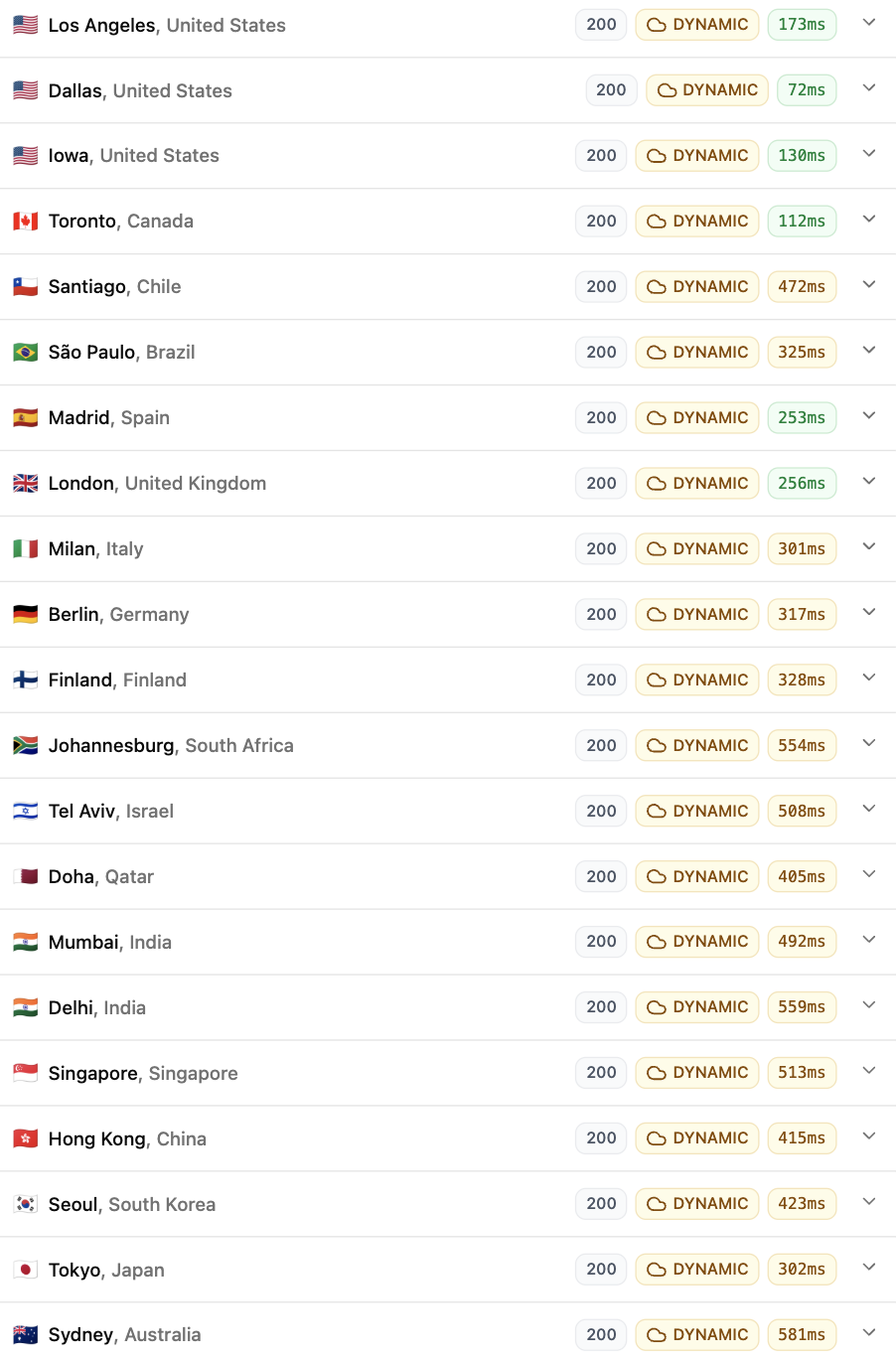
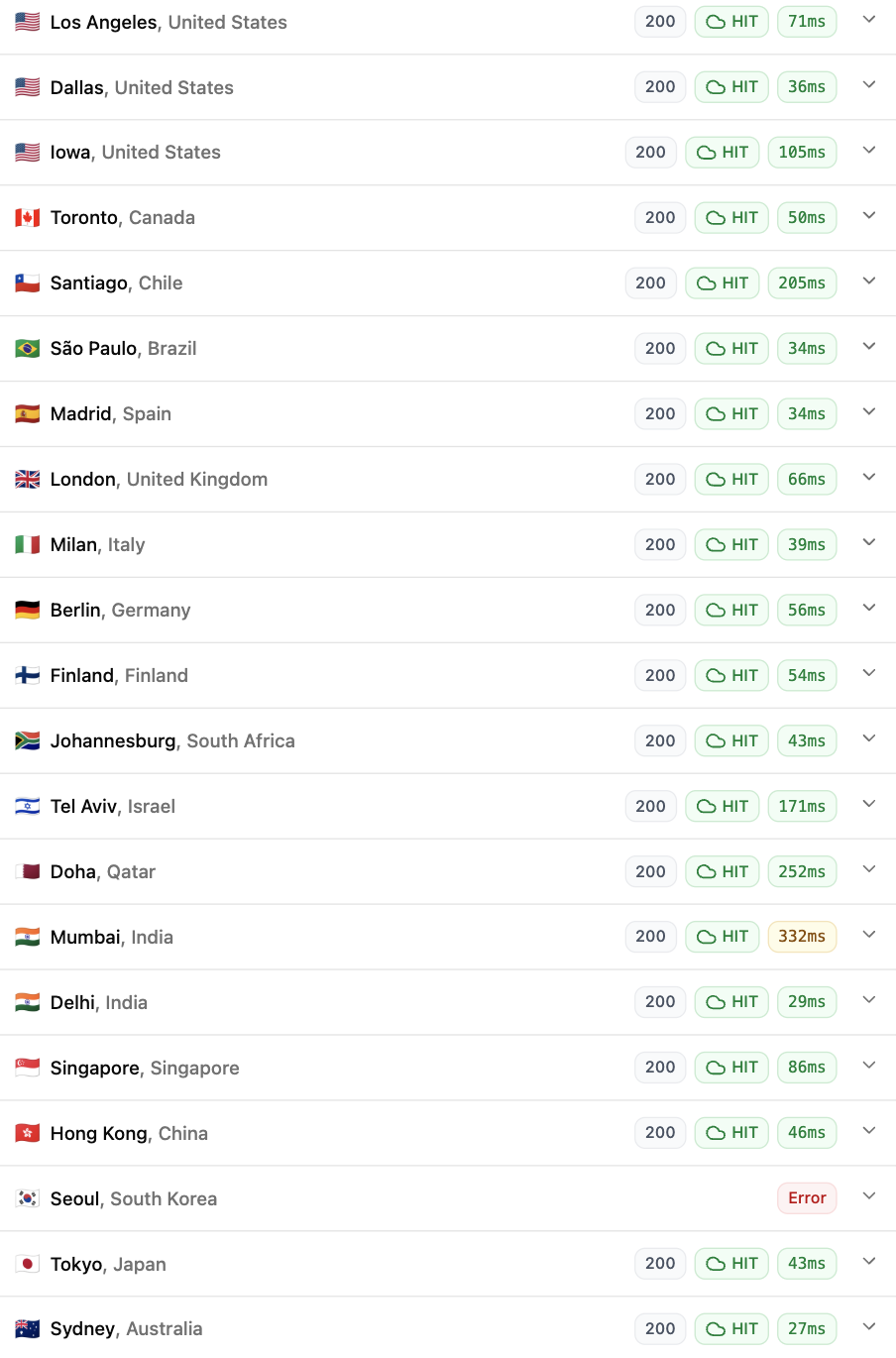
Global TTFB – ExonHost’s ‘Turbo Plus‘ plan:
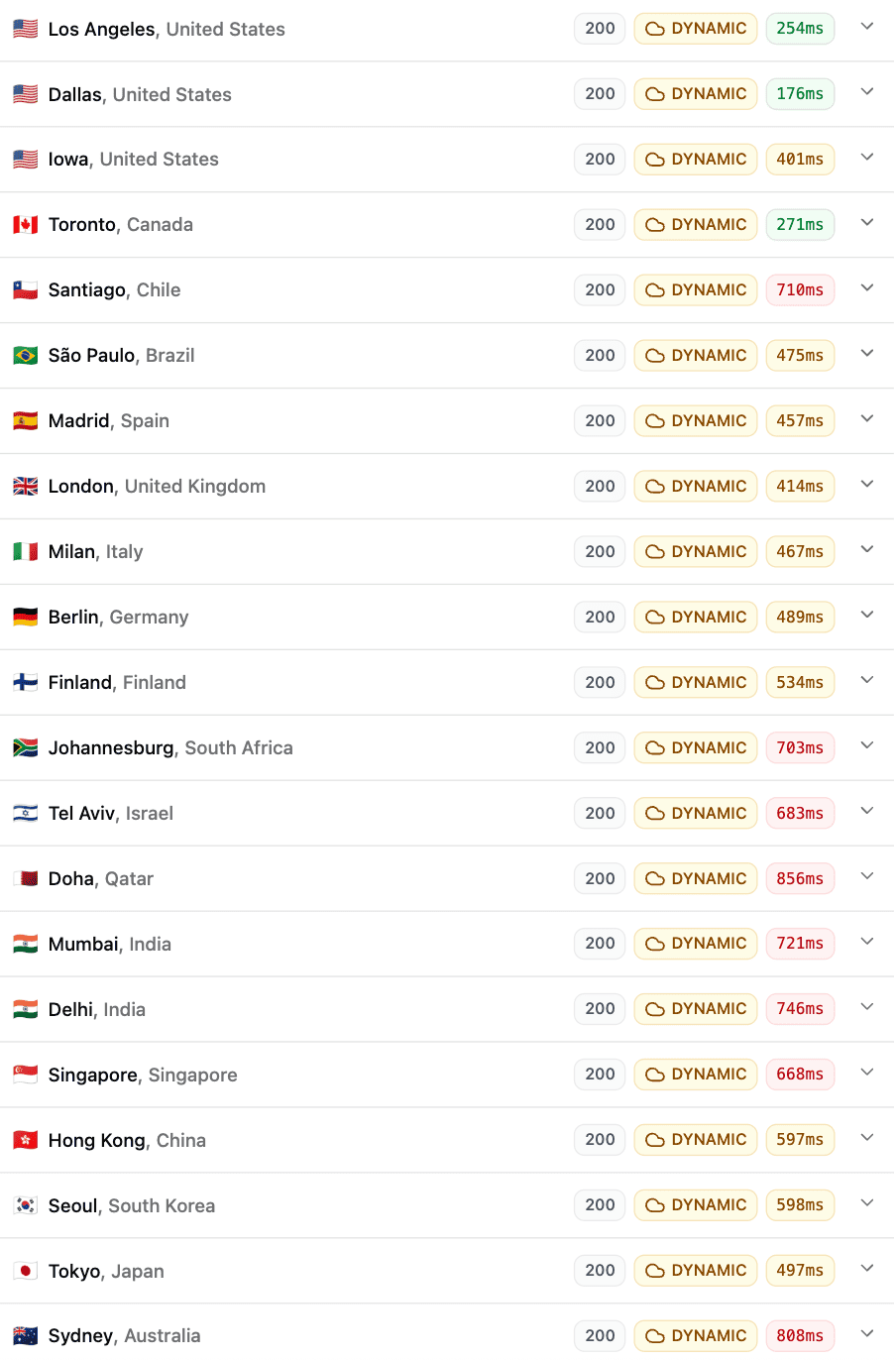
Uncached + CF Static Cache
Cached (LiteSpeed) + CF Static Cache
Cached (LiteSpeed) + CF Dynamic (Full Page) Cache
Global TTFB - ExonHost's 'Advanced' plan:
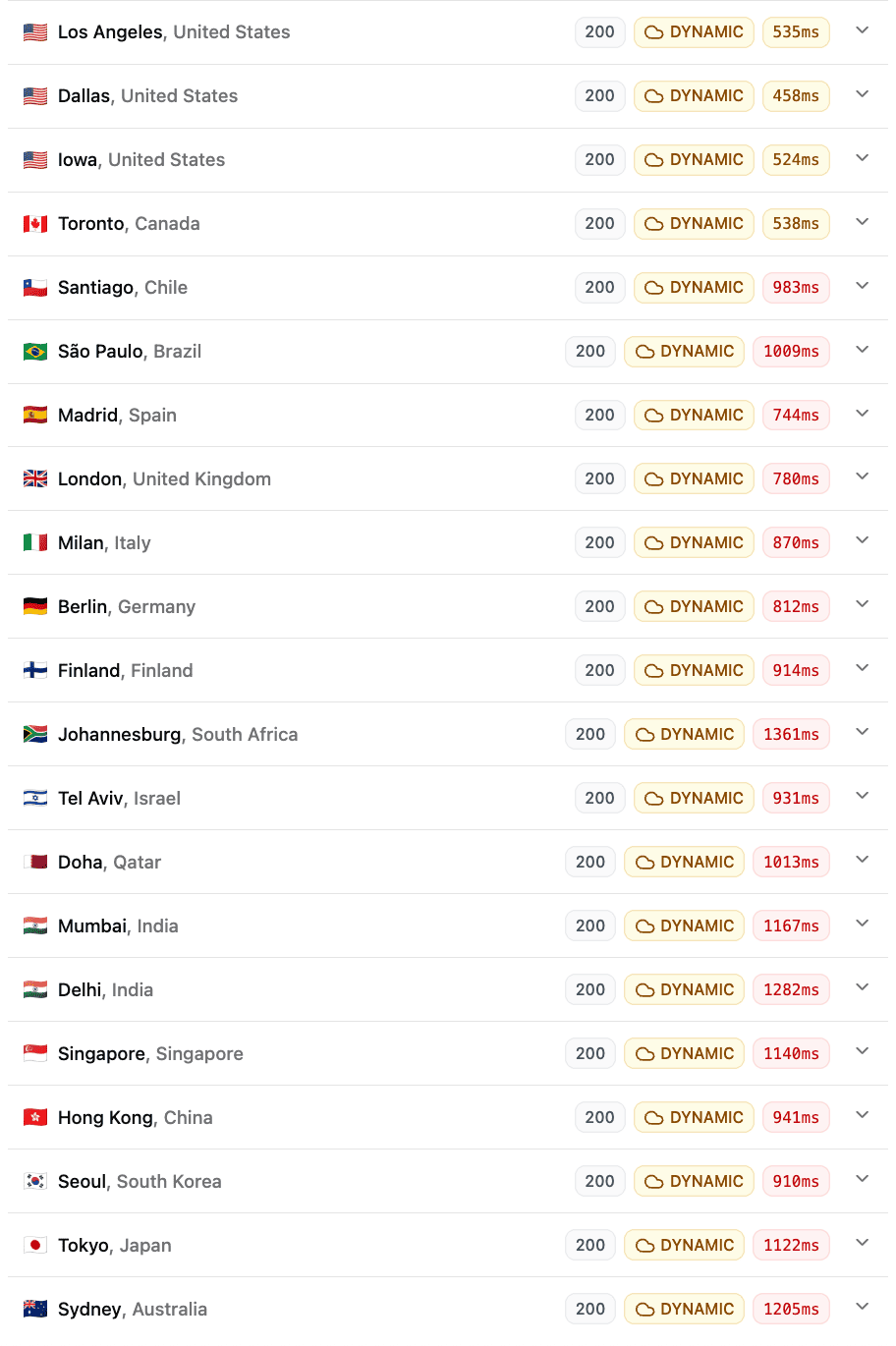
Uncached + CF Static Cache
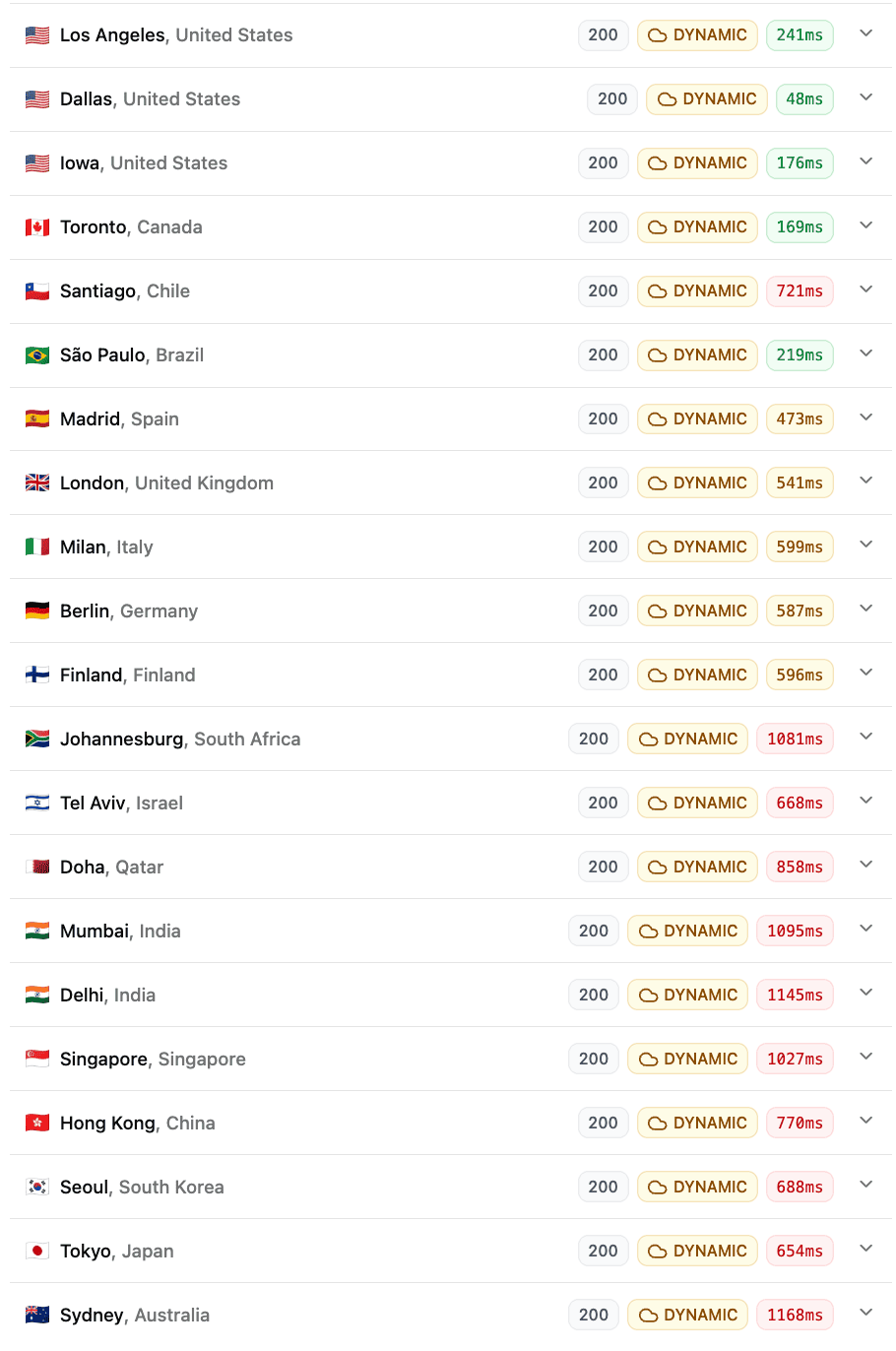
Cached (LiteSpeed) + CF Static Cache
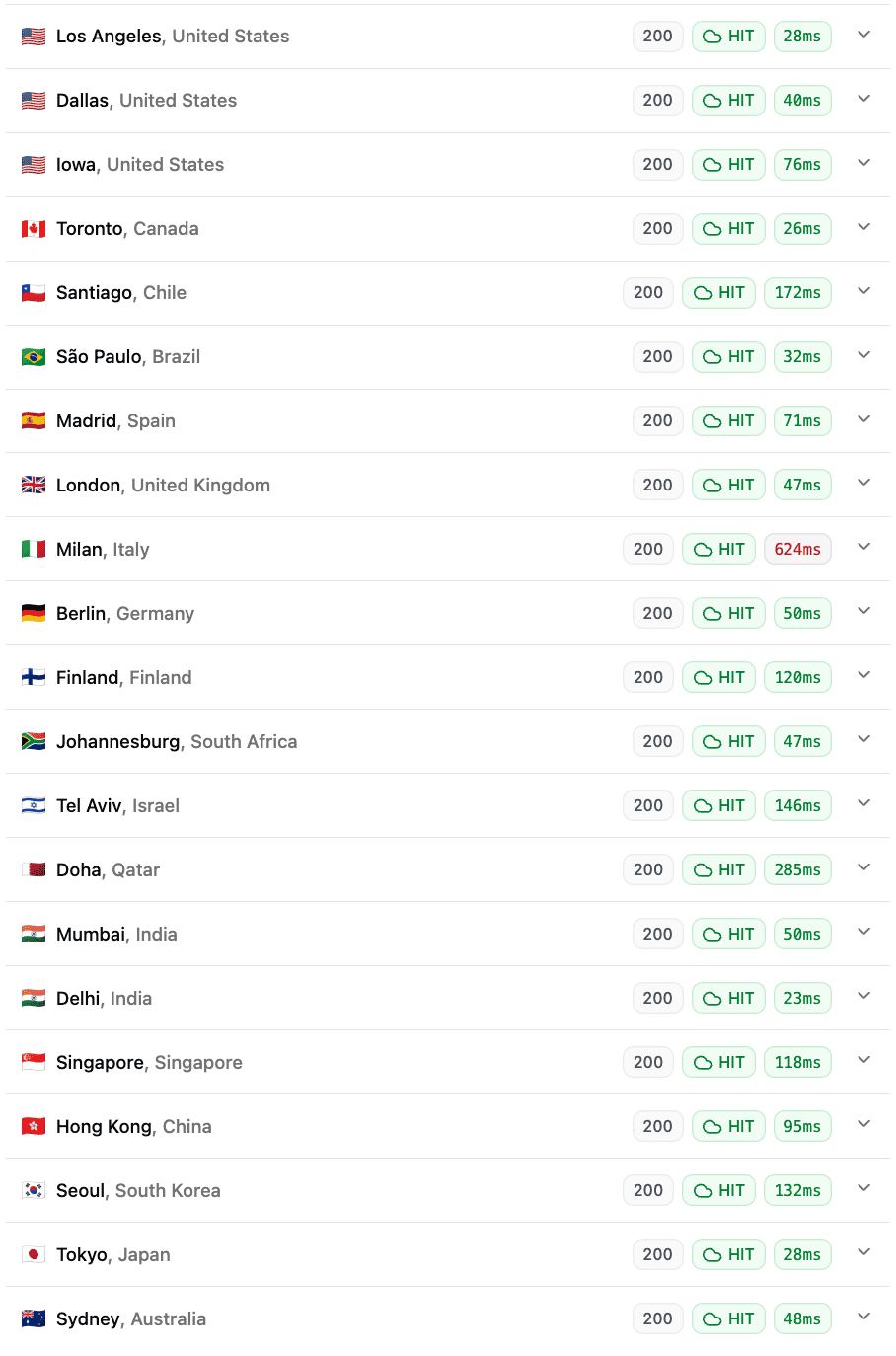
Cached (LiteSpeed) + CF Dynamic (Full Page) Cache
Two things are evident from these results.
One, while the gap between the two plans was marginal in benchmarks, it still translated into a meaningful difference in real-world page serving times.
Two, for your well-cached static sites, if you use a CDN like Cloudflare for dynamic caching (i.e. serving the HTML pages directly from CDN PoPs), your origin server performance becomes irrelevant for end users.
Again, here's the comparison with MDD for some additional context.
Global TTFB - MDDHosting's 'Plaid' plan:
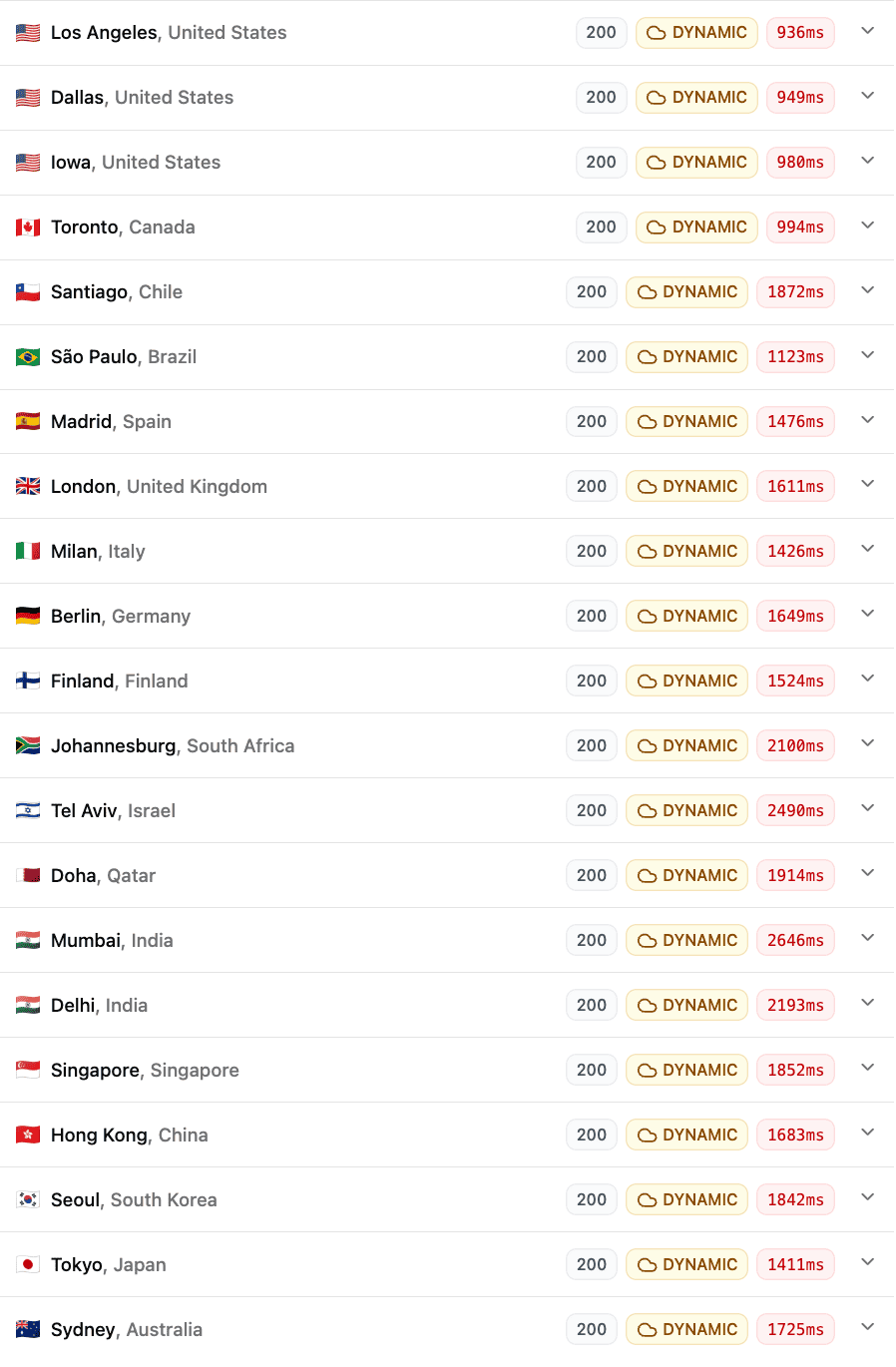
Uncached + CF Static Cache
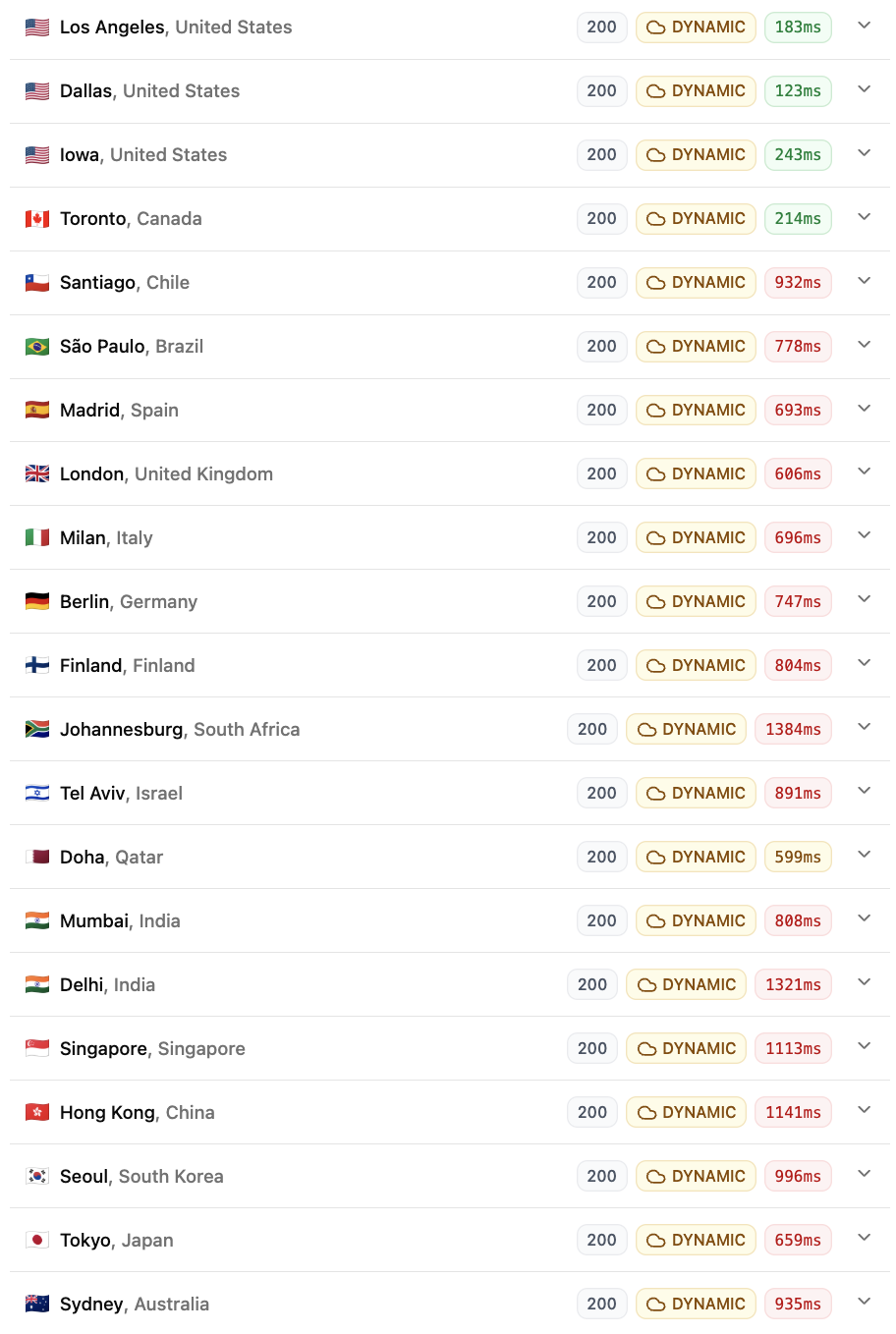
Cached (LiteSpeed) + CF Static Cache
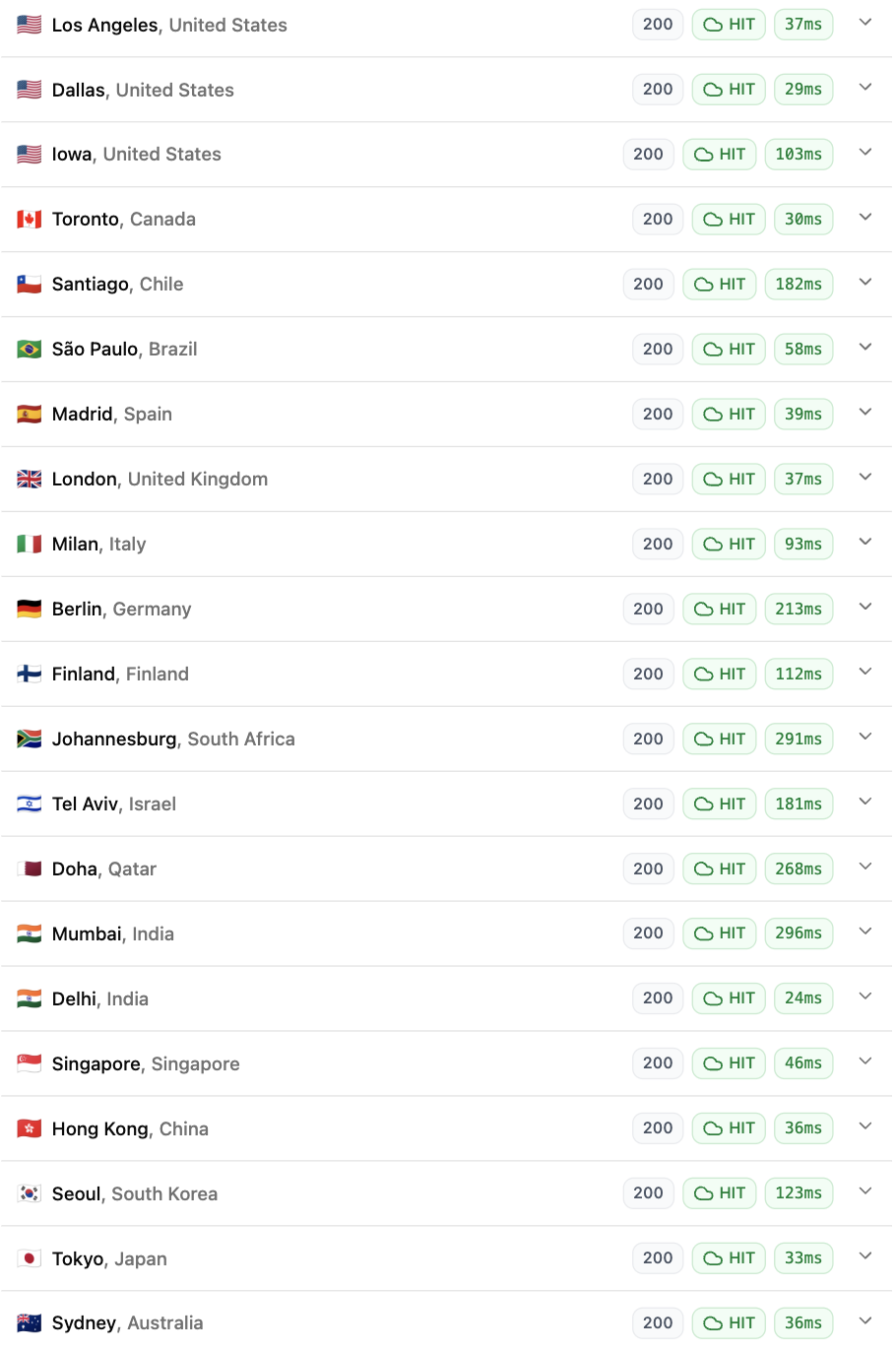
Cached (LiteSpeed) + CF Dynamic (Full Page) Cache
What can I say, MDD's results were underwhelming to say the least. Especially for the uncached test. Though their benchmark results did give us a hint.
Fortunately, for cached pages, the difference wasn't as big and you probably won't even notice it in the real world. But if you're primarily looking to host highly dynamic, heavy scripts with little room for caching, I would seriously prefer a faster host like ExonHost over MDDHosting.
6. Have realistic expectations about uptime
Yes the '99.9% uptime guarantee' is a standard across most hosts, but realistically, you need to be prepared to face occasional downtimes, especially ones that are beyond the scope of ExonHost.
I monitor all my sites using UptimeRobot in 5-minute intervals. Most months pass by without a single incident, but occasionally there are months when my sites remain offline for brief periods (usually between 10 to 90 minutes).
Here's a real example (screenshot taken from my UptimeRobot dashboard).
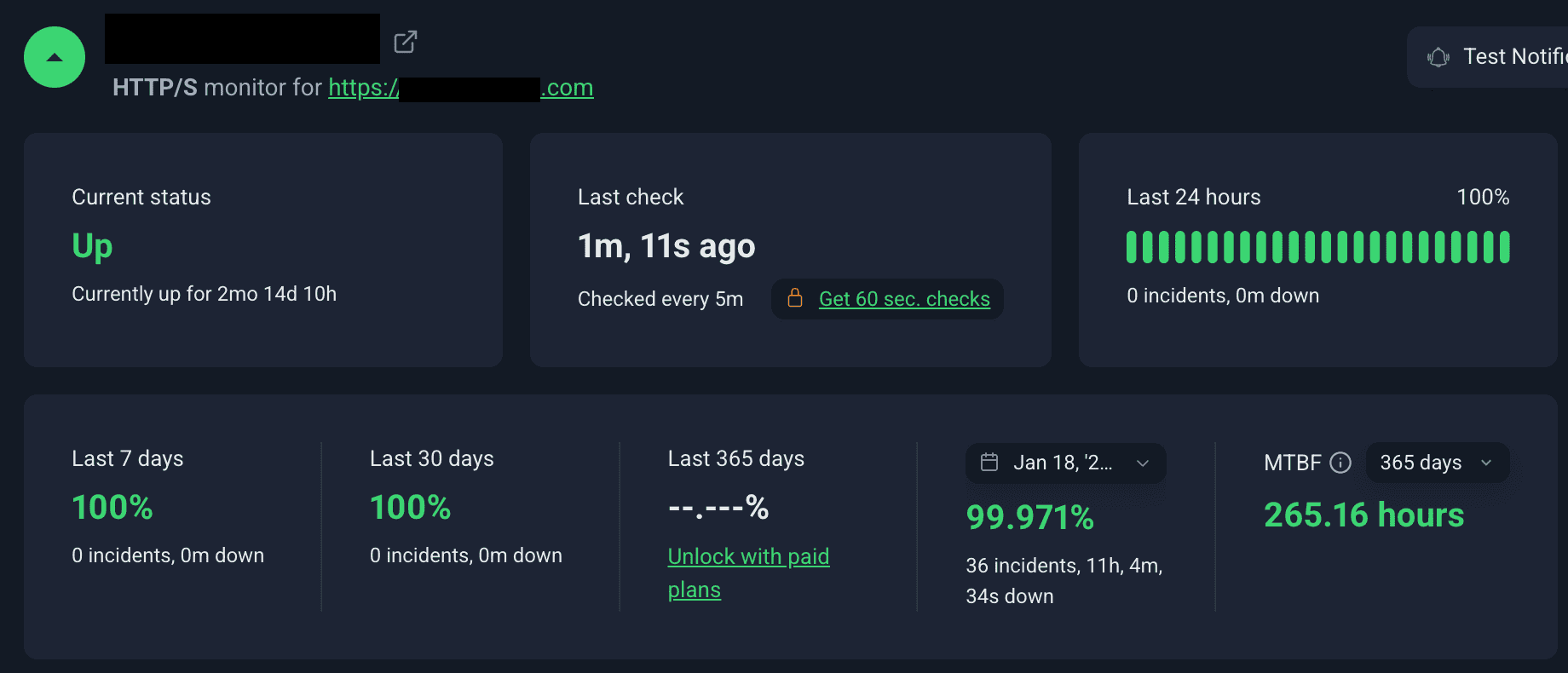
The 99.971% figure above applies to the entire length of the monitoring (which is close to 5 yrs for this particular website). However, in ExonHost's defence, most short 'incidents' (around 5 minutes) tend to be false positives and something to do with what occasionally happens between UptimeRobot and Cloudflare.
Still, there have been numerous instances over the years that I can recall (and verify from my support tickets with them):
- Downtime due to hitting resource limits owing to a temporary surge in bot visits. Resolved on their end by applying new mod_security rules.
- Downtime due to issues at their datacenter(s). I think once it was a networking issue like a switch failure or similar and another time there was a temporary power disruption to the server.
- When they first brought in the Ryzen 5900X servers, I was facing intermittent reliability issues like occasional 503 errors. They had to migrate my account back to their older Xeon server for some time while they sorted out the issues in the newer servers.
- Once I was unable to login through wp-admin because their newly introduced security feature (CPGuard) was resulting in a ReCaptcha loop. Although it was very swiftly fixed after I brought it up.
I've been hosting my sites with them since 2017, and there were hardly any issues until mid-2023. The majority of the incidents I referred to above happened between 2023 and mid-2025. Since then, stability has been much better. But I still dug deep into my tickets history to paint a clear picture about the kind of uptime you can expect realistically.
In reality, far worse downtimes tend to be common with plenty of web hosts that otherwise provide a great service. Such as MDDHosting's infamous 2018 incident which led to several days of downtime (I only had a few non-serious sites hosted with them at the time).
ExonHost has recently introduced this new 'service status' page, which shows the status of all their servers, along with uptime stats, recent downtime incidents for each server along with the cause behind those.
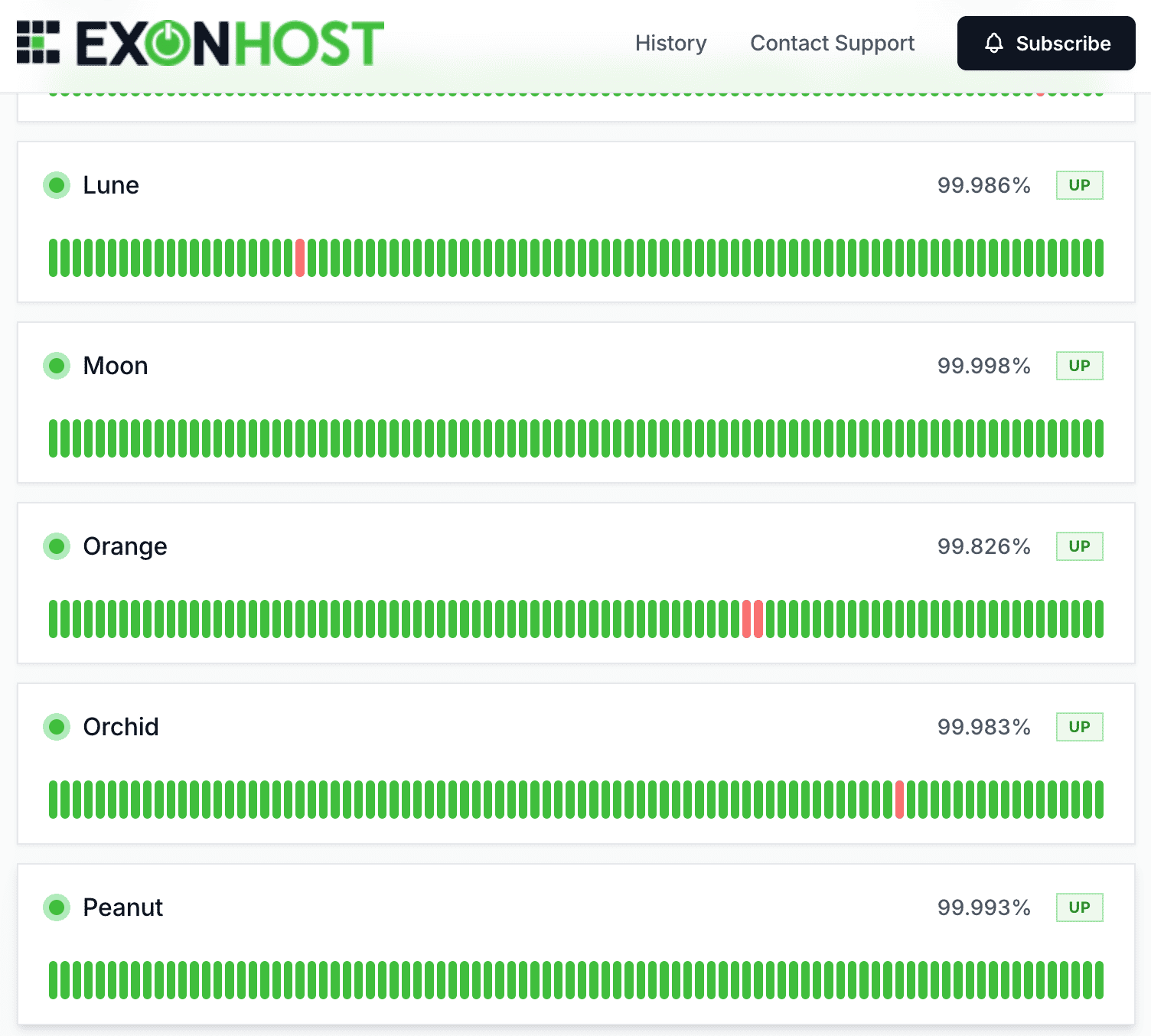
ExonHost Server Status Page
7. Support is decent (Saleh Ahmed himself is amazing)
Towards the beginning, during the 2017 to 2021 period, I saw most of my technical support requirements getting fulfilled by Saleh Ahmed (co-owner of ExonHost) himself.
As the company (and number of clients) grew, they had to understandably hire more support staff, most of whom were decent to interact with.
However, to be honest, none of them came close to Saleh himself. He is a veteran in the hosting space. He could understand my (relatively complex) issues, diagnose the root cause and resolve it very very fast.

Saleh Ahmed at their office.

Saleh Ahmed at their datacenter.
While he still chips in for critical issues (see below), minor issues often take some more explaining from my side before their other technical support staff can clearly grasp them and offer any meaningful resolution.

Saleh Ahmed is very helpful and quick to respond.
Unfortunately, I can't share screenshots of older (pre-2023) support tickets where he (very quickly) helped me resolve a myriad of issues, most of which were beyond the scope of their hosting service itself. This is due to the fact that they switched to a newer client support platform a couple of years ago which isn't displaying the older support tickets.
Still, a few examples of things he helped me with over the years:
- Way back in 2017, the onboarding process was extremely smooth. They swiftly migrated around 8GB of my data from the previous host, for free. Lots of big names in hosting charge you for migration beyond a couple of GBs.
- One of my sites was experiencing a (HTTP <-> HTTPS) redirect loop, and I couldn't figure out what was causing it. After I opened a support ticket, it was promptly fixed within minutes by Saleh.
- I received lots of help from Saleh in setting up email security records like SPF and DKIM properly. Their outbound email limits are also very very lenient compared to most other shared hosts that I've used.
- He diagnosed bot attacks (including hacking attempts) many times and advised me on ways to prevent them at a layer above (Cloudflare in my case). This eliminated unnecessary burden on the server itself and helped keep resource usage in check (currently the average CPU usage is less than 5% across both my accounts).
I also have to mention Masumul Haque (co-owner), who always promptly responded to my billing-related tickets, which never required any back-and-forth.
Coming back to the present times, sometimes relatively complex (but non-critical) requests take some time before I get a response. My guess would be their level 1 and 2 support techs are incapable of assisting with those, and it often takes an hour or two before I get a response.
This is an area where MDDHosting easily outperforms ExonHost. With MDD, you get a useful response for even the most complex of queries within minutes. They even display the actual time taken to reply to a technical support ticket (average of last 7 days):
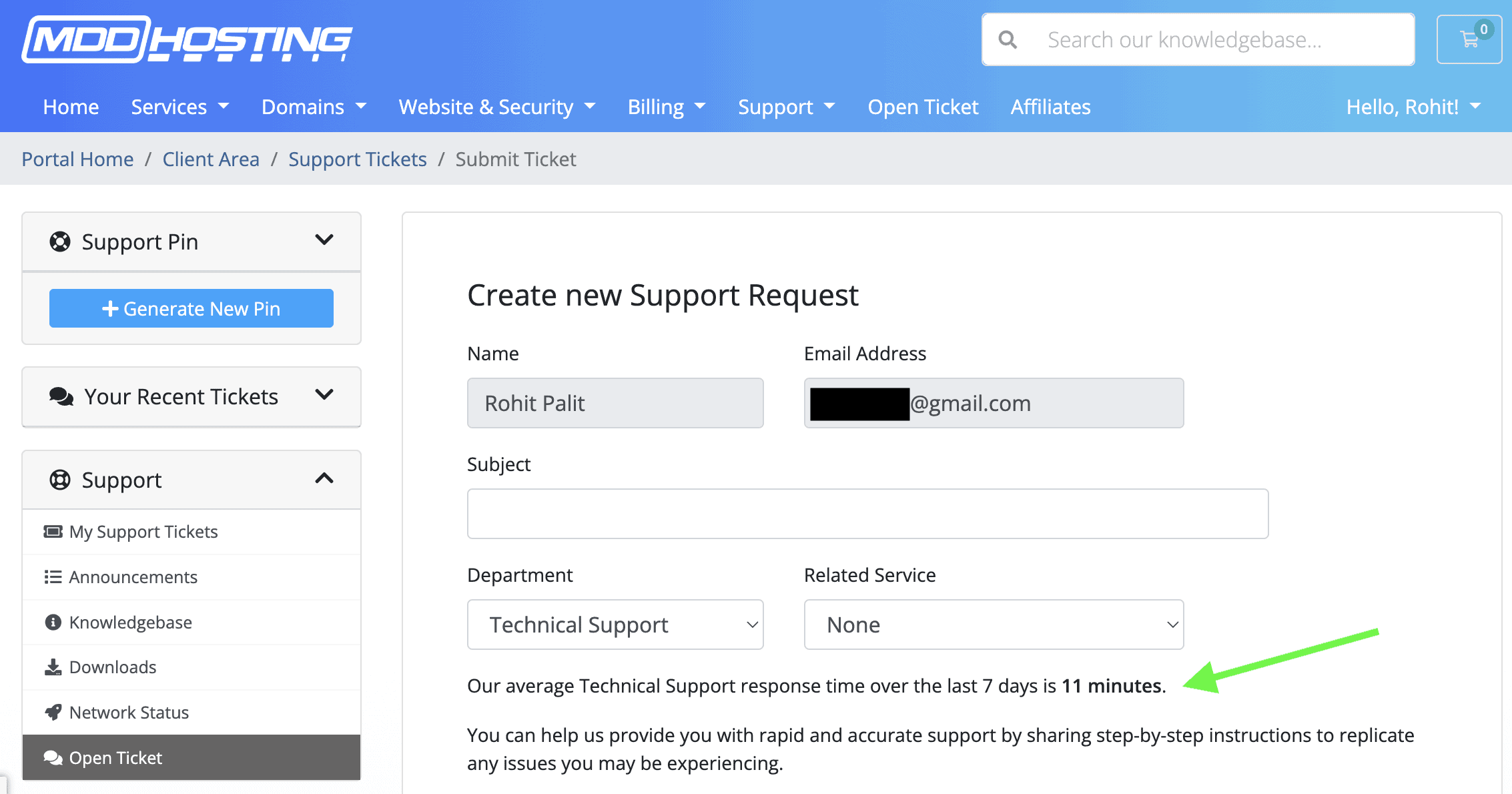
MDDHosting Support Response Time
8. Resource & infrastructure-wise, more bang for your buck than any other host
Let's take their Turbo Plus plan, costing around $18.86/month.
You get 4 CPU cores (Ryzen 9950X) and 4GB of RAM, along with 50GB of NVMe storage (that too, PCIe 5.0), with the ability to host up to 30 websites.
There's no hidden limit in their TOS on how much resource you can use for how long, unlike many other web hosts offering similar specs (albeit at a higher price). Case in point: MechanicWeb ("You may not use 60% or more system resources for longer than 60 seconds." - their ToS).
For around $23-24 a month, you get between 3 to 6 cores and 3 to 6 GBs of RAM with providers like MonsterMegs, ChemiCloud, HostArmada and MechanicWeb. However, apart from MW, all others use CPUs that fall behind in single-thread performance. See the comparison below (click for full view) to get an idea.
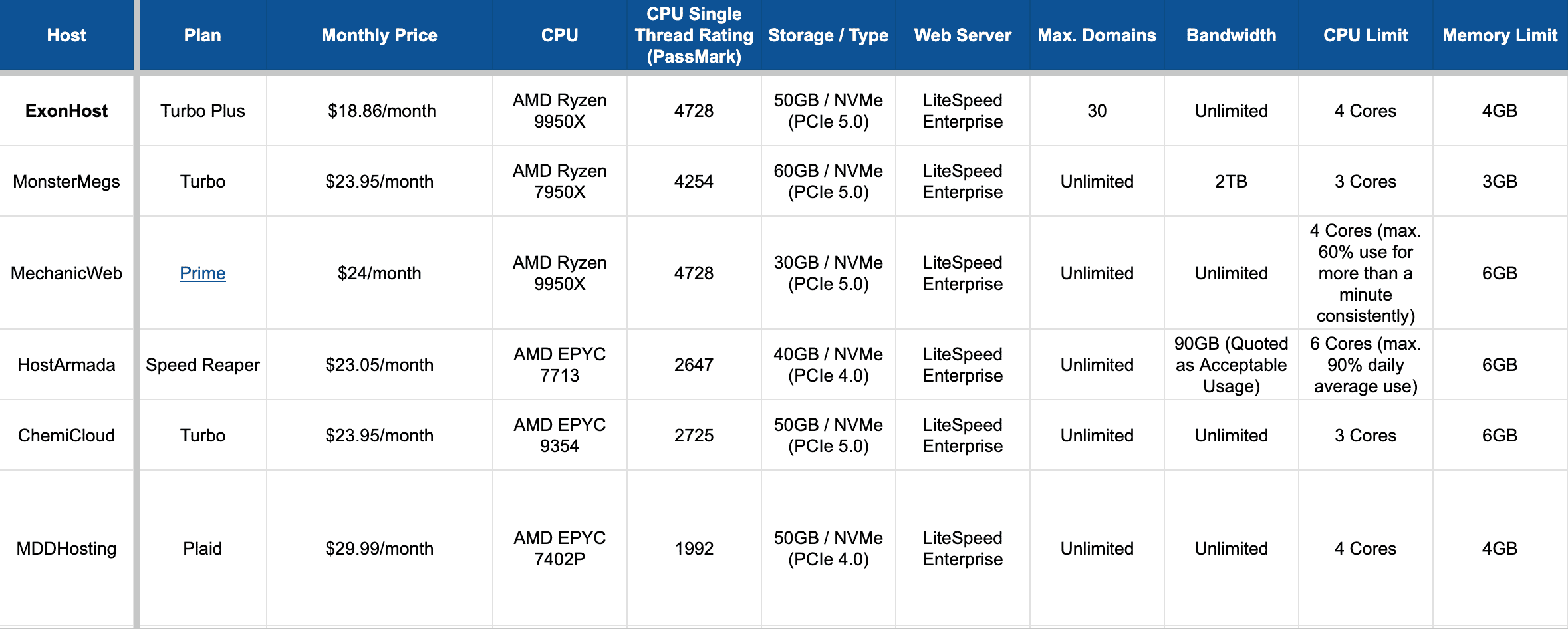
Comparison with ExonHost Turbo Plus plan. (click on the image to open it in full-screen)
SharedGrid offers Ryzen 9950X-powered shared hosting at almost half the price (around $11/month), but you'll have to settle for Enhance as the control panel instead of the widely popular cPanel. You'll also have per-website limits of 2 cores and 2GB RAM, as opposed to twice that for the whole account (and available across all your websites) with ExonHost.
You also get MariaDB, an optimized, faster version of MySQL, across all of their shared and turbo plans. "Modern MariaDB is 13% to 36% faster than modern MySQL" - see here.
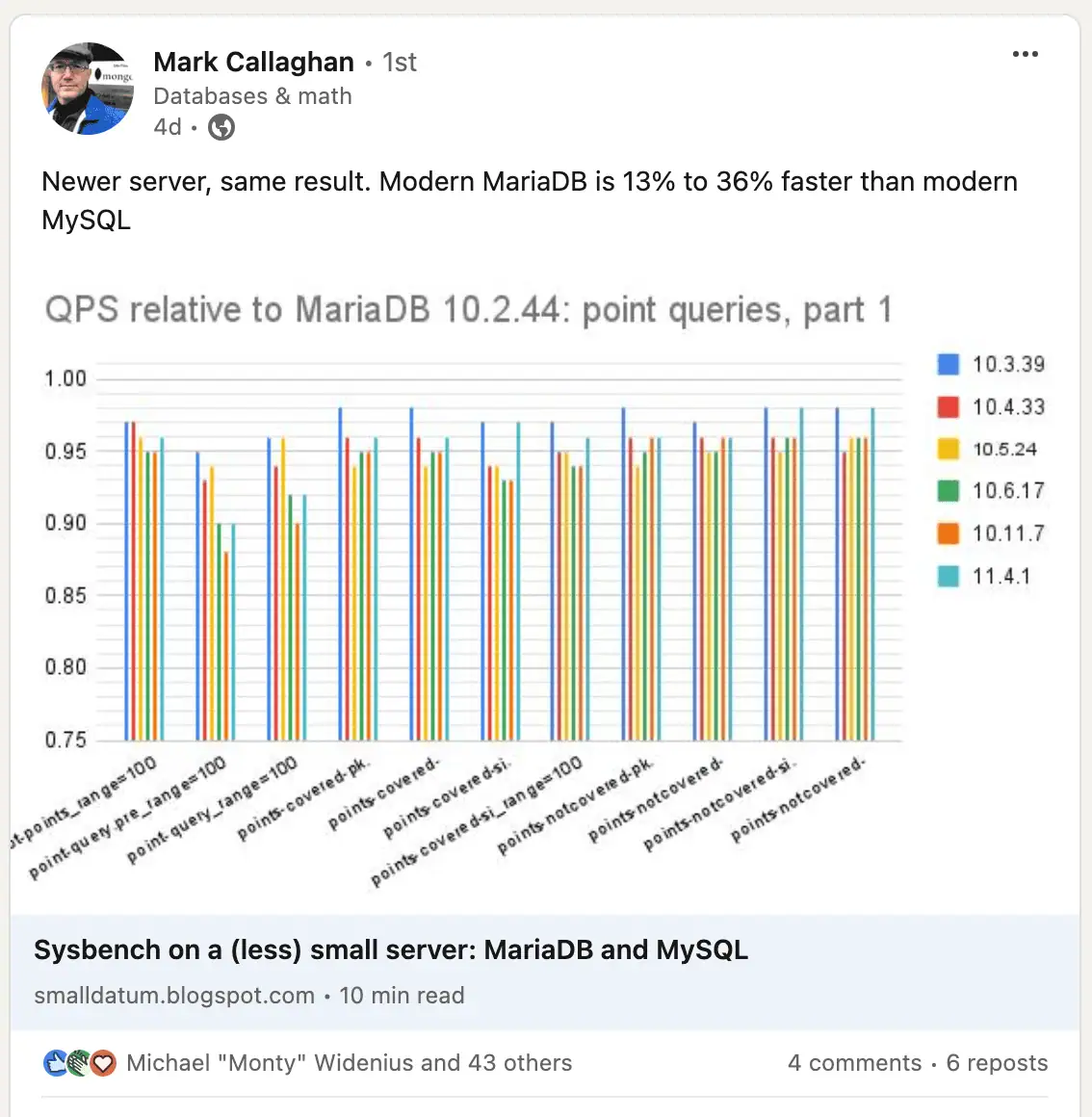
MariaDB vs MySQL benchmark
PHP 8.x is supported and enabled by default. You can select the PHP version of your preference via cPanel → 'Select PHP Version'.
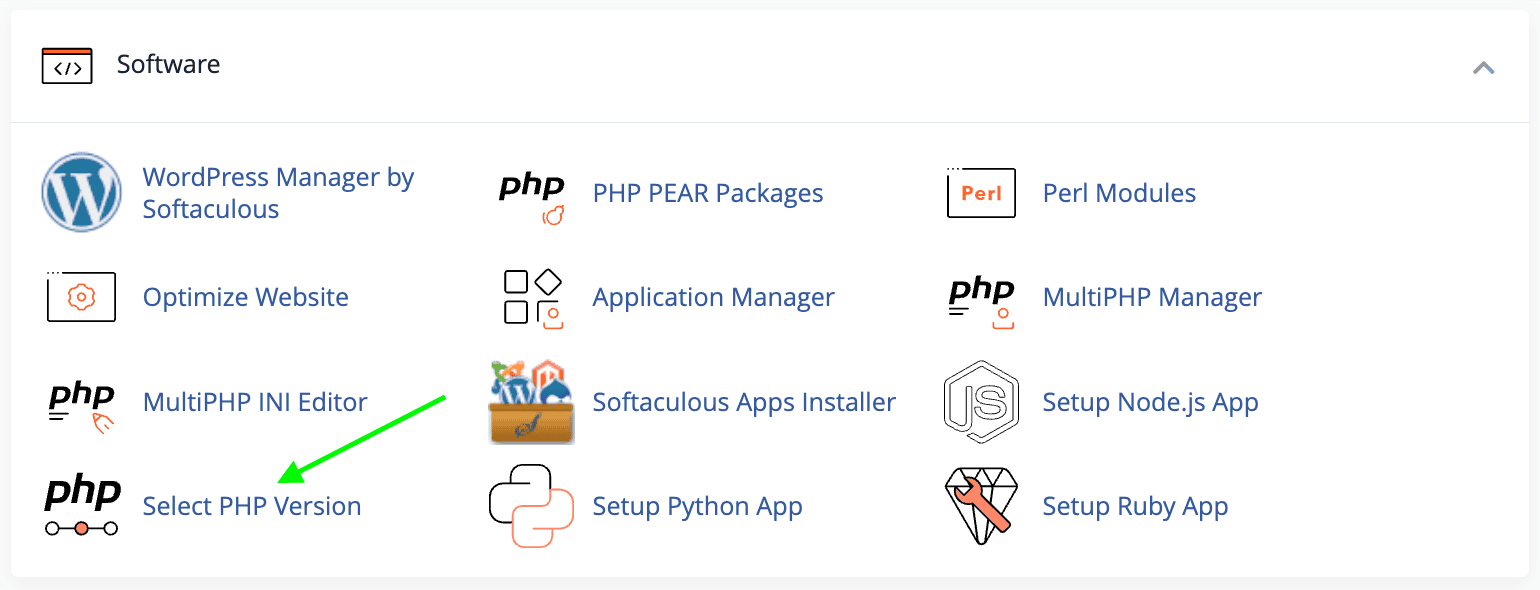
ExonHost cPanel PHP Version Selector
You can also enable or disable individual PHP modules and set PHP values like memory_limit and post_max_size right within that same interface.
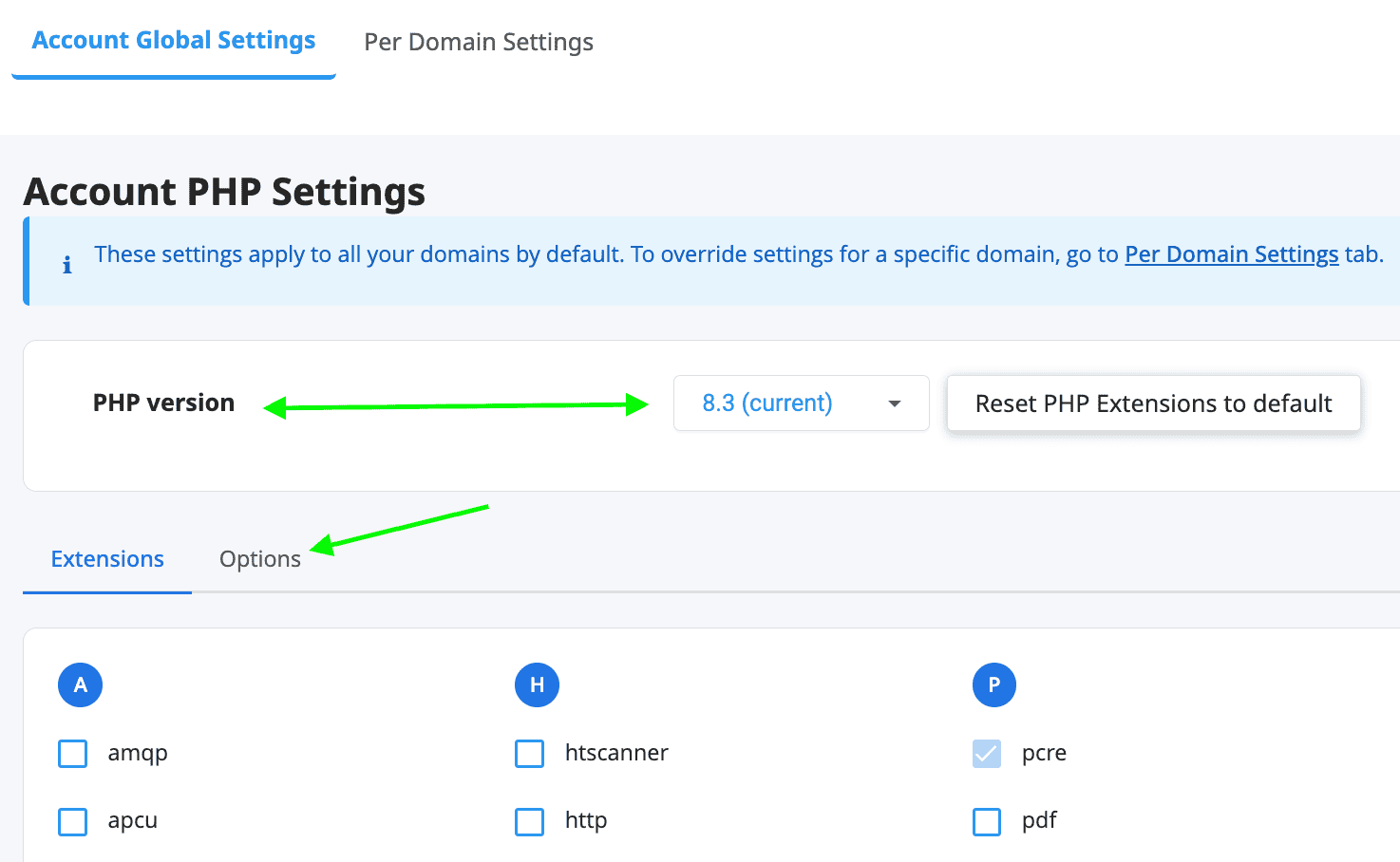
ExonHost cPanel - Selecting PHP Version and Modules
Not only did ExonHost not discontinue using cPanel throughout its regular, steep price increases over the years, they kept adding new security and customer-focused features. You get both cPGuard and Imunify360 / ImunifyAV to take care of security.
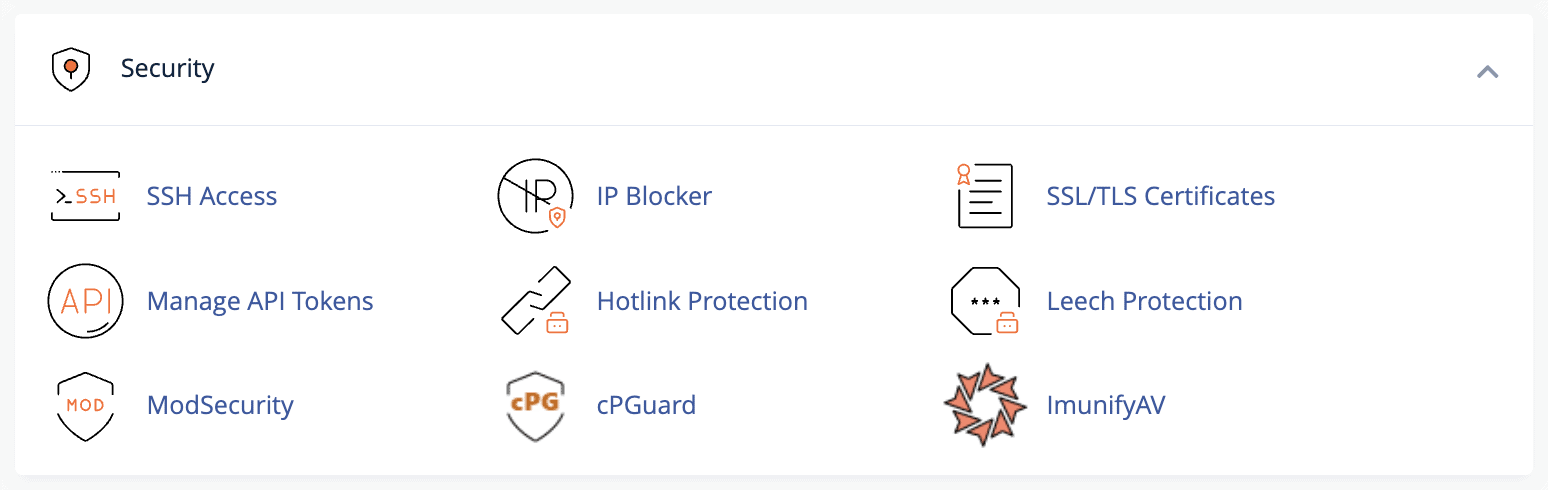
cPGuard and ImunifyAV
Both allow you to scan your entire account for malware and potentially compromised files. You can even fix the automatically-quarantined affected files without your host forcing you to pay extra for malware removal (hosts like SiteGround do this).
cPGuard comes with a WAF (web application firewall) which blocks bad bots and saves precious server resources. This is especially useful if you're not a fan of solutions like Cloudflare and prefer to use the host's own DNS.
9. Easy scalability up to 8 Cores & 8 GB RAM
Within their shared/turbo platform, you can scale all the way from their most basic 'Starter' plan to the most premium 'Turbo Prestige' plan depending on your requirements. I'm attaching the resource limits of each of their Turbo (semi-dedicated) plans below:
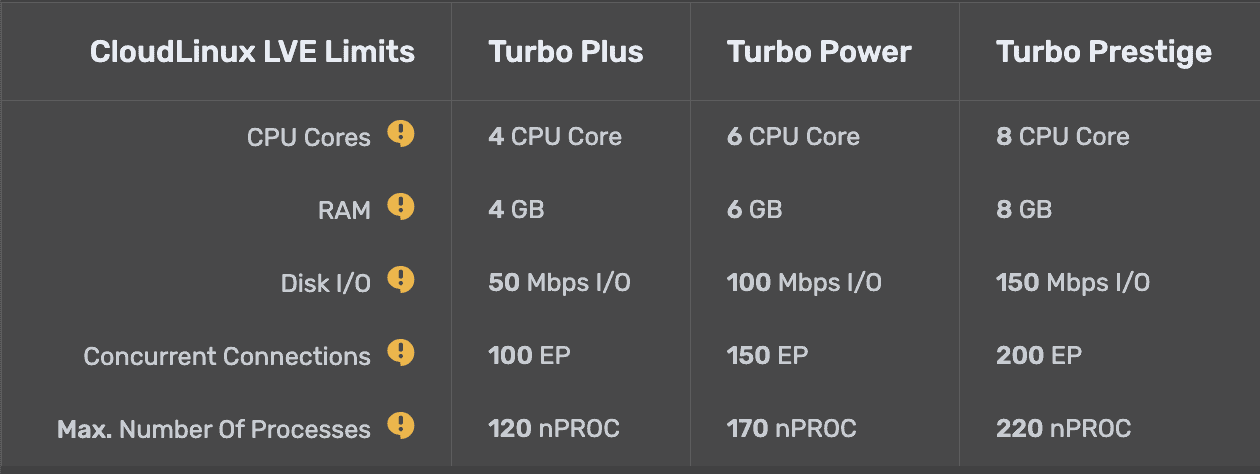
The 'Turbo Prestige' plan comes at only $34.90/mo (on a monthly billing cycle) and the allocated resources (8 cores & 8GB RAM) should be enough to handle even the most demanding dynamic WordPress sites (including WooCommerce sites).
This allows you to avoid the hassles of a more complex product like a VPS or a dedicated server where you also need to pay for licenses for individual features.
The plan-switching is hassle-free and instant, as I've experienced a couple of times. You can upgrade/downgrade your current plan anytime on their customer panel.
In the era of server-level caching solutions like LiteSpeed and full-page caching possibilities using the App for Cloudflare plugin, most small WordPress sites (which tend to be mostly static) hardly need much server resources.
Unless yours is a critical site already receiving thousands of visitors per day, I'll recommend you to start with the 'Standard' plan, costing $7.54/month (on a monthly billing cycle, or $66.03/year on an annual cycle).
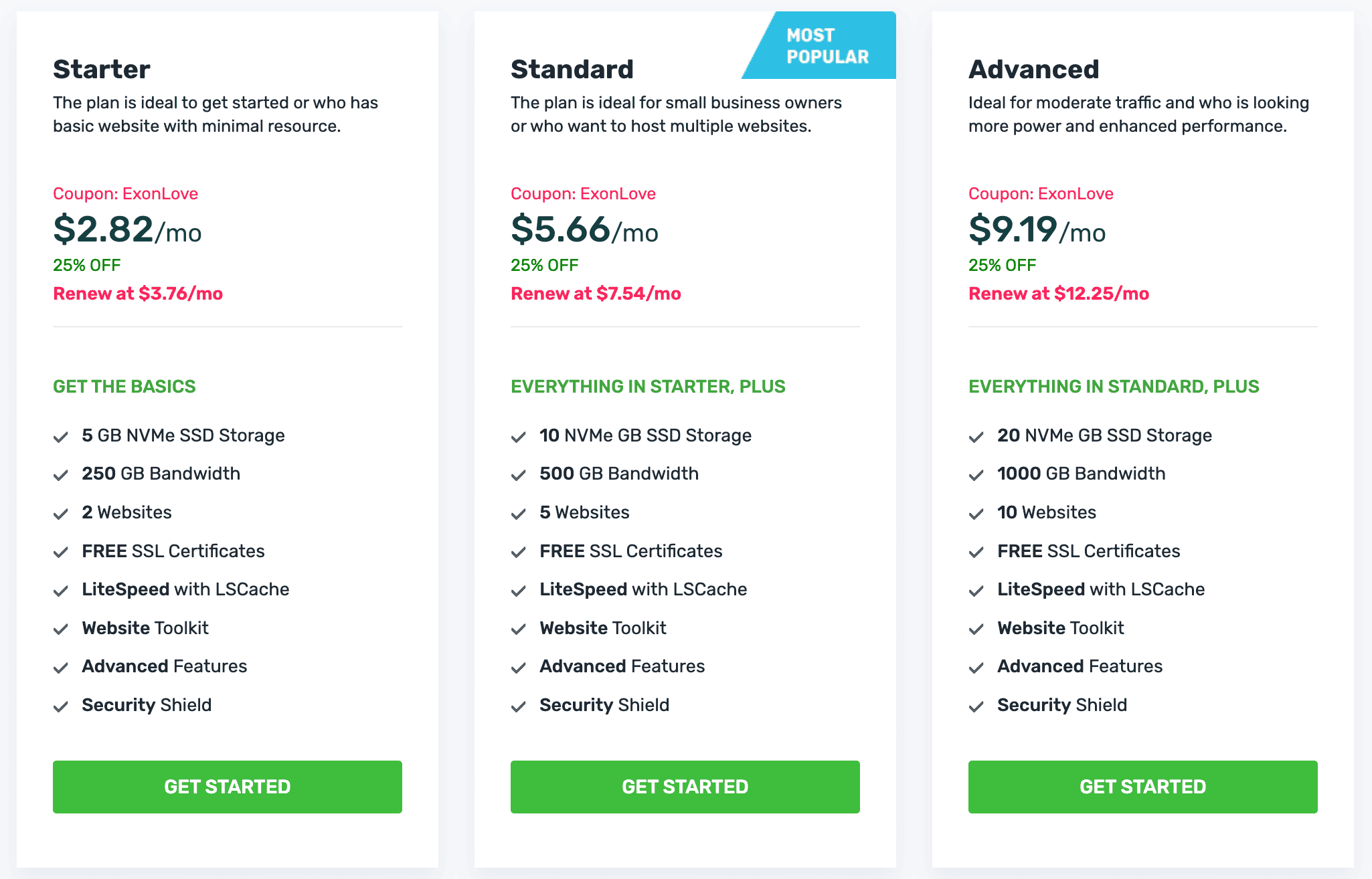
ExonHost shared hosting plans.
With that plan, you'll have the option to host up to 5 websites, and have 10GB of storage (still the fastest NVMe kind) and 500GB of monthly bandwidth. Other plan-specific resource limits below:
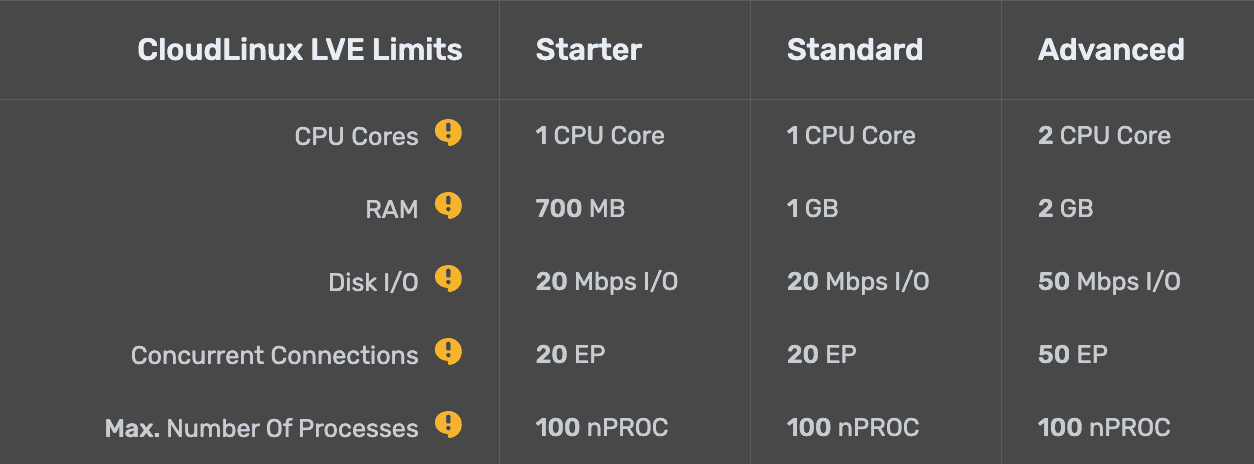
ExonHost resource limits for shared hosting plans.
As I mentioned above, these standard shared hosting plans are hosted on Ryzen 5950X servers (as opposed to the even faster Ryzen 9950X powered 'Turbo' platform). But honestly, at this level, you'll likely never notice the difference — especially if you're using caching and CDN in a proper way (I've outlined that in a dedicated section below).
11. High-frequency VPS option for those prefering complete control
Last year, they launched high-frequency VPS for users who won't settle for anything but the absolute best performance.
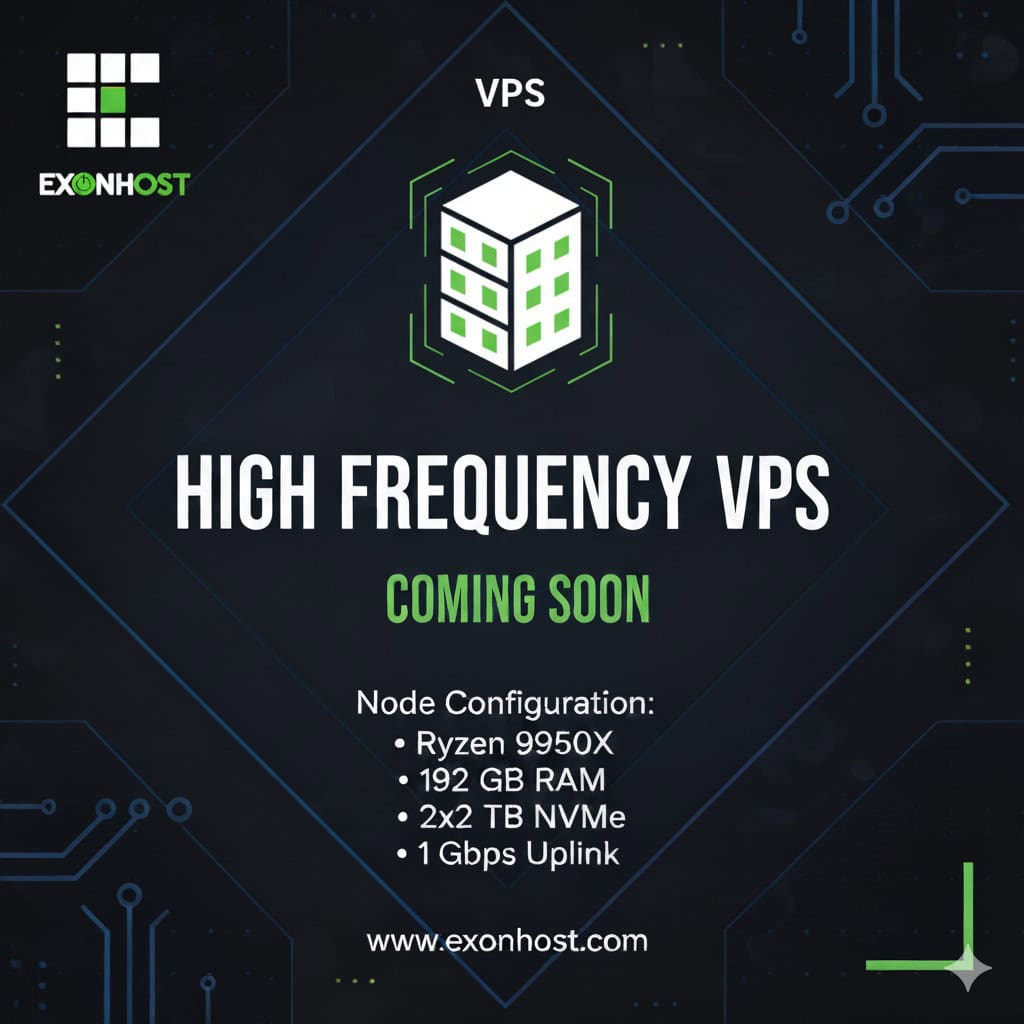
Check out their VPS section for pricing.
Of course, you get full server-management along with root-access and everything else you tend to expect from a managed VPS provider.
Just note that they don't offer any money-back guarantee for their VPS offerings.
12. Ideal caching & CDN setup for WordPress sites
ExonHost pays for the LiteSpeed Enterprise license for their shared & semi-dedicated servers, which means you'll be able to take full advantage of the LiteSpeed caching plugin as well as their CDN (QUIC.cloud).
Here's a benchmark showing the power of LiteSpeed web server along with the LiteSpeed WordPress caching plugin (which offers server-level caching):
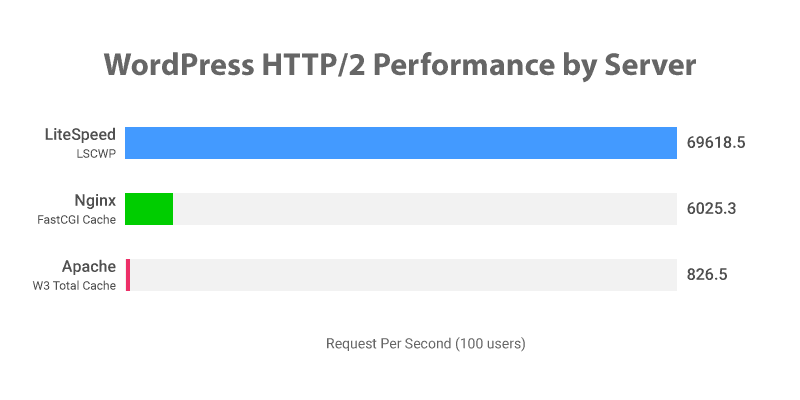
The advantage of the 'LiteSpeed Enterprise' license used by ExonHost is that you get roughly 10GB of monthly bandwidth for free when using QUIC.cloud's 'standard' plan. This is different from their free plan offering only 6 POPs (CDN nodes).
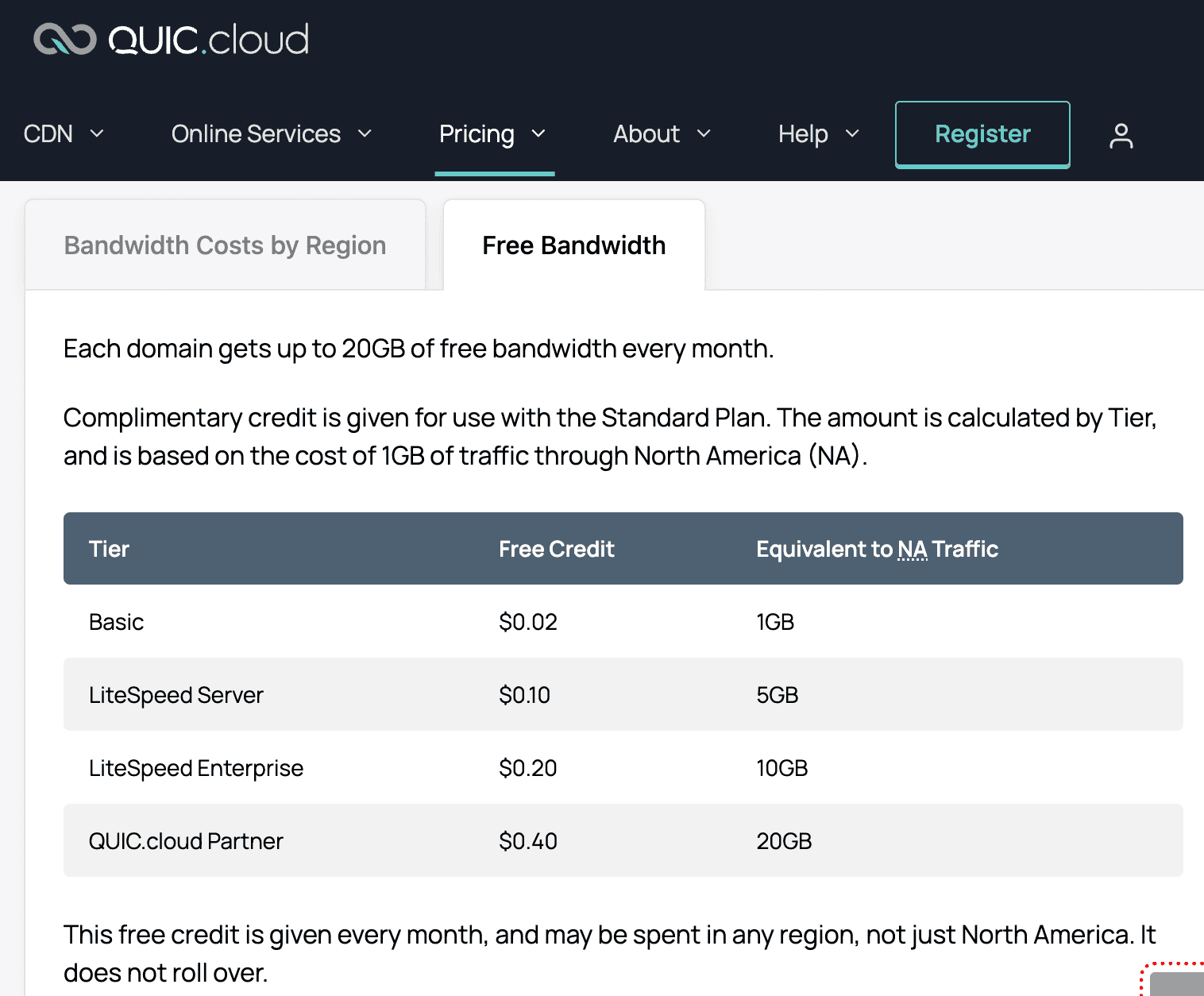
QUIC.cloud Pricing Tiers
For higher-traffic websites such as mine, I prefer to still rely on Cloudflare for CDN.
There's a very good workaround for Cloudflare not caching HTML content by default: the App for Cloudflare WordPress plugin. This allows your entire page (HTML) to be served from Cloudflare's entire range of global CDN nodes, without paying for Automatic Platform Optimization (APO) which costs $5 per month per domain.
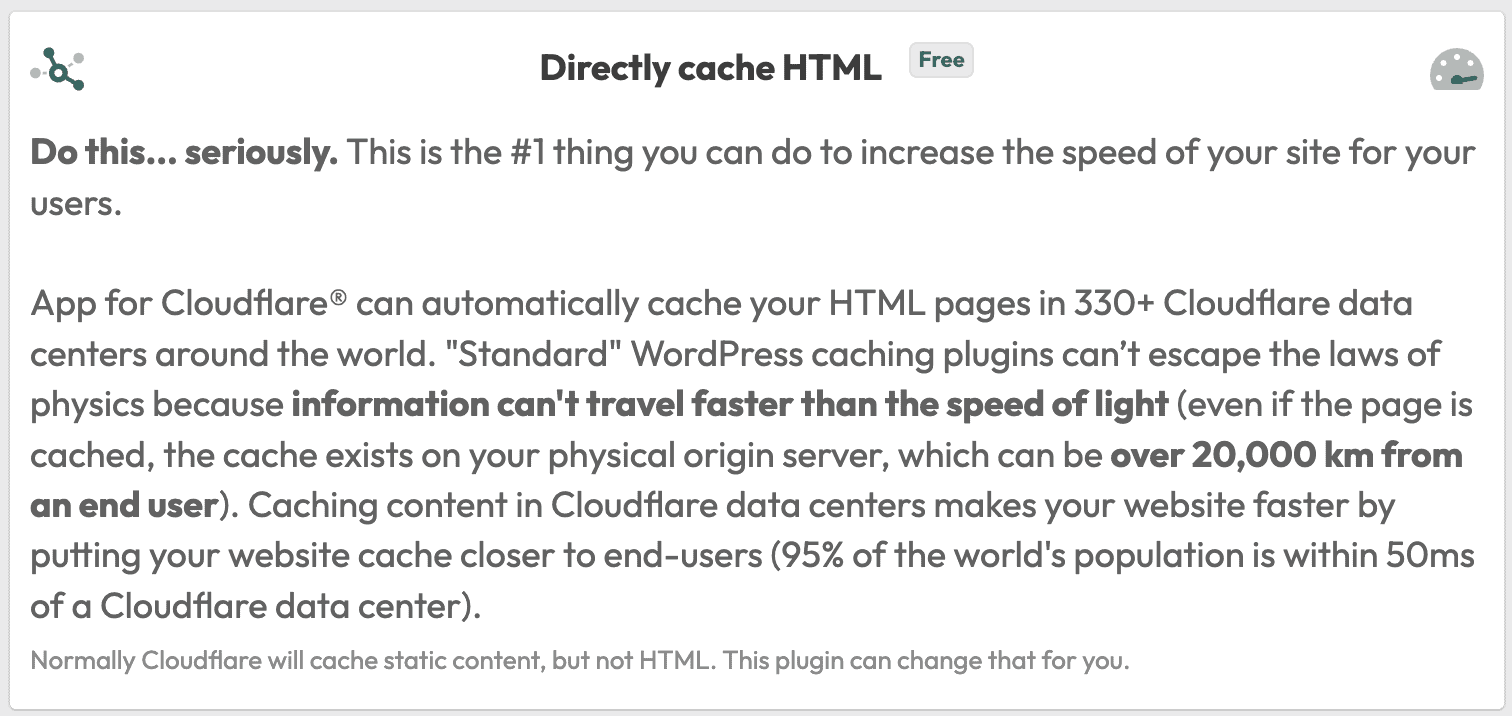
What 'App for Cloudflare' Does
It's relatively easy to configure (requires you to just paste your Cloudflare API key). This is especially useful if your target audience is spread out across more than a single region.
Check out the global TTFB of one of my sites below, hosted on ExonHost and using the AppForCF plugin to take advantage of Cloudflare full-page caching. Tested using the free FlyingTTFB tool.
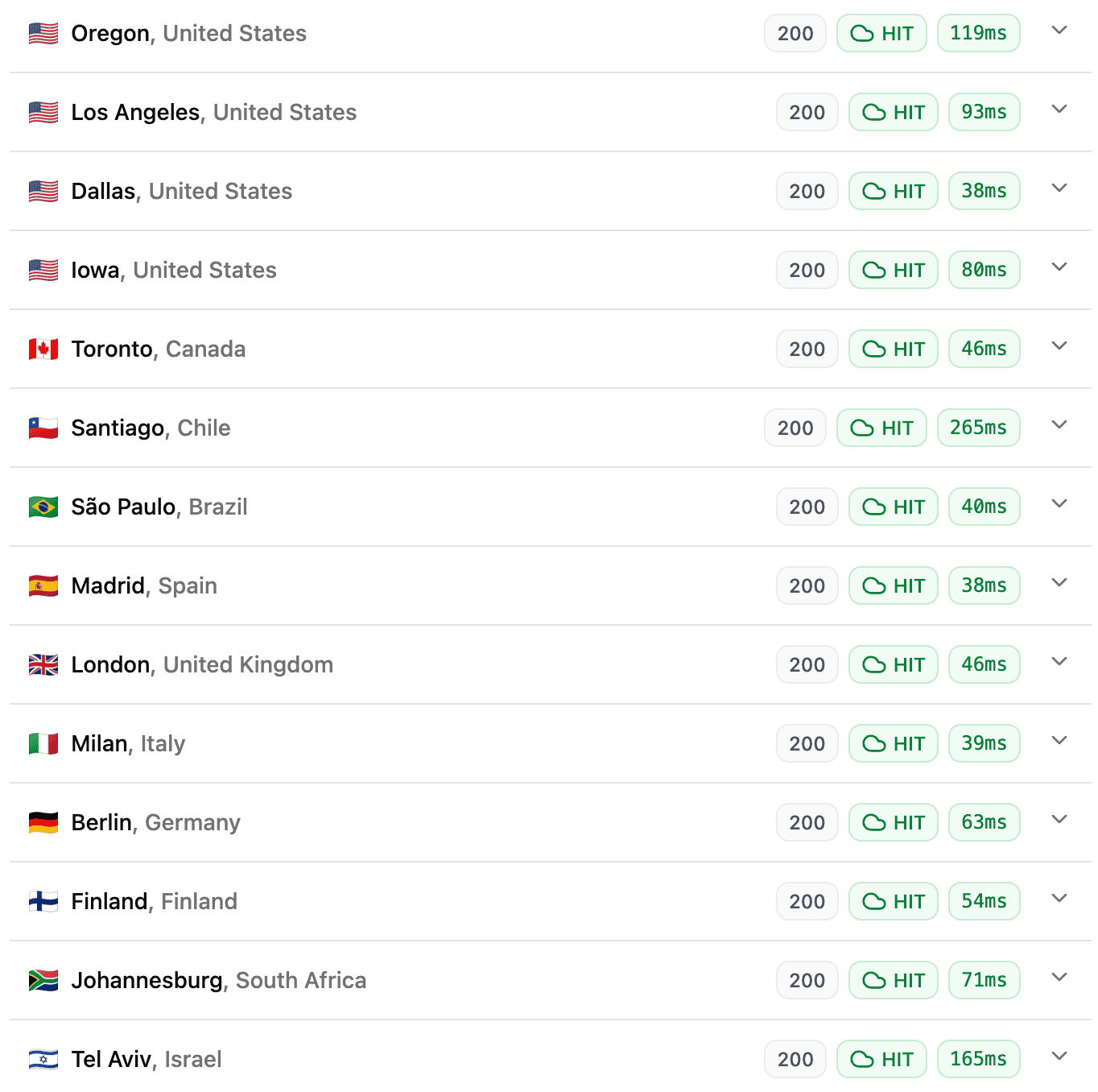
TTFB of my site using App for Cloudflare
The 'cloud HIT' icon indicates that the page HTML was directly served by a nearby Cloudflare node, bypassing the origin server entirely.
I rely on the LiteSpeed Cache plugin to optimize the front-end, like minifying and combining CSS, minifying and delaying JS, and various other optimizations.
Even if you're using the App for Cloudflare plugin, you can still keep page caching enabled via the LS Cache plugin, because each new request of a page that's yet to be cached by Cloudflare will still reach the origin, and that specific page load for that particular user will take longer if LiteSpeed's own page caching is disabled.
To improve WordPress backend performance (for mostly static sites) and overall performance (for dynamic sites), you should enable Redis object caching via the LiteSpeed Cache plugin. Here's the exact settings I use:
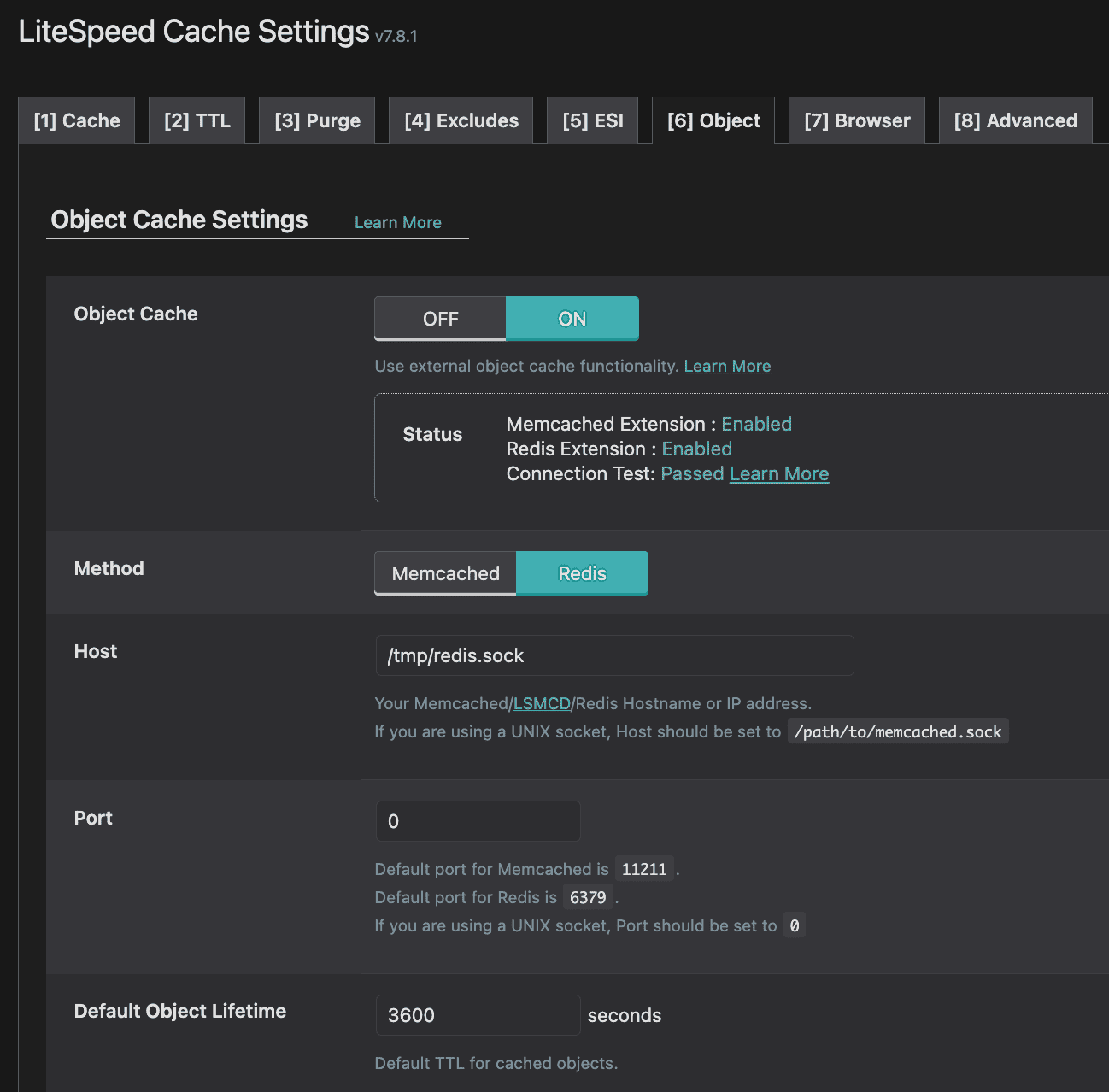
LiteSpeed Cache object caching Redis settings.
If you see "connection test: failed", just ask their support to take a look at the server config to make sure Redis is enabled and properly configured. It might just be the case that Redis was somehow disabled on your specific server.
Note: you'll find a setting on the same page called "Redis Database ID", where 0 is the default value. You can use 0 to 15, just make sure you use a unique number for each site of yours hosted on the same server, to prevent objecting caching conflicts.
Sometimes, enabling object cache for WP-admin can cause conflicts and you seeing expired data (such as you click on the settings for one plugin, and another one gets opened). In that case, you can use 'disable WP-admin caching' under the LiteSpeed Cache object cache settings, or disable Redis entirely (if your site is mostly static anyway).
13. 4.9/5 TrustPilot rating & ICANN-accredition
As of writing this review, ExonHost has an almost perfect 4.9 rating on TrustPilot.
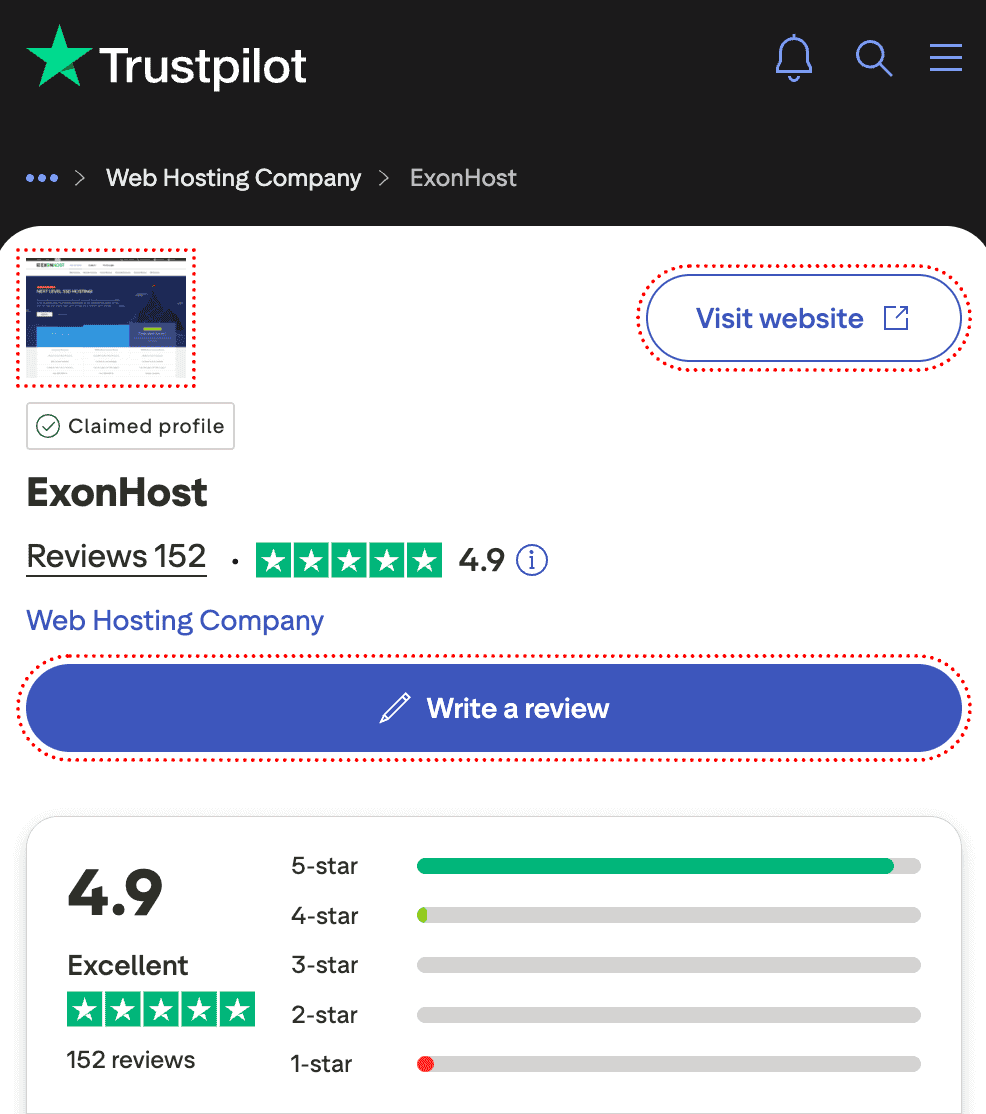
ExonHost TrustPilot rating.
Most of the (few) 1-star reviews are a result of around 15 hours of downtime in 2021 across a few of their shared hosting servers hosted in the WebNX datacenter in Los Angeles. It occurred due to a fire incident provoking an emergency power cut-off.
A few of you might be skeptical about choosing ExonHost for your US/UK targeted sites, because of their Bangladeshi origin. Let me try to alleviate some of that fear. They're not only the #1 provider based in Bangladesh by size, they're also the first (and so far, only) ICANN-accredited domain registrar based in Bangladesh.
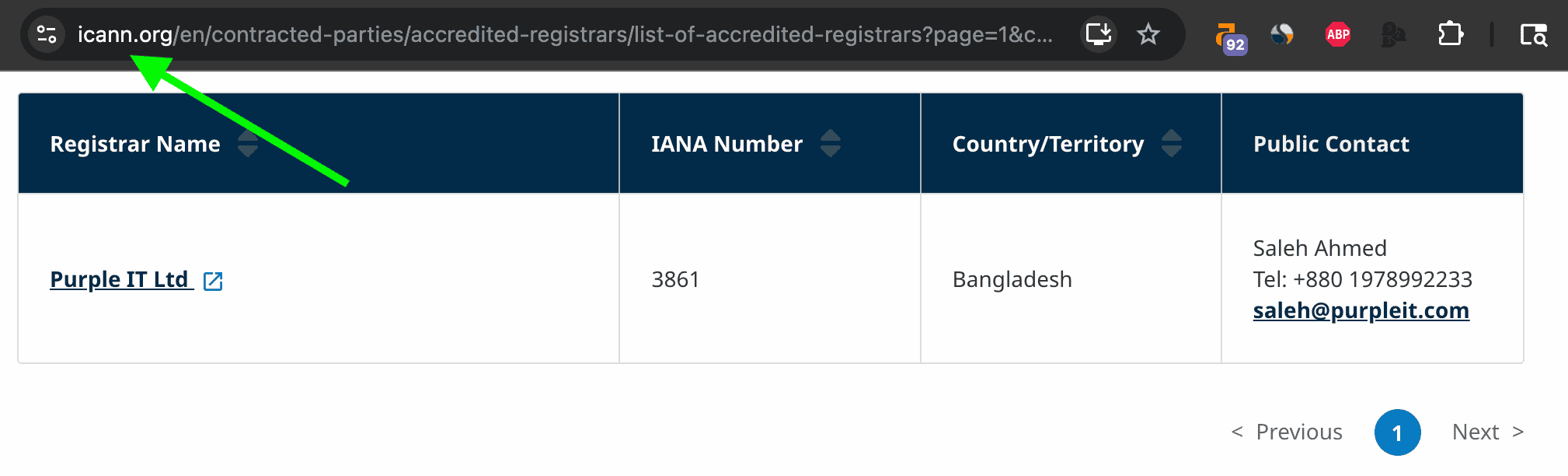
Purple IT Ltd. is the parent company of ExonHost.
I've been using them exclusively for my US datacenter-hosted websites (Utah, Tampa and Dallas), and faced no issues specifically due to their Bangladeshi origin.
My Verdict
By now you've probably understood that I've had a mostly great experience with ExonHost so far. But that doesn't mean they're ideal for everyone.
Choose them if...
- You want cutting-edge performance (CPU, RAM, storage and overall infra).
- You prefer semi-dedicated over VPS management.
- You want a reliable service overall with decent support.
Avoid them if...
- You expect enterprise-grade uptime & failover solutions.
- You need an ultra-polished onboarding and persistent hand-holding.
- You can't live without native English-speaking support.
Website: ExonHost.com
Have you tried ExonHost? Let me know about your experience by leaving a comment below.
I’m using the Exonhost service as well for half a year. In this short period of time, I haven’t found anything bad about this company.
Hope they carry on their business satisfying their customers.
Me also using Exonhost service, low cost better performance, and best support.
Great detail review, Rohit, I’am also very satisfied with their services. I appreciate the quick support and quality service of exonhost very much. Team of exonhost are great to work with. A+ service