

ChemiCloud offers high-performance shared hosting plans at somewhat reasonable prices. They’re also known for their support and liberal resource limits (with affordable add-ons to increase them further).
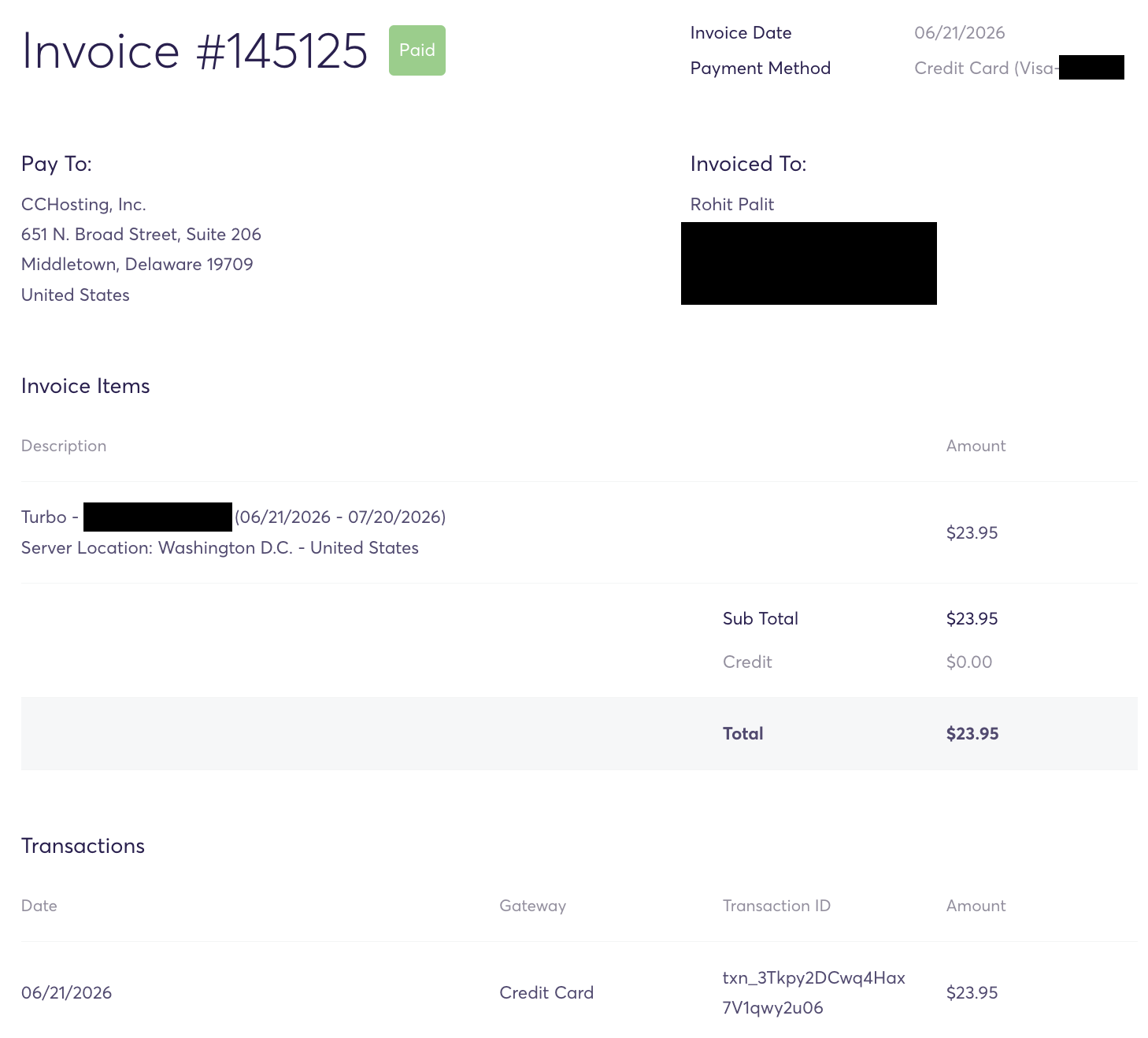
I’ve been a paying customer, using their ‘Turbo’ plan (recent invoice below).
I’ve spent countless hours extensively testing the performance of a production-site (i.e. money making) of our portfolio hosted on ChemiCloud — both synthetic server benchmarks and real world performance (things like TTFB under different cached/uncached configurations).
In addition to evaluating their support quality, I’ve done my fair bit of research about their tech stack, overall infrastructure & reliability, and existing user reputation about various aspects of their support.
Note: ChemiCloud also offers VPS hosting and managed WordPress hosting, but this review is limited to my personal experience using their shared hosting.
Here’s everything I could find! (jump to the conclusion if you’re short on time; this review is 3,500+ words long)
1. Getting started…
I chose the ‘Turbo’ plan, which gets you 50GB of NVMe-tier (the fastest kind) SSD storage alongside 6GB of RAM. Unlimited websites (domains), LiteSpeed Enterprise, cPanel, you get the whole package. Even their datacenter choices give customers immense flexibility:
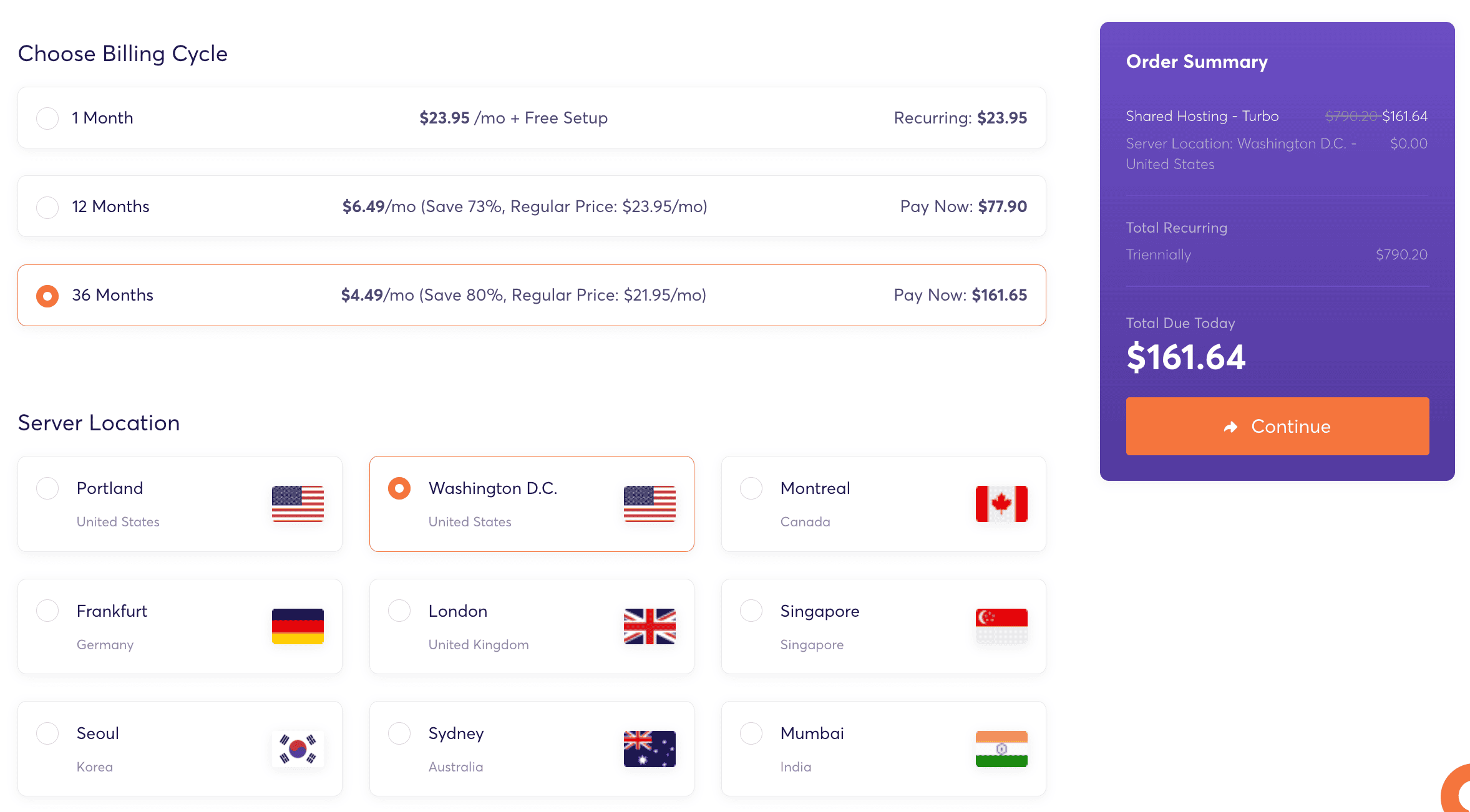
East and west coast options within the US, and internationally you have: Canada, Germany, UK, Singapore, (South) Korea, Australia and India.
Since my traffic is mostly US-based with minor CA and UK traffic, I chose their Washington, DC datacenter which should serve all three regions reasonably well.
While signing up (and later as well), you get the option to just boost the memory (RAM), CPU and storage allocations, by paying a relatively small extra monthly free:
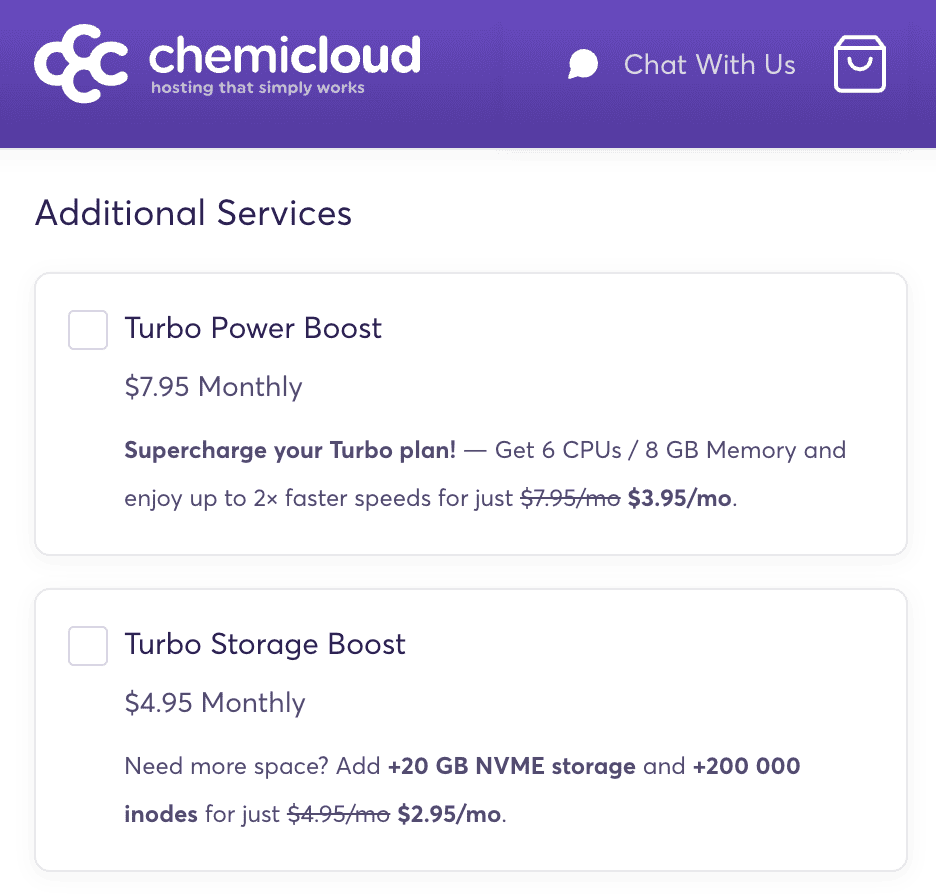
The standard price for the ‘Turbo Power Boost’ add-on is just $7.95/month, which takes your total monthly bill (on a monthly billing cycle) before discounts to $31.9/month, which is still lower than many other hosts offering shared/semi-dedicated plans with similar resources.
2. Migration (site transfer)
Right after clearing the invoice, I created a support ticket tagging their migrations department. The ticket form asked me for a plethora of information about the sites I wanted to transfer, and my old host:
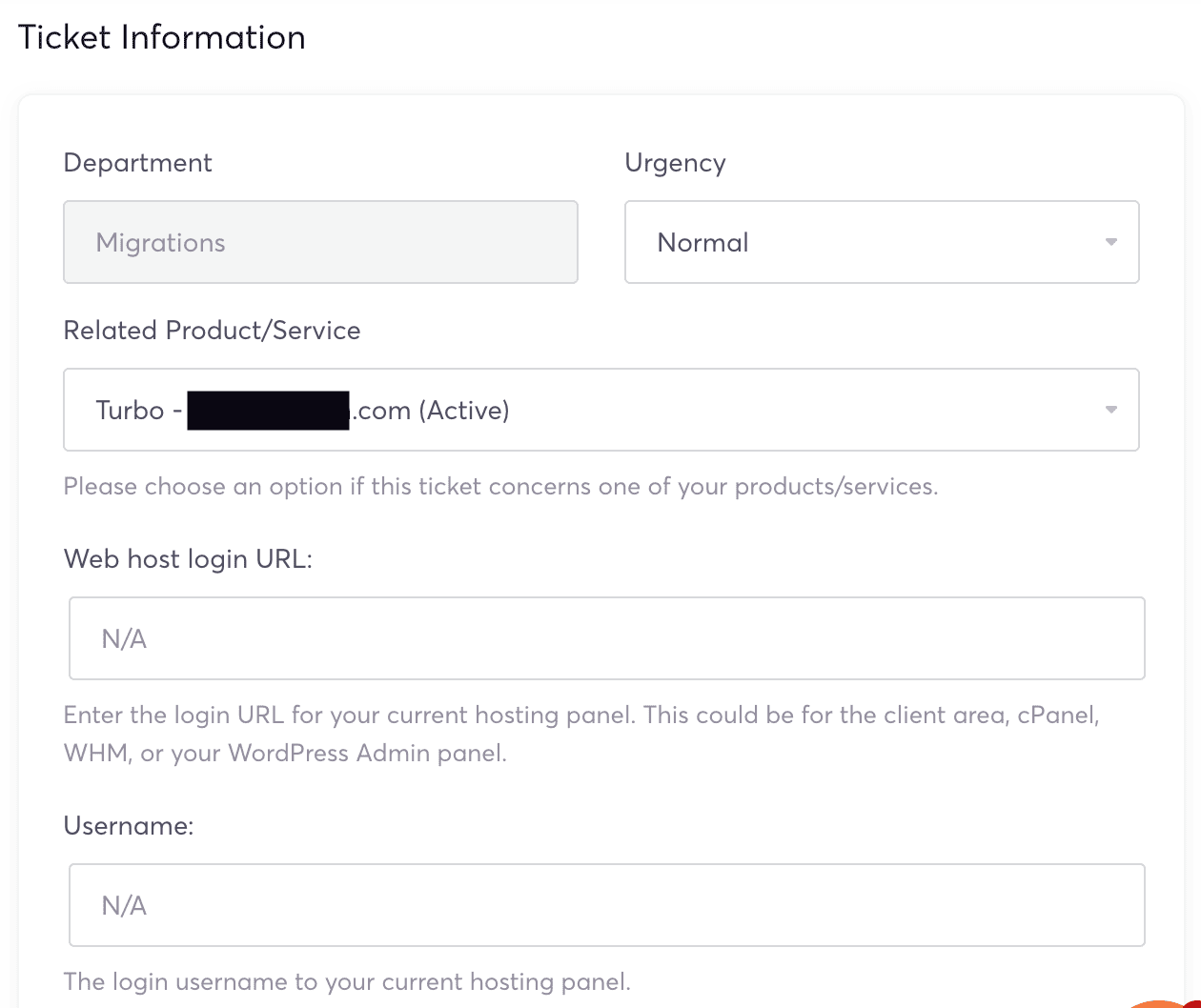
The easiest option for you (and beginners in general) would be to simply share your old cPanel (or any other control panel) login details, specify the domain(s) you want transferred, and leave the rest to the ChemiCloud website migration team.
However, being someone who likes more control over processes, I already had the site’s home directory and MySQL database downloaded prior to purchasing the ChemiCloud hosting plan. So, I chose to upload them to my Google Drive and share the link in the support ticket, writing ‘N/A’ in the fields that asked for login details of the old host.
I got the first reply in just 44 minutes, which said the migration was complete!
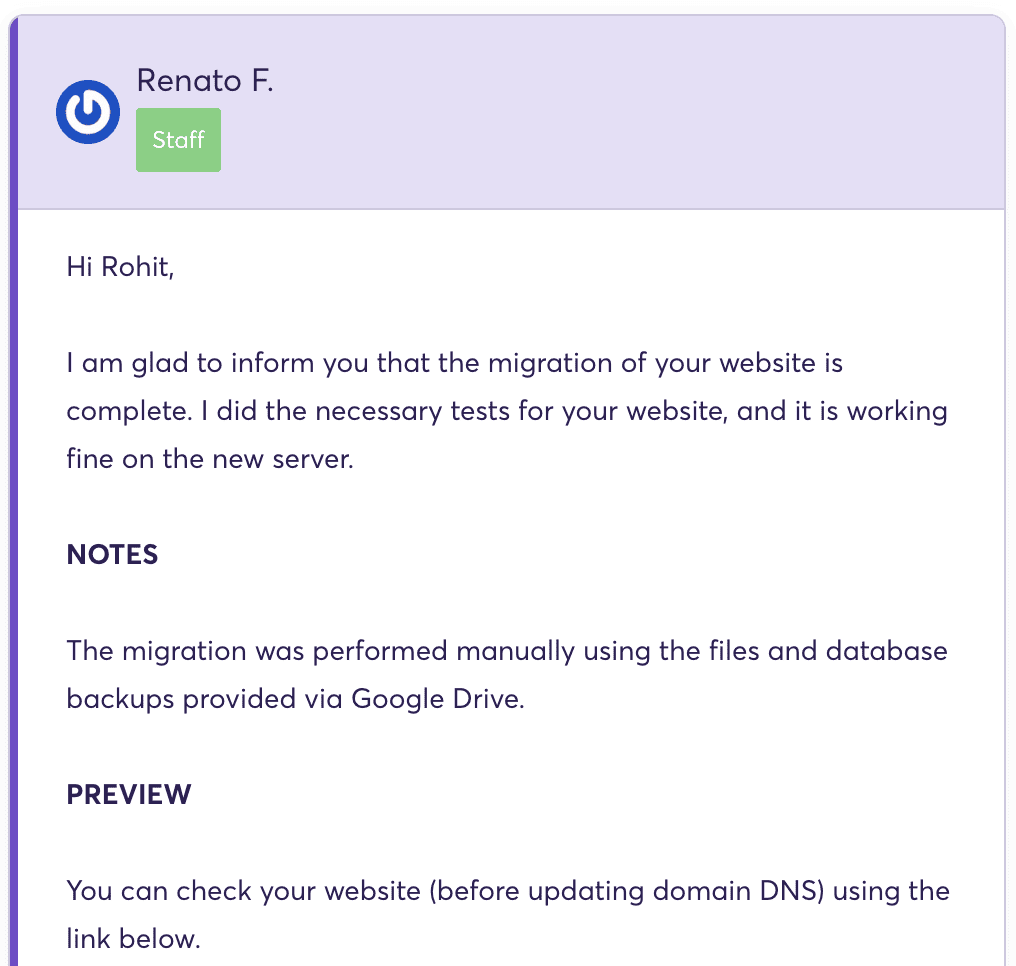
The site was working fine, no qualms. Since the domain was behind Cloudflare, I just had to update the origin server IP inside Cloudflare to the new ChemiCloud server’s IP (which I received in their welcome email), and everything was working perfectly out of the box, including SSL (https).
Migration policy in a nutshell: ChemiCloud are happy to migrate up to 200 cPanel accounts and 10 non-cPanel accounts for free for up to 60 days after you sign up. Beyond that, charges apply.
3. Hardware & tech stack details
An optimized web server performs only as fast as its underlying components (both hardware & software) allow it to be. Therefore, it’s crucial to know exactly what you’re signing up for.
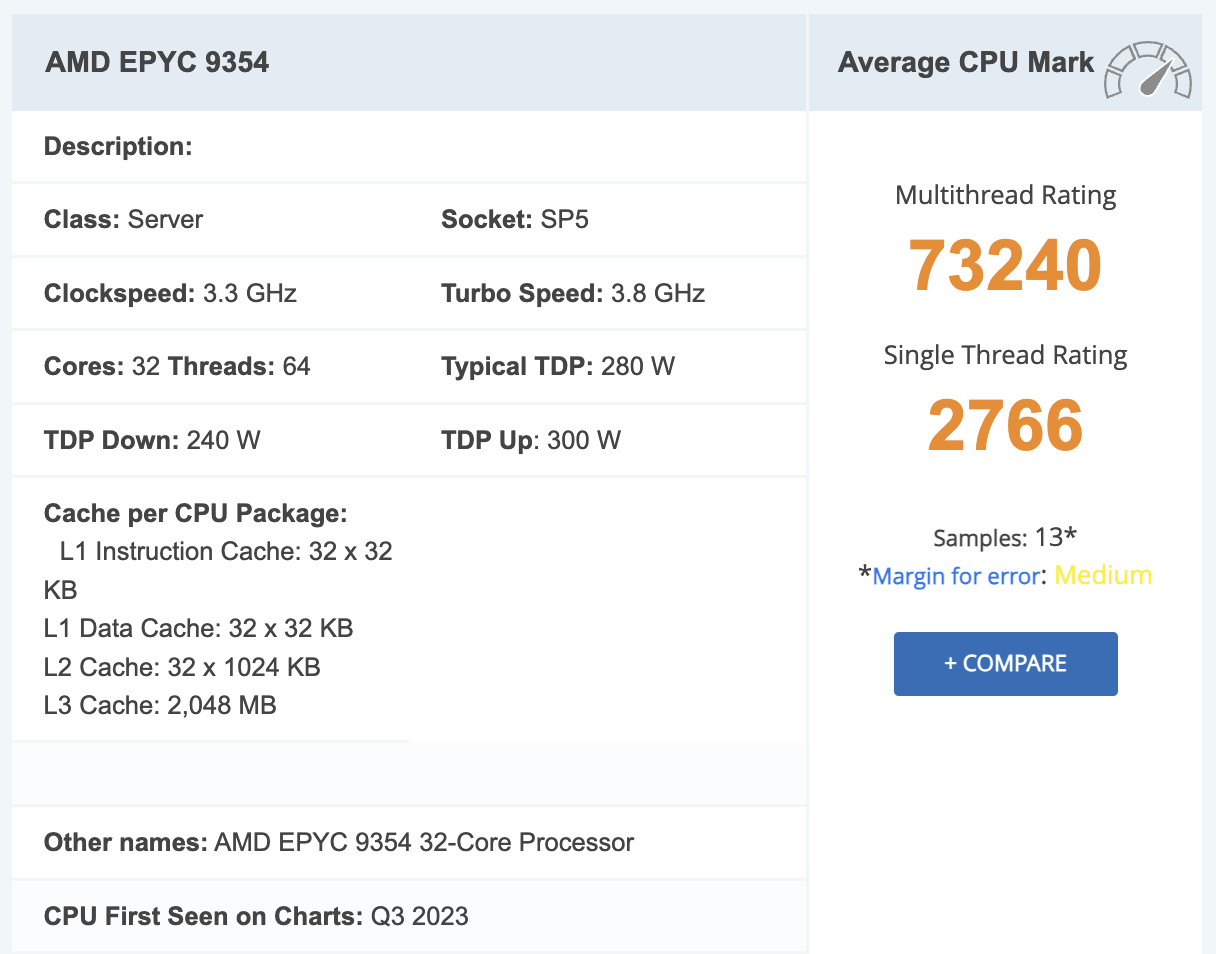
Hardware details (for their shared servers): AMD EPYC 9354, DDR5 memory (with ECC-support), NVMe SSD storage (PCIe 5.0).
The memory and the storage are of the fastest kind (at least as of writing this review). The processor is fairly fast and new (released in 2023) as well, with a single-thread rating of 2766 on PassMark, but not the absolute fastest around.
I asked ChemiCloud about how they generally go about hardware refreshes, and this is what they wrote to me:
We utilize AMD EPYC-powered servers across our hosting platform. Hardware refreshes and deployments occur over time, so specific processor models may vary between locations and deployment generations.
When it comes to their shared hosting tech stack, these are the most important bits:
1. LiteSpeed web server (LiteSpeed Enterprise license) with LSCache support.
In my other reviews, I’ve written extensively about LiteSpeed being far superior than regular Apache and even nginx. You can browse these benchmarks yourself to get an idea. These are broadly the most relevant test results for most people:
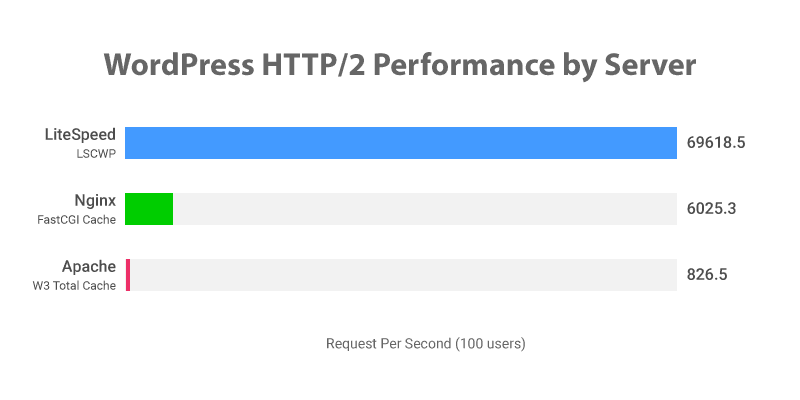
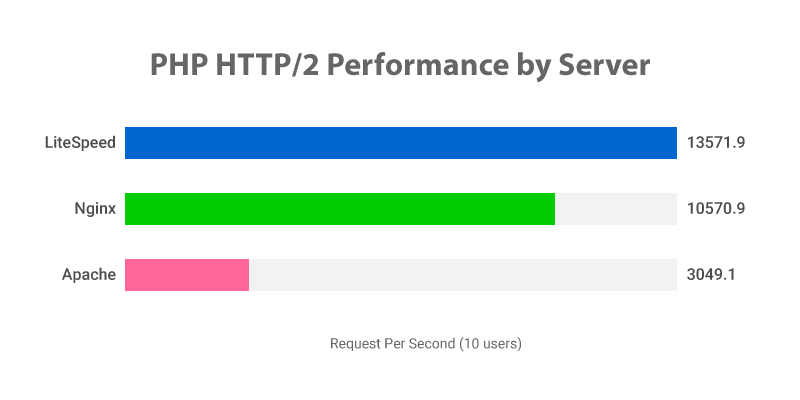
I think the majority of shared hosts still don’t use LiteSpeed because it costs money (license fee). There’s a free version too (OpenLiteSpeed) but most features of the LiteSpeed Cache plugin don’t work without a commercial license.
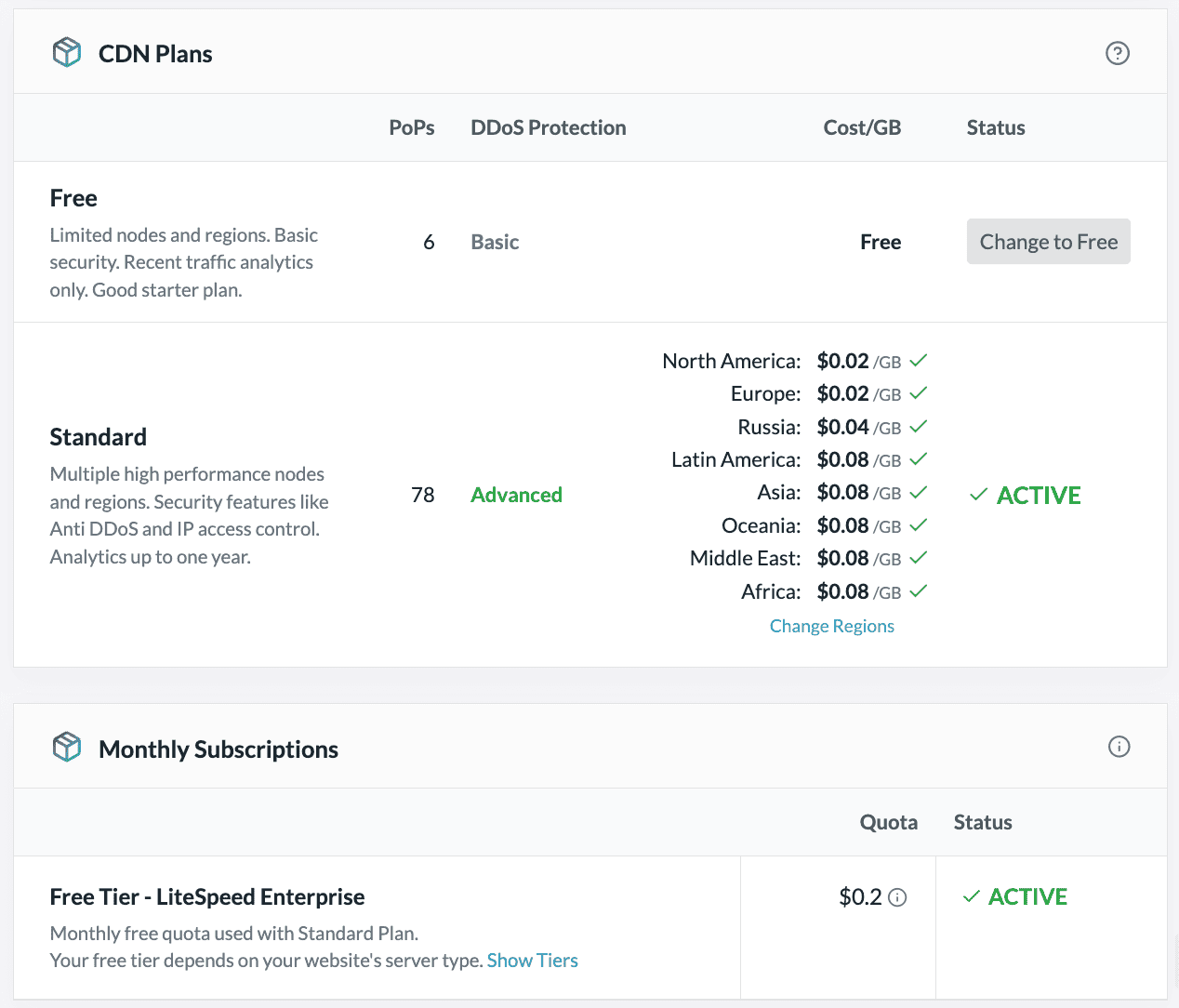
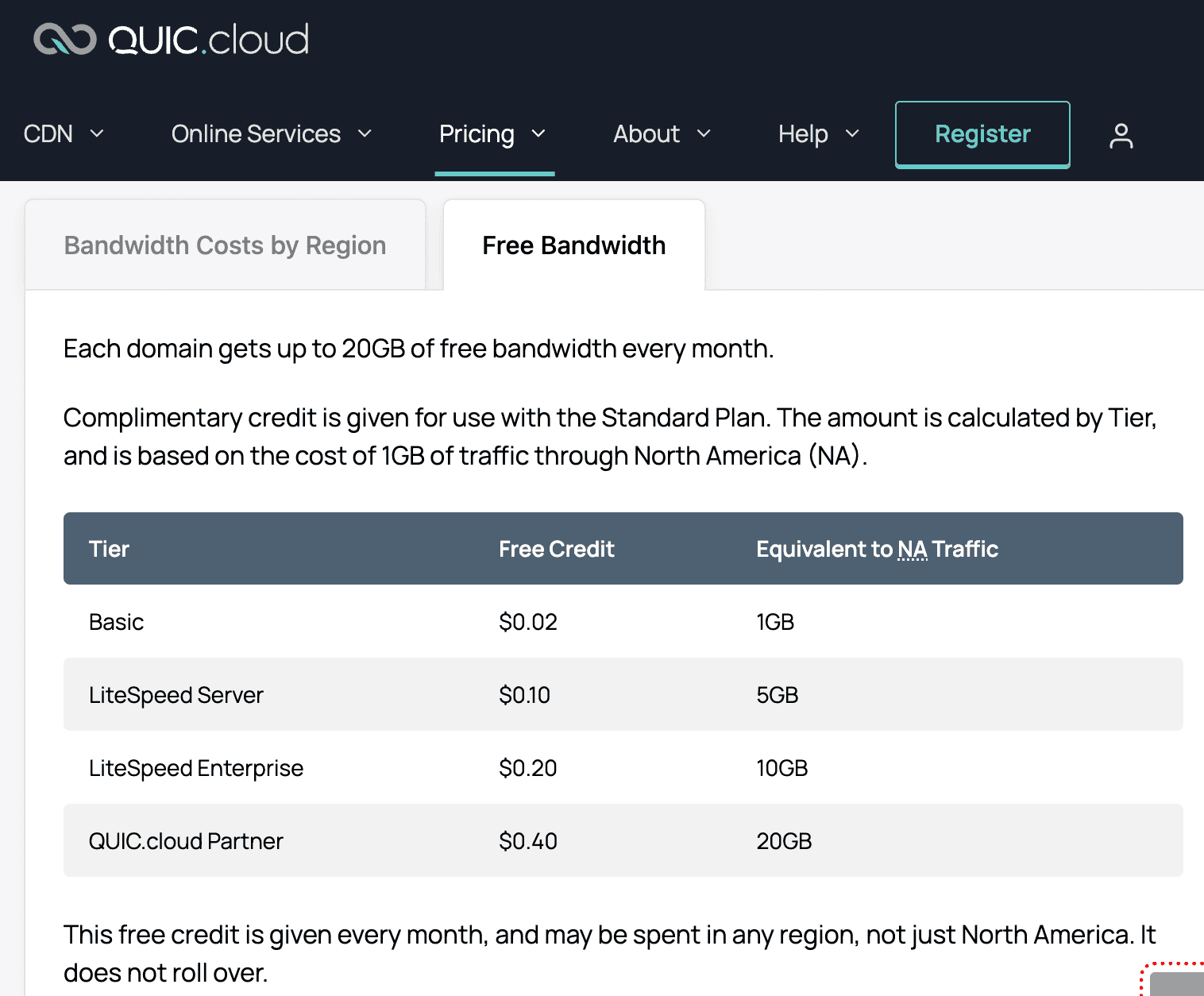
ChemiCloud uses LiteSpeed Enterprise for all their shared servers. This also means you get some free monthly bandwidth (roughly 10GB) if you decide to use LiteSpeed’s own QUIC.cloud CDN (see below). If you exhaust that limit, you have the option to switch to QUIC.cloud’s free tier (has only 6 global PoPs instead of 78 for the paid plan).
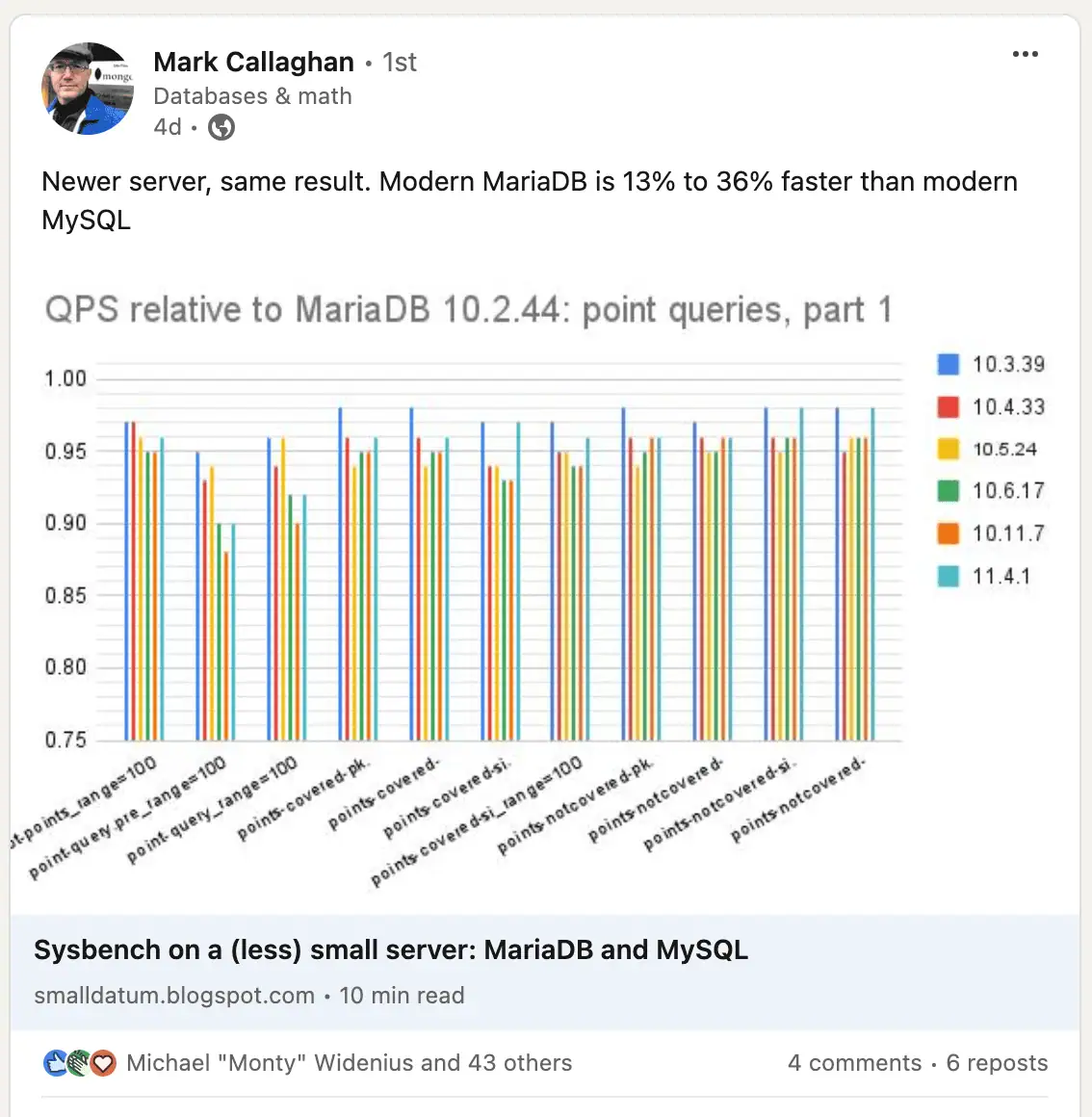
2. MariaDB instead of MySQL – this is faster than MySQL. “Modern MariaDB is 13% to 36% faster than modern MySQL” – see here.
3. CloudLinux OS & CageFS account isolation
The advent of CloudLinux has made the differentiation between shared and semi-dedicated hosting unnecessary. This is due to its modern account-isolation technologies (like CageFS).
This also allows hosts to limit server resources (like CPU, RAM etc.) on a per-account level, thereby preventing any single demanding/rogue account from suddenly using up all of the available resources and affecting overall server performance (for other users).
This also made the ‘number of accounts hosted on a single server’ metric irrelevant, because now it mainly depends on how much processing power and system memory you’re equipping that server with.
This means hosts like ChemiCloud can offer scalability within a ‘traditional shared hosting’ environment by offering different plans with different amounts of server resources, making an additional ‘semi-dedicated’ tier redundant.
Account isolation is also beneficial in terms of security, where a single compromised account (hosting malicious files) can’t affect any other account hosted on the same server.
4. Object caching support (Redis & memcached) – which you need to enable following these instructions. This significantly improves performance for highly-dynamic websites like WooCommerce sites.
4. Server performance benchmarks
Here’s the meaty bit (which actually matters for your website performance) that you won’t find in generic reviews and YouTube videos.
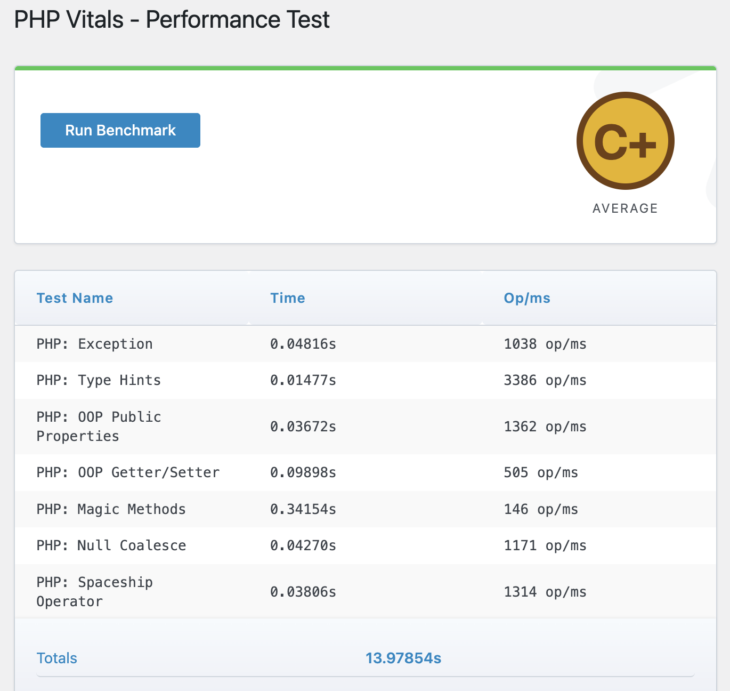
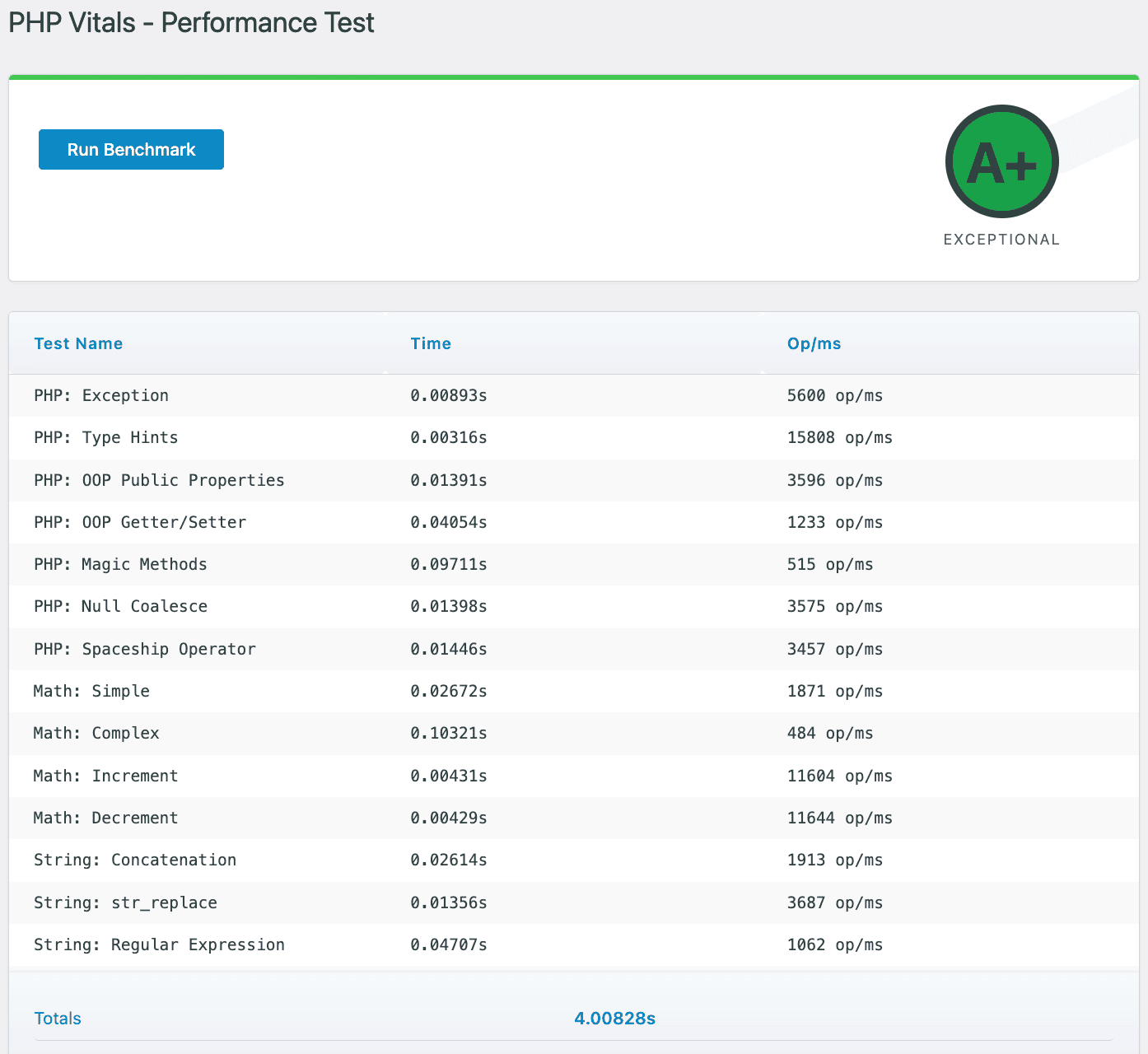
First, let’s do PHP Vitals, which primarily measures PHP processing performance of the server and displays an overall grade like A+, A, B+, B and so on. WordPress is mostly PHP.
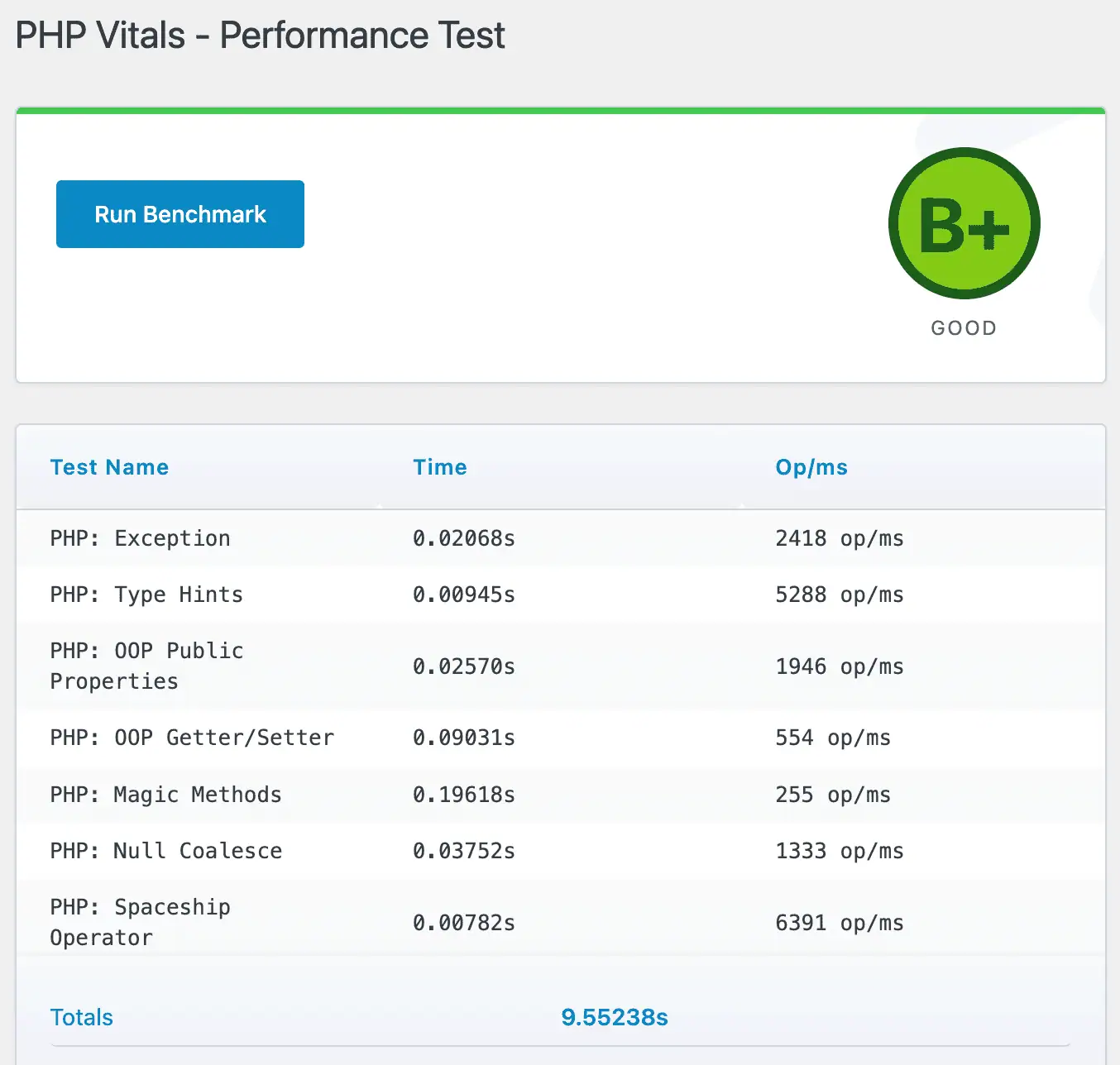
Practically, B+ is decent but not the fastest you can get. Also, there are good providers offering similarly priced plans with similar resources that manage lower scores. For example, MDDHosting:
To get A and beyond, you must specifically choose a host using one of the fastest processors currently, such as the AMD Ryzen 9950X, which ExonHost does:
For the next text, I’ve used the WordPress Hosting Benchmark plugin by Anton Aleksandrov.
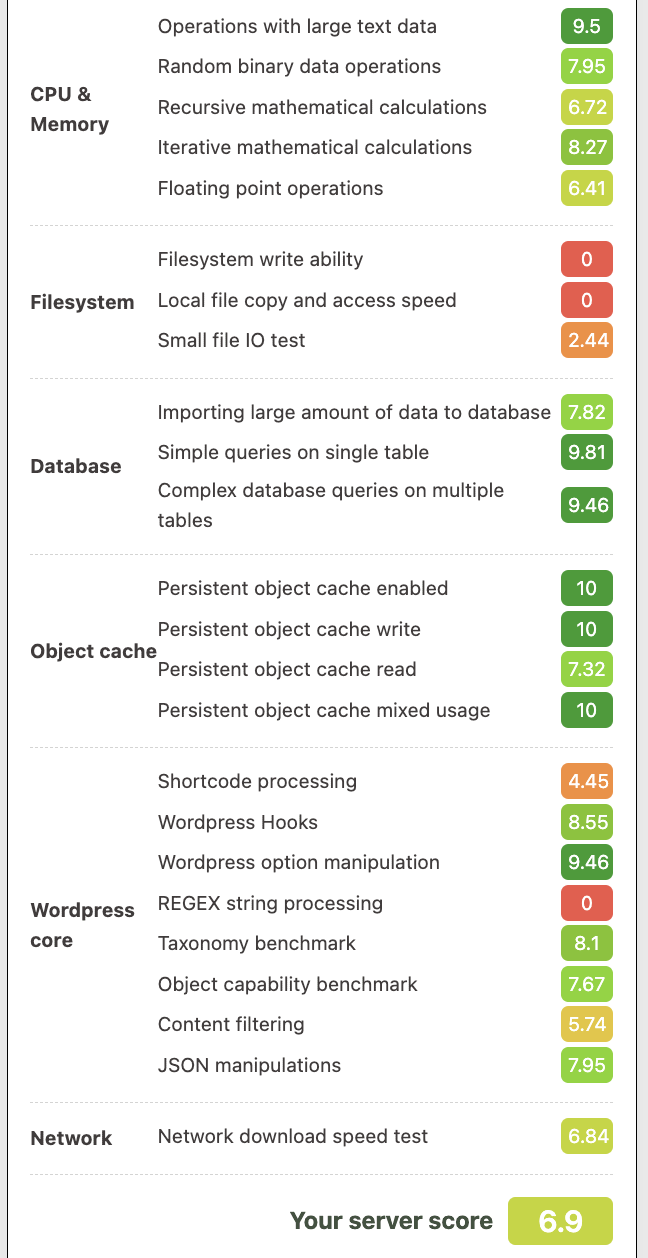
The overall score might not seem that impressive, but a large part of that is due to the ‘zero’ scores in the filesystem performance department. I asked ChemiCloud about it (created a support ticket) and they tested things on their end.
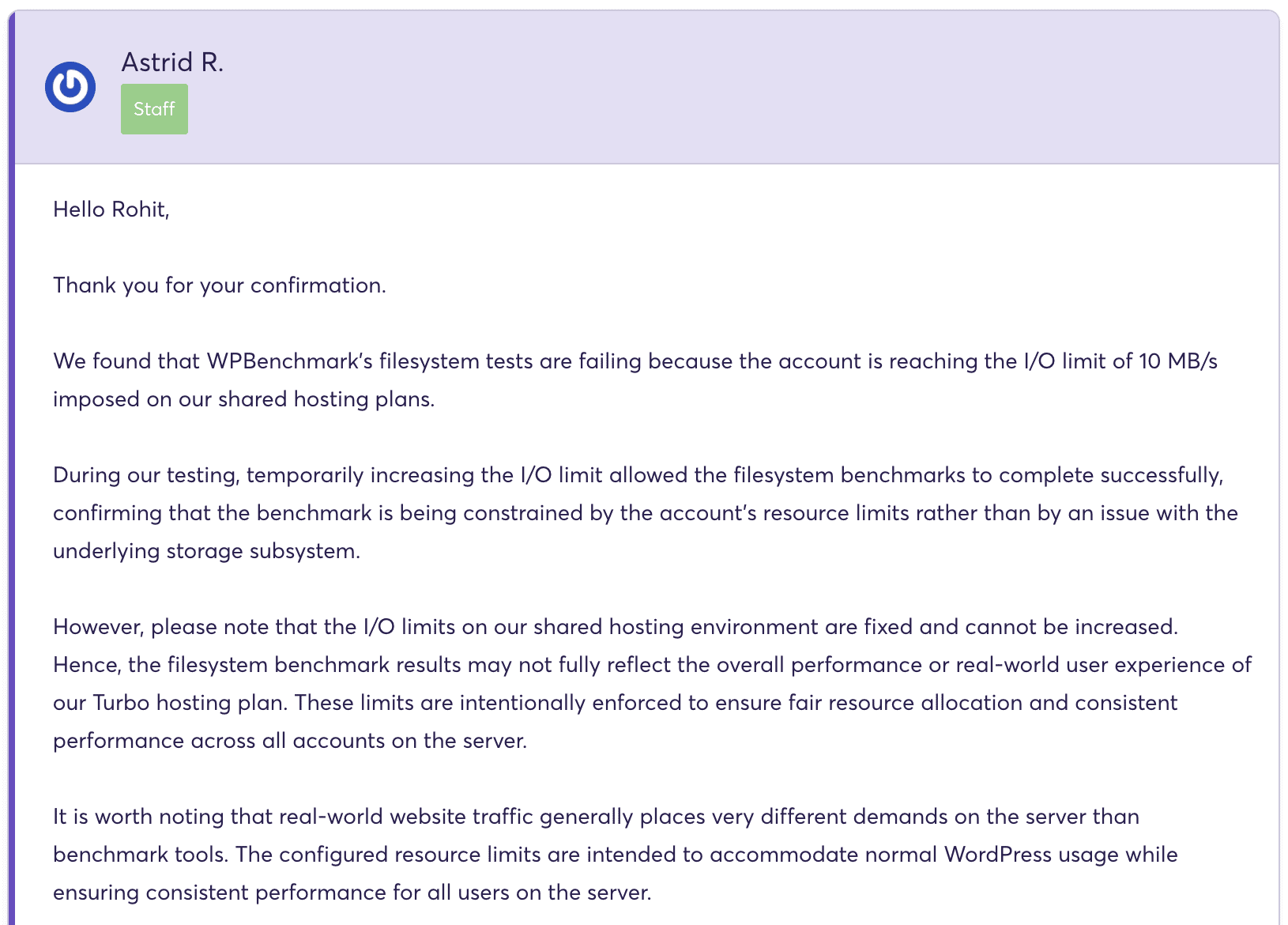
Astrid from ChemiCloud’s tech support let me know that this was happening due to a disk I/O limit which is placed on every shared hosting account to prevent a single rogue account (whether it’s facing attacks or something else) affecting the storage performance for the entire server.
It scored another zero in the ‘regex string processing’ test for similar reasons (limits designed to protect the server from single-user abuse).
Despite this, the score is actually not that bad and comparable to MDDHosting’s Plaid platform (my review):
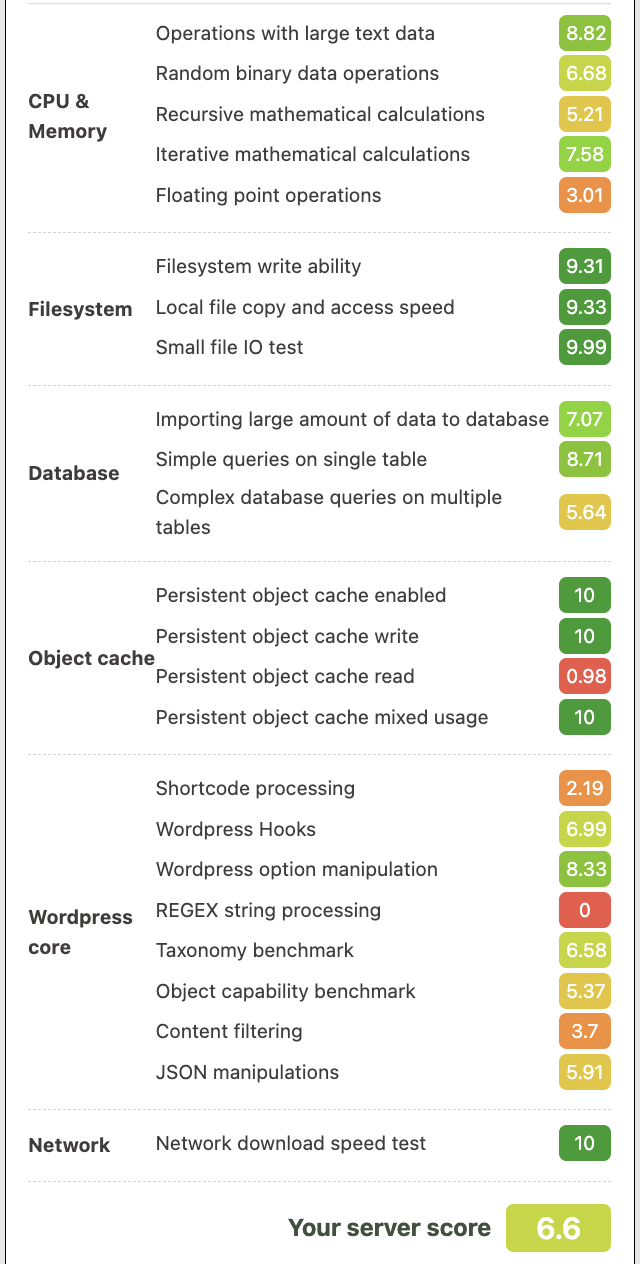
A ‘zero’ in the regex test for MDDHosting as well, notice the pattern?
The reason why MDDHosting scores so high in the filesystem department is because they don’t have any storage I/O limits at all, apart from using StorPool, a software-defined storage solution that utilizes multiple NVMe drives in parallel for read/write.
I do have to note that this is not that significant for real-world website performance, and more relevant for accessing/manipulating raw amounts of data, such as taking backups manually.
5. Real-world performance (website load times)
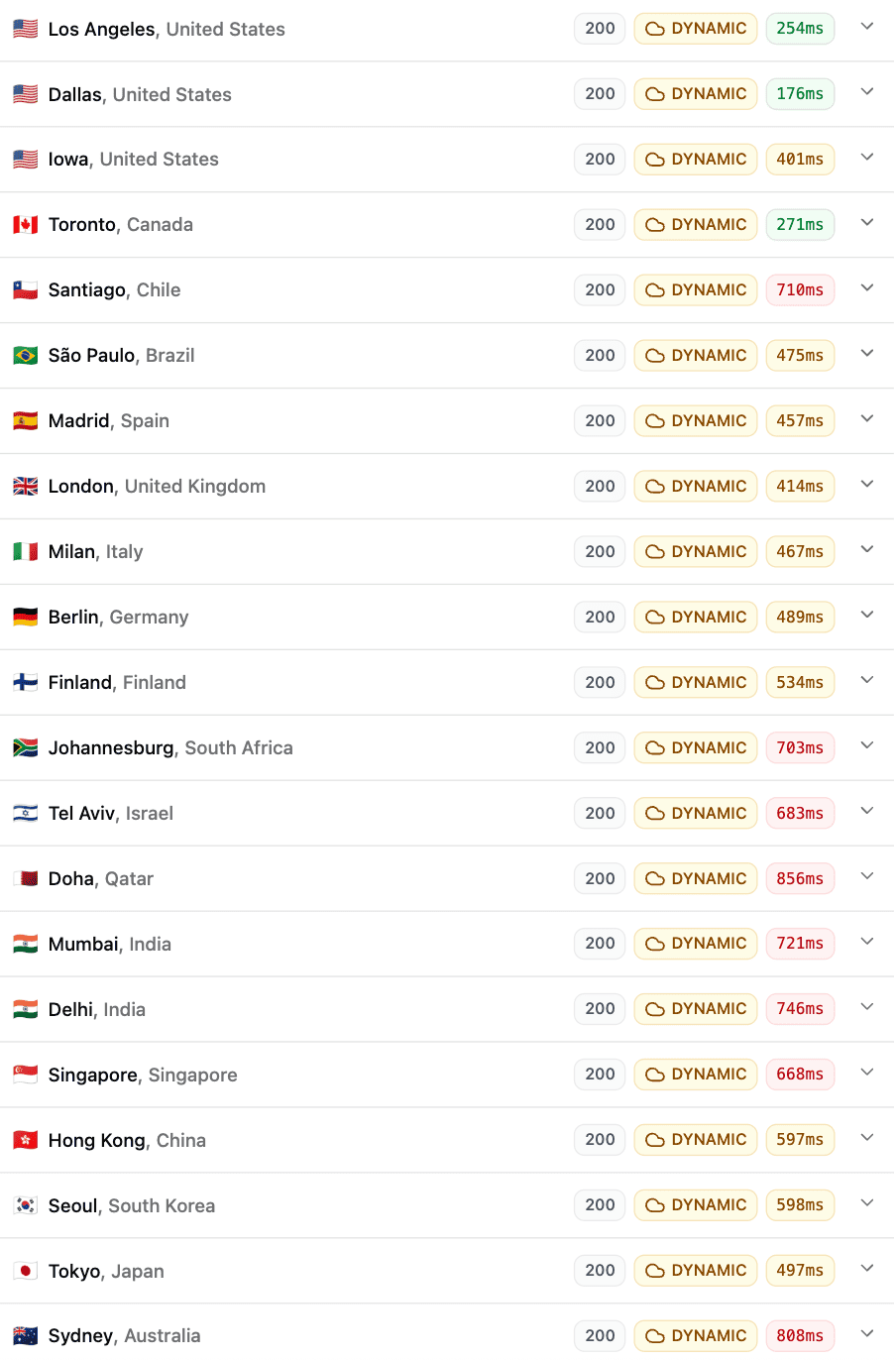
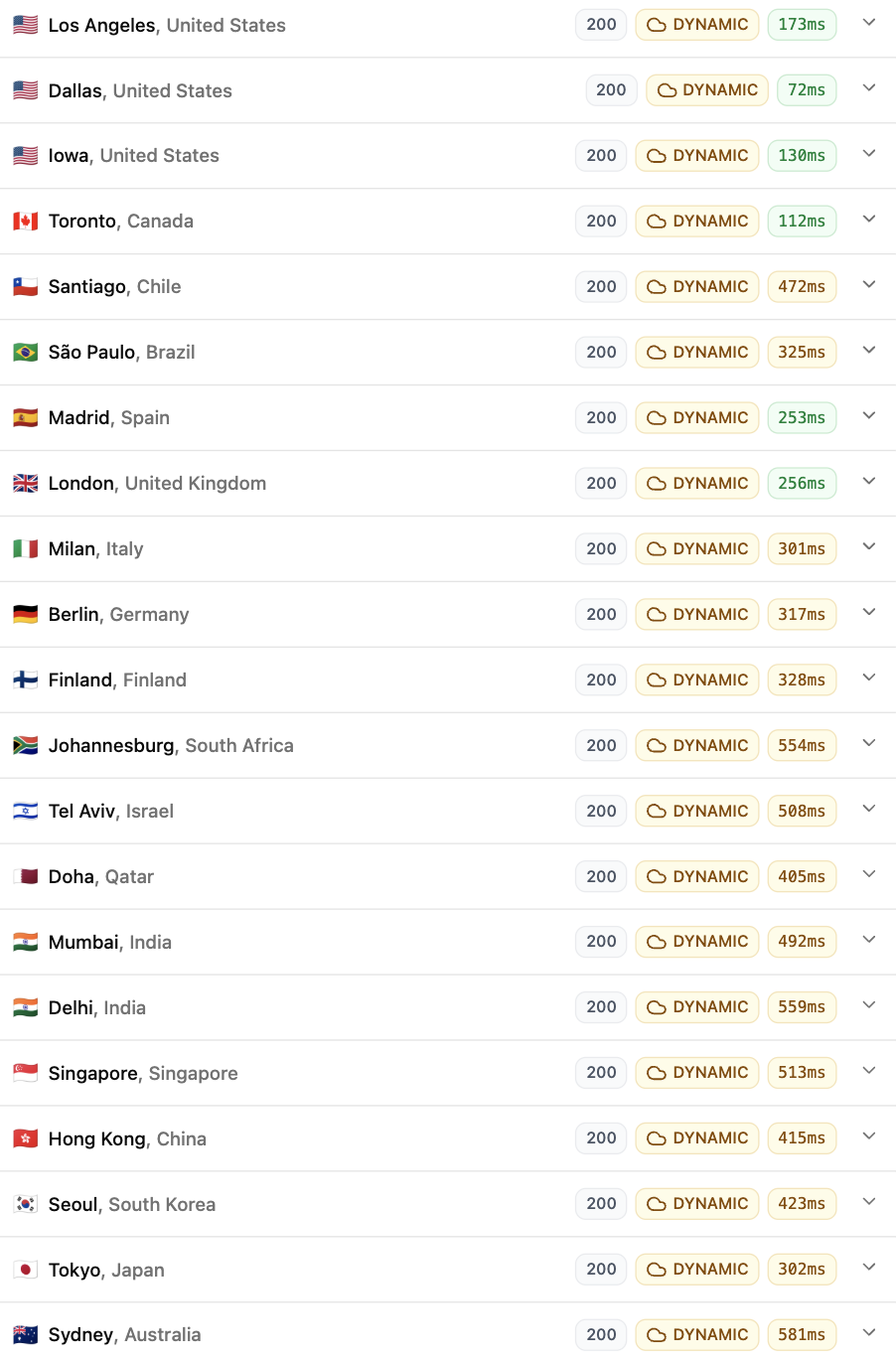
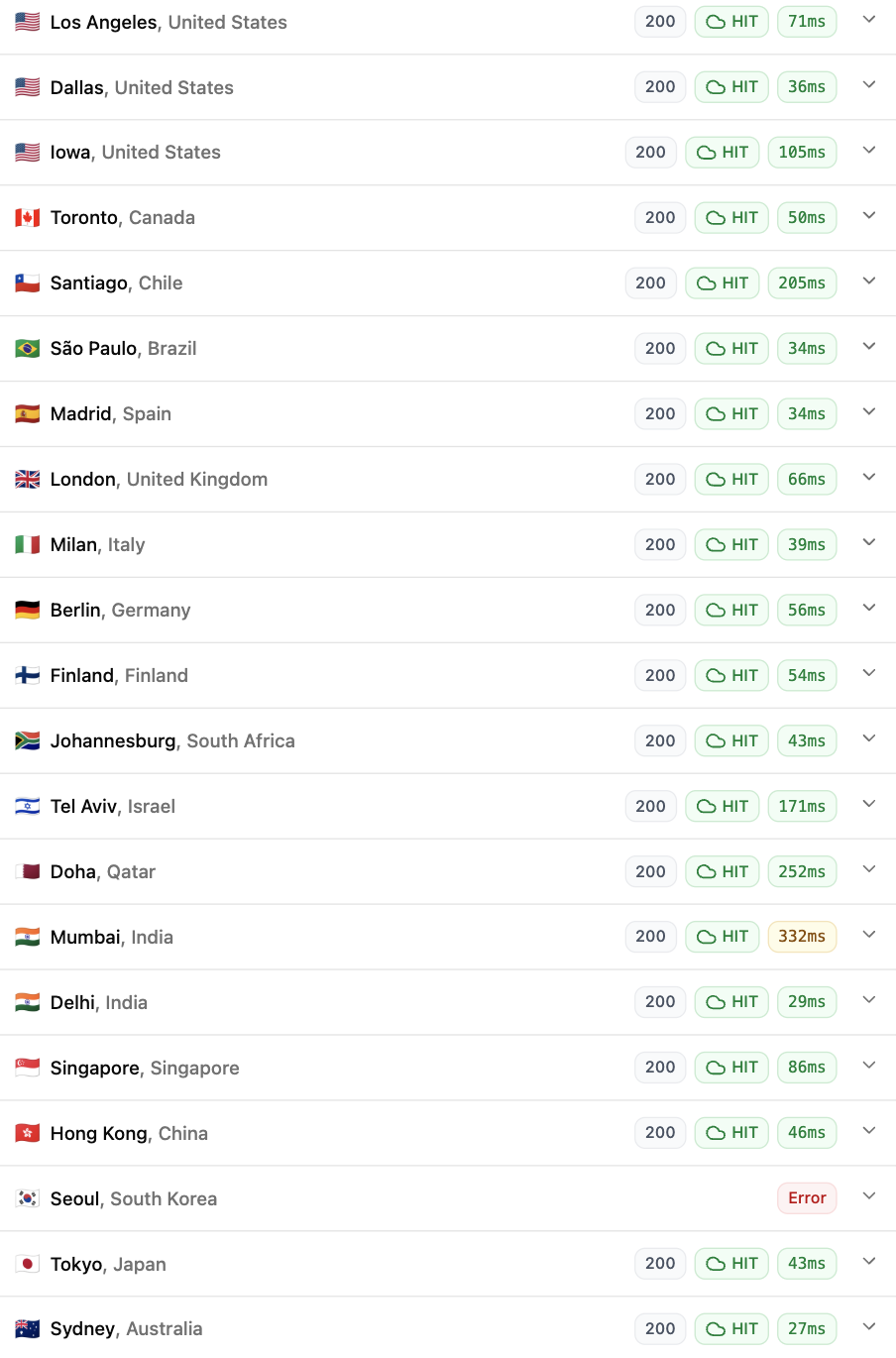
For testing real-world website performance, my preferred test is the global TTFB test using FlyingTTFB. This measures the initial server response time from many different locations across the globe (especially useful if you get visitors from more than one particular region).
I’ve used a WordPress site for this test, loading a simple blog post (doesn’t use any page builder).
I’ve run this test under 3 different conditions:
- Uncached + Cloudflare CDN (for static resources only)
- Cached (LiteSpeed Cache) + Cloudflare CDN (for static resources only)
- Cached (LiteSpeed Cache) + Dynamic (Full-page) Caching enabled (Cloudflare) using the App for CF plugin, where the entire page is served directly from Cloudflare’s global PoPs (bypassing the origin, i.e. ChemiCloud entirely)
This is what each test means:
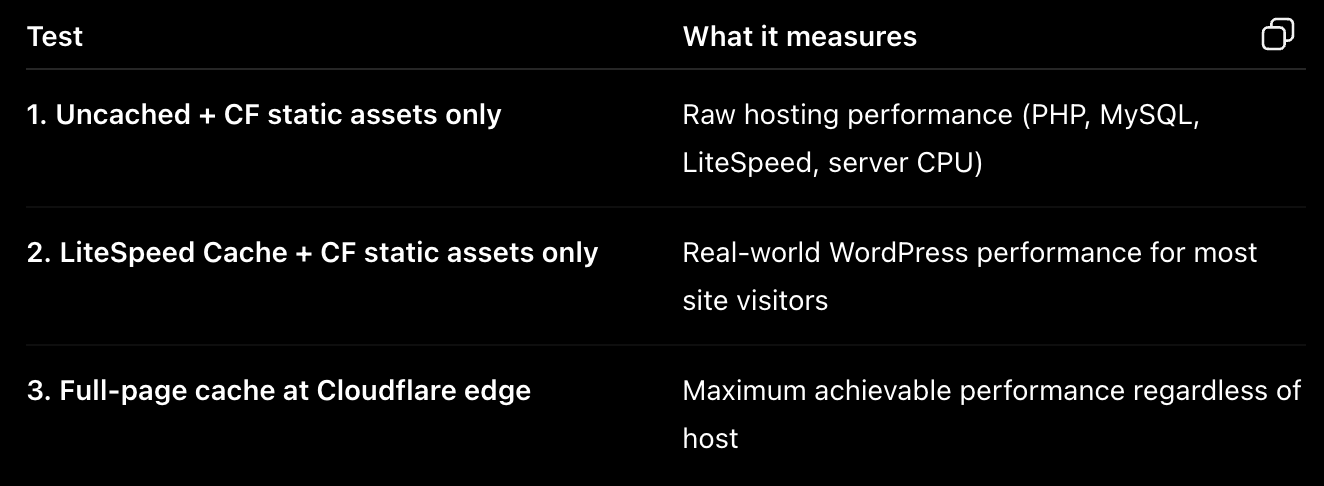
TTFB = ‘Time to First Byte’ Response Time in miliseconds (lower is better)
For dynamic sites (WooCommerce, forums etc.), take into account the ‘uncached’ TTFB values. Similarly, for mostly static sites (blogs and other article-based sites), consider the cached (using LiteSpeed page caching) numbers.
Lastly, for static sites, the Cloudflare full-page caching mechanism shows you what’s possible if a static version of your webpages are served from a CF PoP (node) that’s closest to your visitor. I wouldn’t give this too much importance since it bypasses the origin (in this case, your web host) almost entirely.
These are the results (please interpret based on the hints above)…
Global TTFB – ChemiCloud’s ‘Turbo’ platform:
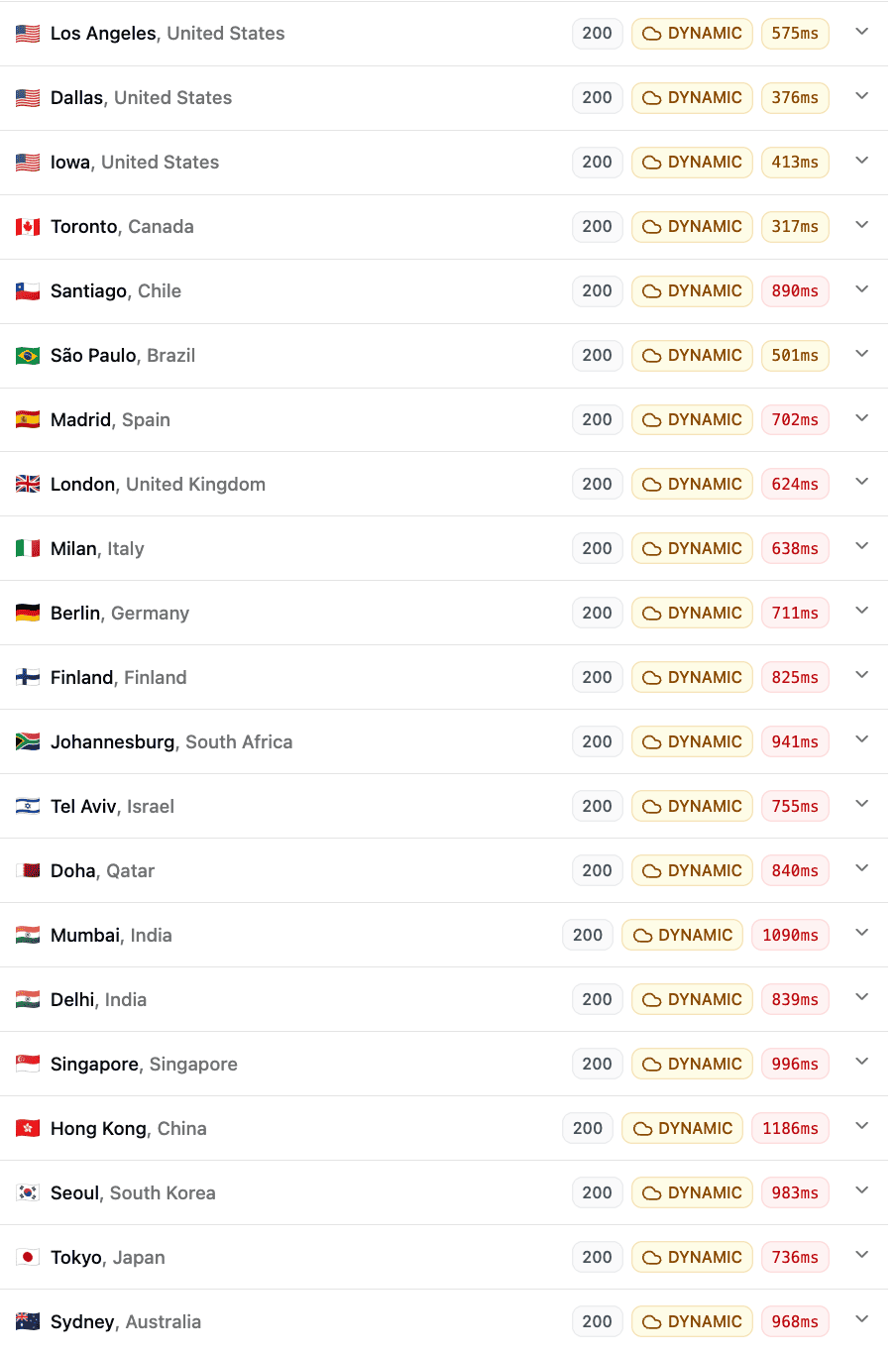
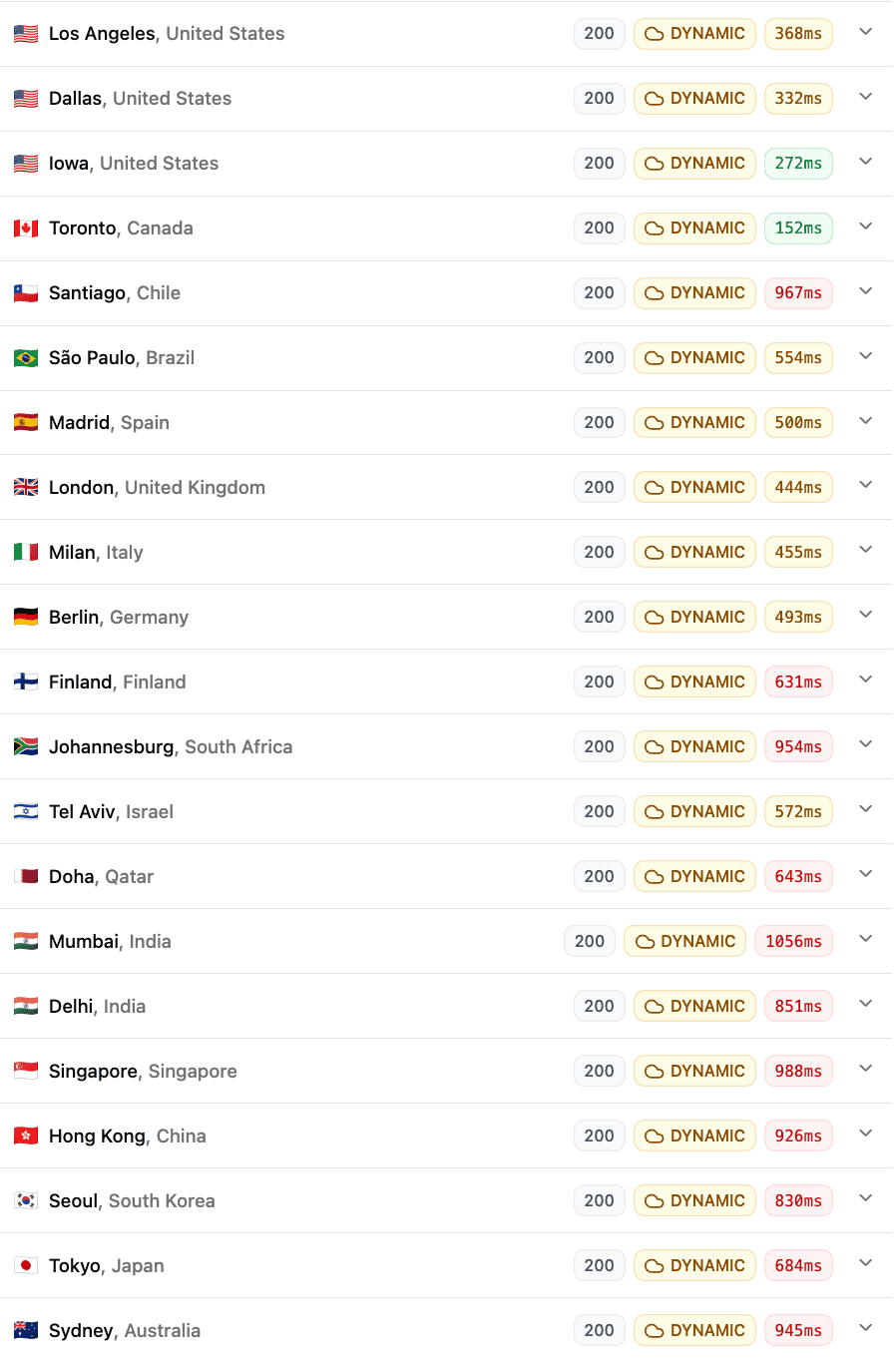
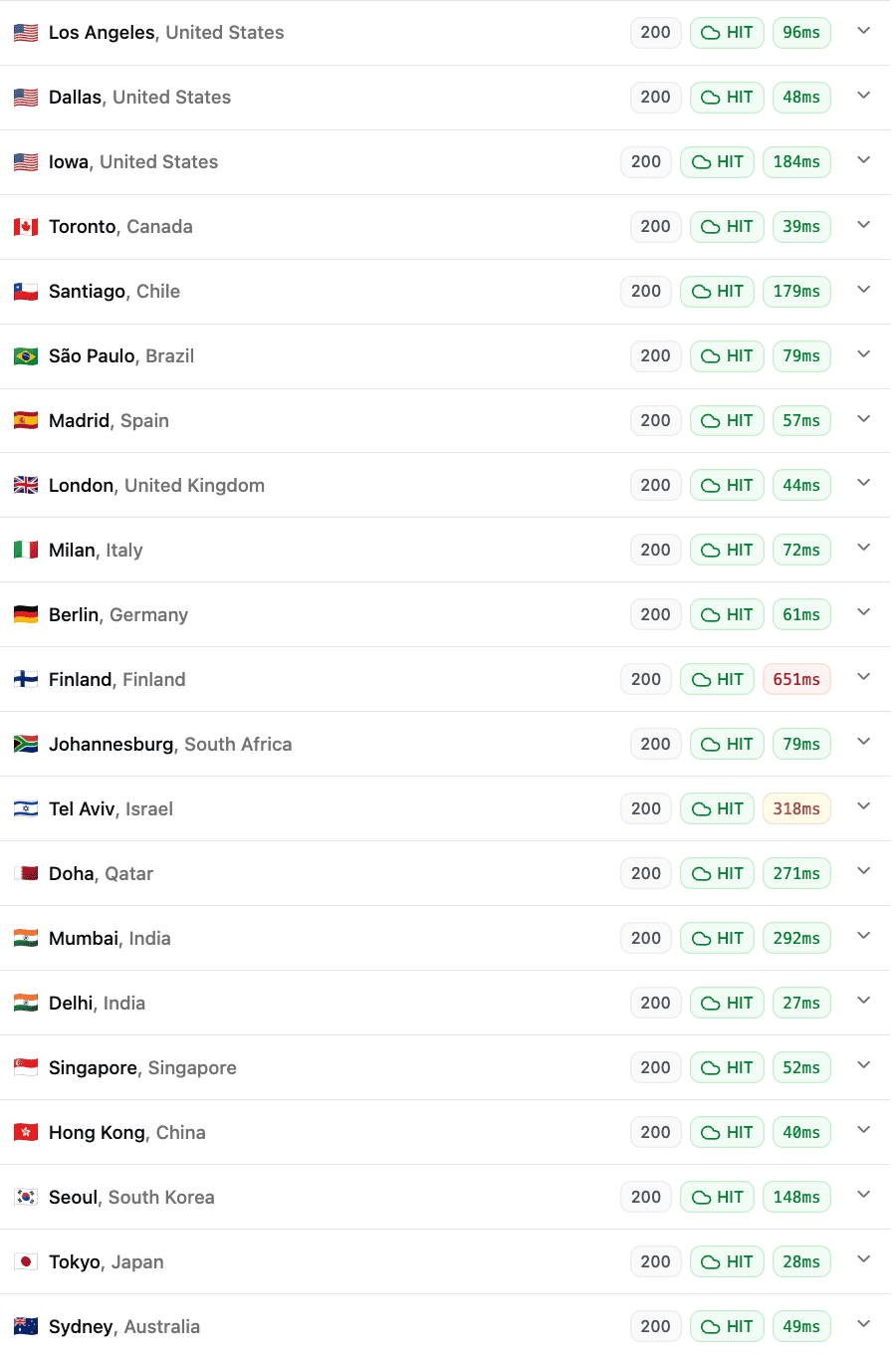
I ran each test multiple times, to eliminate the possibility of outlier events affecting any particular test. I saw broadly similar results to what you saw above.
For context, these are the test results for two other hosts offering similar resource-based plans.
Global TTFB – MDDHosting’s ‘Plaid’ platform:
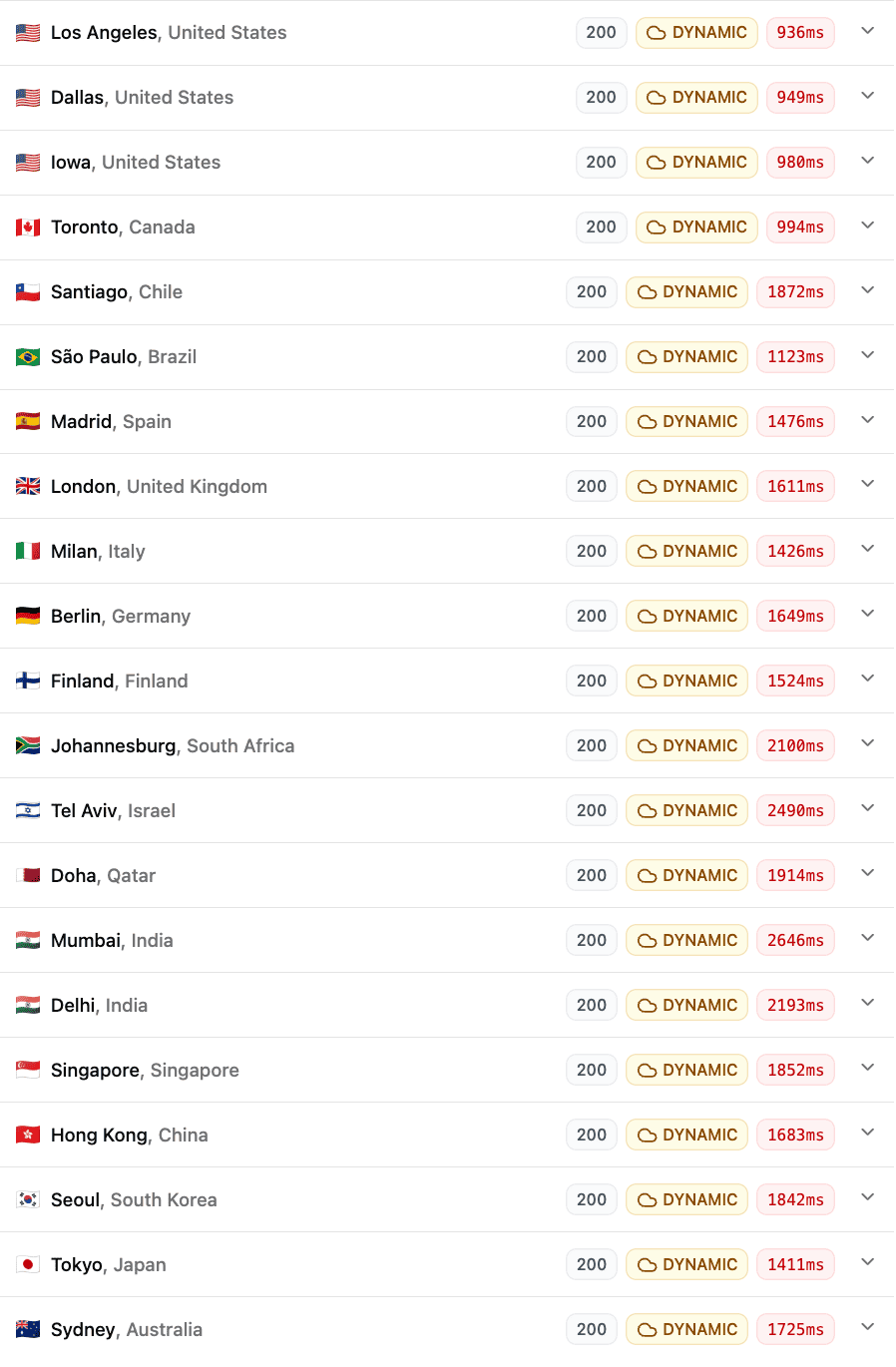
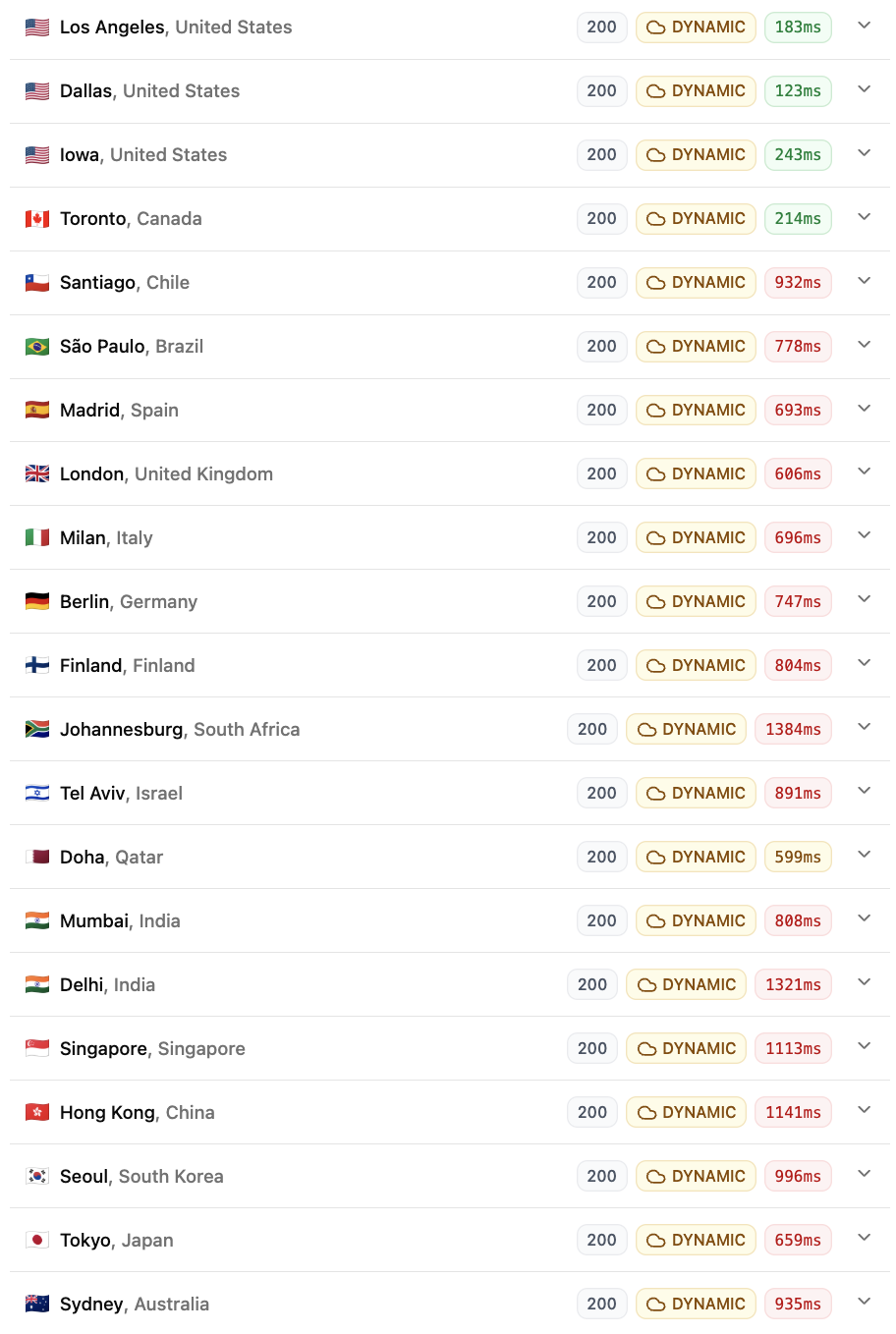
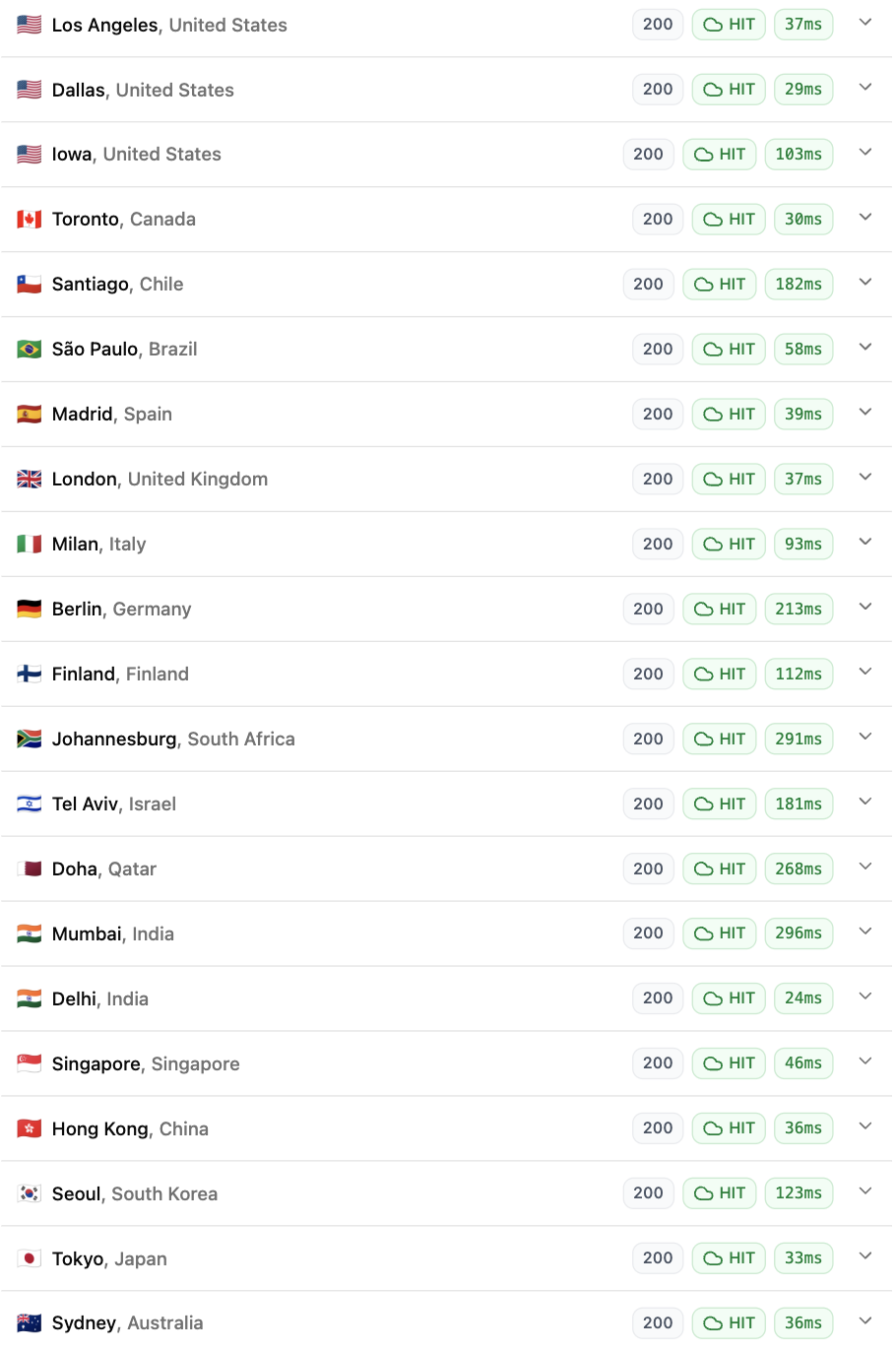
As you can see, the high storage performance of MDDHosting (as you saw in the filesystem benchmark before) didn’t really translate to better real-world website performance.
Global TTFB – ExonHost’s ‘Turbo Plus‘ plan:
ExonHost (my review) delivered generally faster load times (both uncached and cached), mainly because of their faster CPUs, which was also captured in the PHP Vitals test before.
Why do ChemiCloud stick to Epyc (enterprise/server-grade) instead of Ryzen (consumer-grade) CPUs? Primarily because of scale and enterprise-grade reliability. They can utilize much more storage and memory per server, which allows them to host significantly more accounts per server. Things like ‘ECC-memory’-support should theoretically offer slightly higher reliability.
6. Pricing & renewal policy
One thing I have to note is that ChemiCloud charged my card 7 days prior to the next month’s invoice’s due date. This is mentioned in their ToS, but still it’s worth mentioning. Although such a practice isn’t uncommon in the web hosting space, in fact some hosts like SiteGround and BlueHost charge your card 14-15 days prior!
This is their pricing for their shared hosting plans (which is what I used myself):
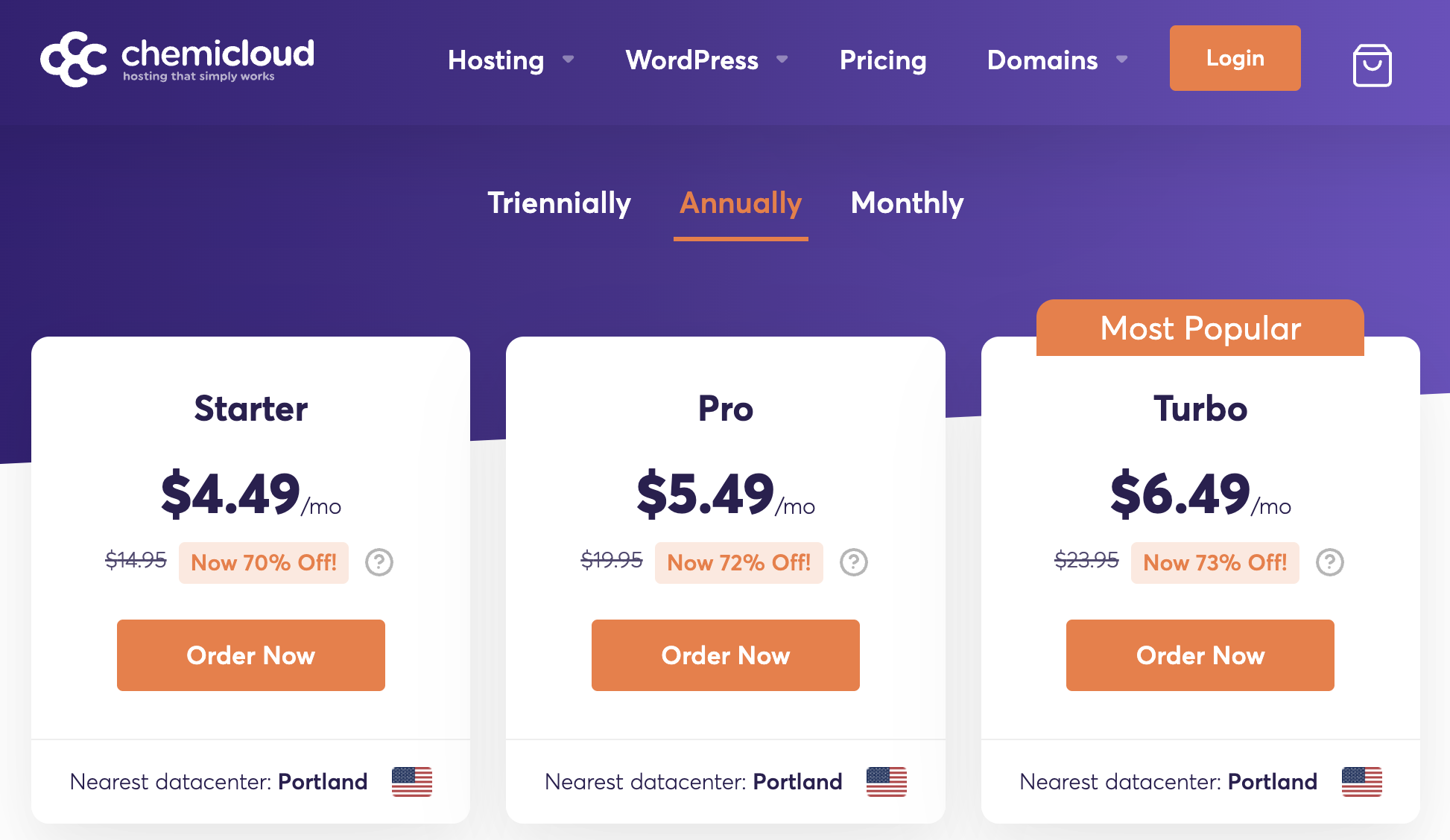
Suffice to say, these are ‘introductory’ prices (applicable for the first-term only), and renewals happen at full price ($14.95, $19.95 and $23.95 per month) just like most other web hosts.
Of course, to extract maximum value, you can always pay for 3 years upfront (triennially), which brings the prices down even further:
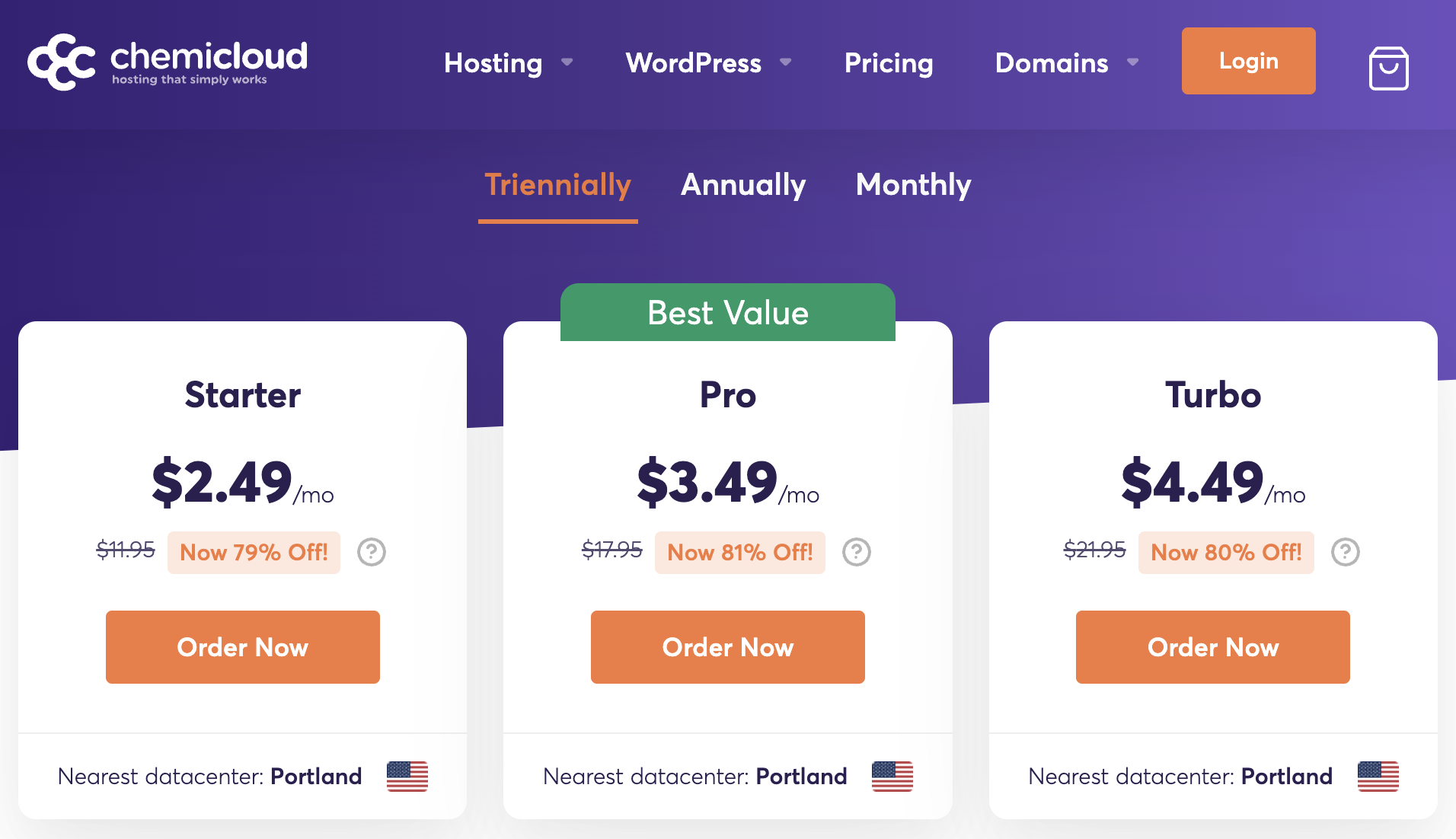
For example, the Turbo plan (the one I used), is only $4.49/mo or $161.64 (one-time) for 3 full years.
As far as value for money is concerned, based on the resources you’re getting, the plans are somewhat moderately priced. Not the most expensive and certainly not the cheapest either. I actually like the VFM-quotient of the Turbo plan the most, since you get considerably more resources for less than 2x the price of the Starter plan.
Coupled with the ‘Turbo Power Boost’ add-on that I talked about earlier, the VFM gets even more lucrative for higher-traffic sites that benefit from more server resources.
I’d have preferred a lower (non-discounted, standard) price for the Starter plan, since you can host just a single website. For non-mission-critical, low-traffic sites like personal portfolio sites etc. that renewal cost might feel excessive.
7. Backup policy
You get daily backups through JetBackup, which you can directly access (i.e. download or restore) via cPanel. Retention period varies by plan (10, 20 and 30 days for their 3 plans).
I actually discovered that for my plan (Turbo), they’re taking 2 backups everyday (bi-daily), as you can see in the screenshot below.
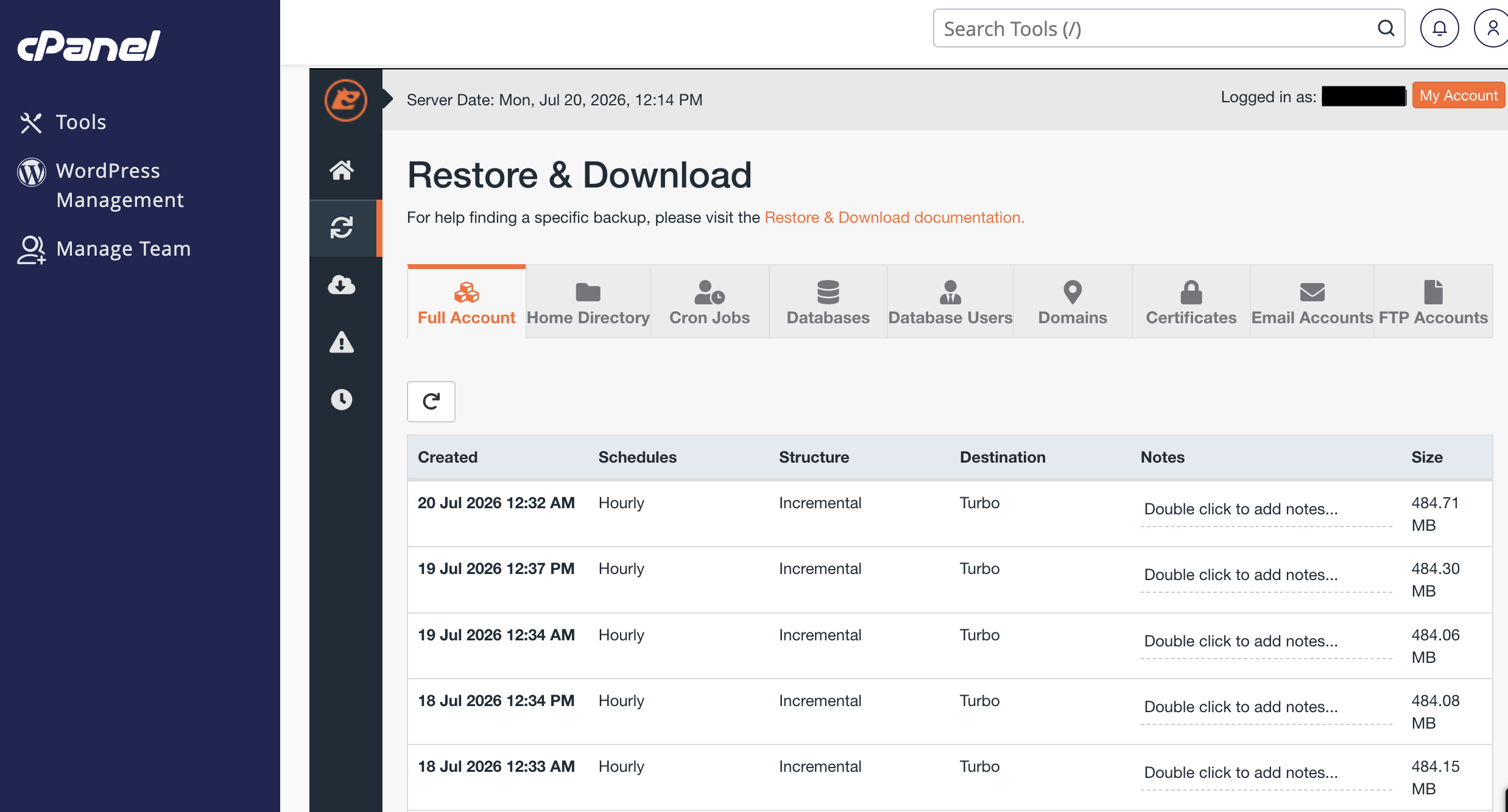
I could still see backups from up to 30 days ago (which actually makes it 60 restore points), which is nice.
8. Uptime, reliability & redundancy
They offer a 99.99% uptime guarantee (4 minutes and 23 seconds of downtime in a full month), more than the standard 99.9% (43 minutes and 12 seconds) that you get with most others. You can read their SLA-page for the exact reimbursement policy in case of downtimes beyond 0.01% in a month.
I haven’t faced any major issue apart from a couple of instances of connection timeouts reported by Uptime Robot (each lasting less than 5 minutes, which is the testing interval of UR), which often tends to be an issue between UR and Cloudflare rather than anything to do with the origin server itself.
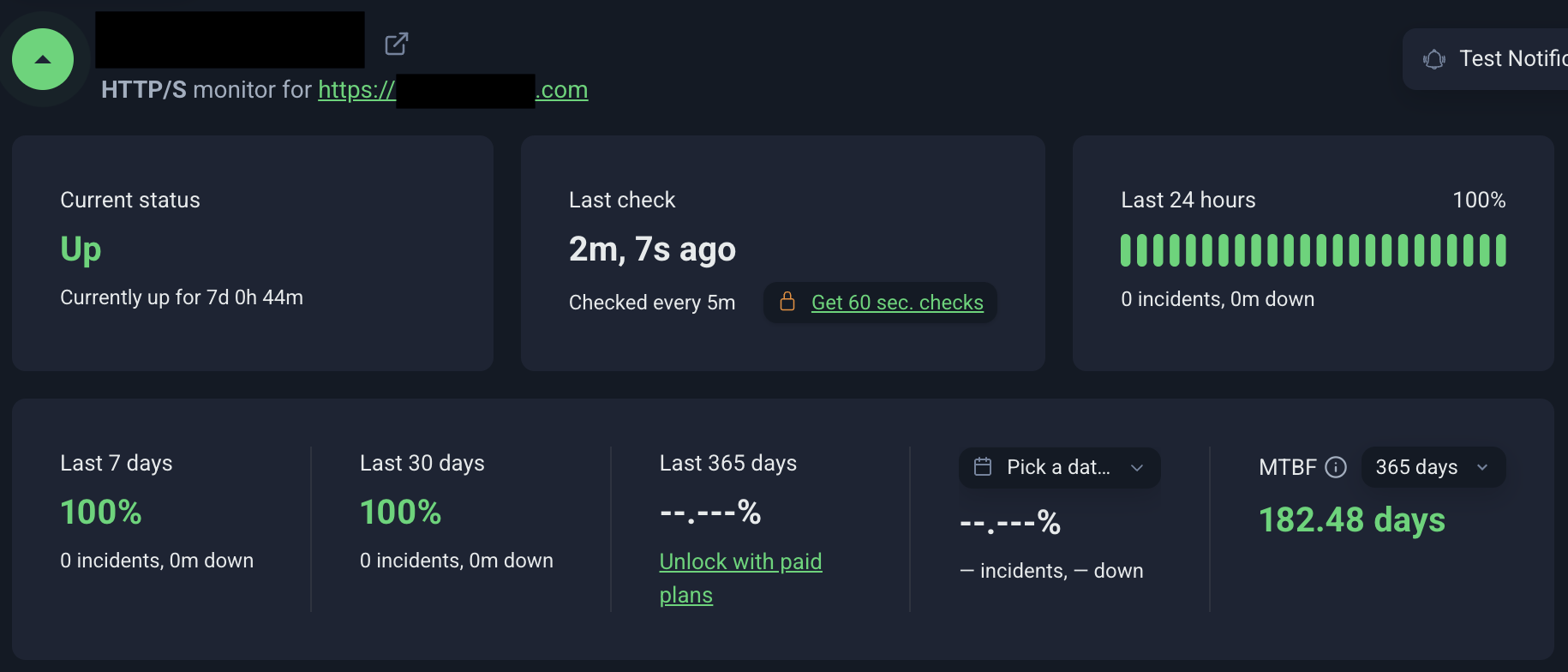
I also didn’t experience any real-world sluggishness while working inside the site’s WP-admin or loading front-end pages from my (several) devices, over different types of connections (4G/5G mobile data and WiFi).
I’ve occasionally faced downtimes (~ 1-2 hours) with other hosts owing to hardware failures or network issues at the datacenter. So, I asked ChemiCloud directly about what they’re doing to eliminate those. This was their response:
We deploy our services within enterprise-grade datacenter environments that provide redundancy for critical infrastructure components such as networking, power, and storage systems. While no hosting environment can realistically claim to eliminate every possible point of failure, resilience and fault tolerance are important considerations in our infrastructure planning.
They’re transparent about their overall network uptime data (including past incidents), which is public: https://chemicloud.com/serverstatus.php
Many other shared hosts have many hidden caps in resource usage. For example:
- MechanicWeb (“You may not use 60% or more system resources for longer than 60 seconds.” – their ToS)
- NameHero (“an account can only use 25% of the CPU for less than 90 seconds at a time” – see here)
- SiteGround (“CPU seconds” that vary by plan. – see here)
ChemiCloud doesn’t have any such hidden, ambiguous limit. Whatever they do have (such as the 10 MB/s I/O limit) is clearly mentioned on their plan details page.
Again, when asked about this, they responded:
The resource allocations advertised for our hosting plans are enforced through CloudLinux. We do not apply undisclosed resource limitations beyond the published hosting plan allocations.
10. Security
You get Imunify360, which you can access via cPanel.
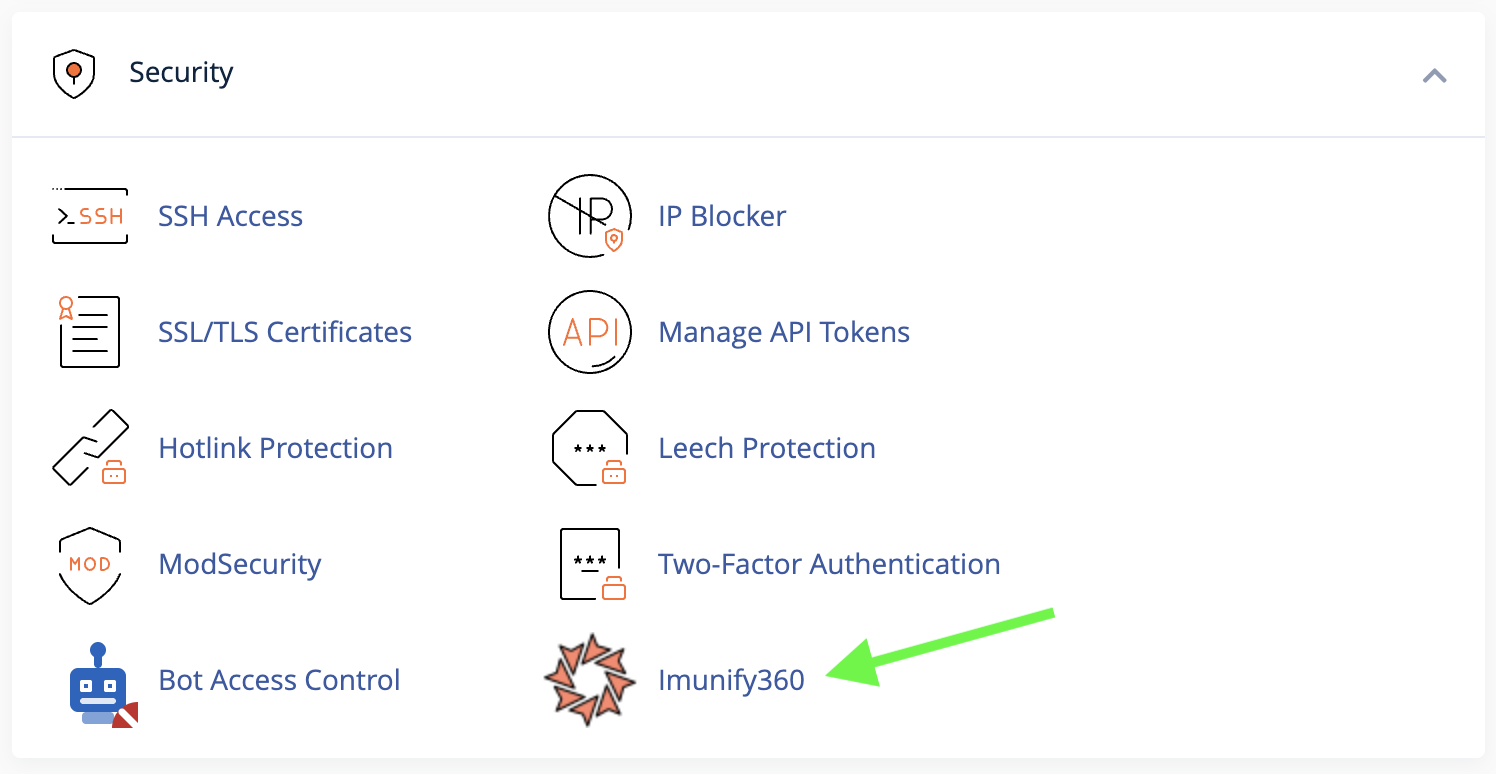
This is a premium security solution that not all shared hosts offer (the license isn’t cheap). In my experience, it’s pretty effective at automatically scanning and quarantining potentially compromised files.
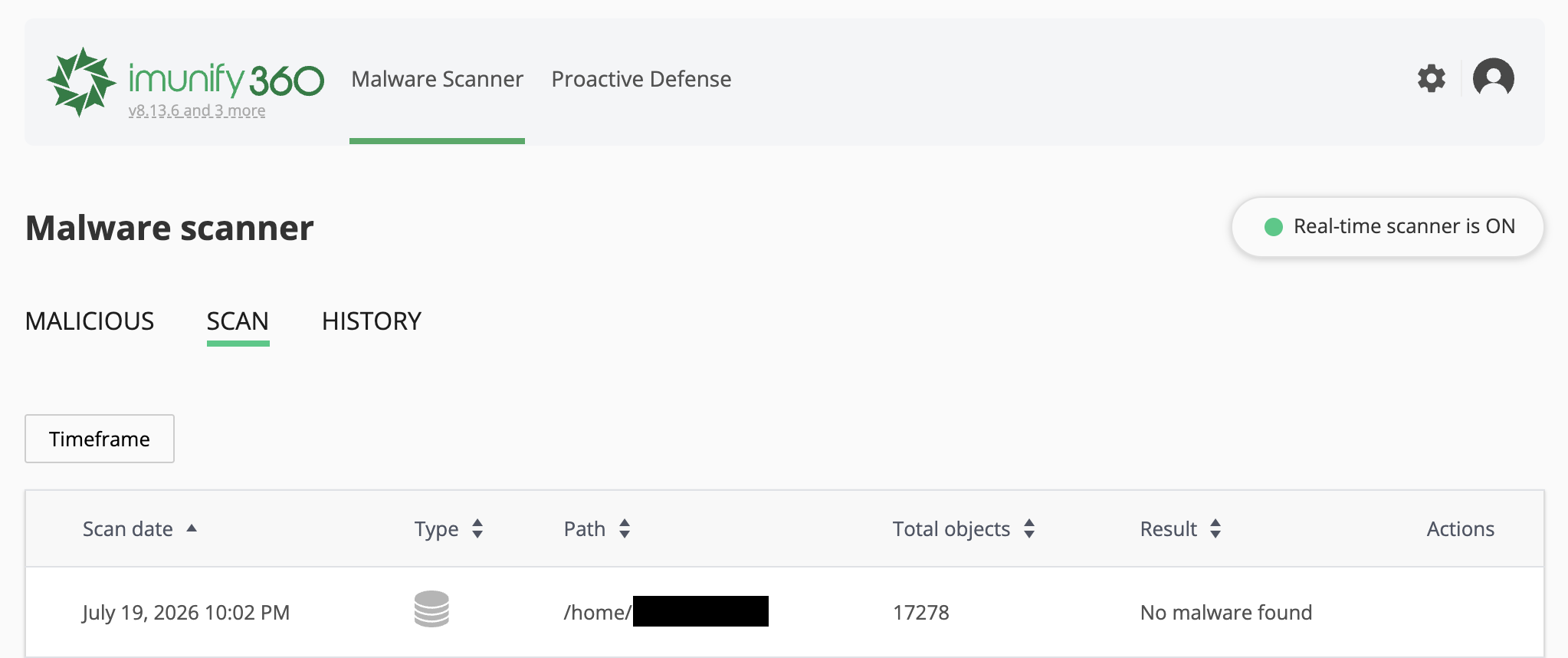
In most cases, it can fix (or assist you greatly in identifying the issues in) the affected files, thereby saving you plenty of extra money for malware removal (hosts like SiteGround do charge for this).
Still, if you’re paranoid about one compromised site of yours making your other sites infected, you can always sign-up for ChemiCloud’s reseller plans (host each website under their own cPanel account, thereby benefiting from CageFS account isolation).
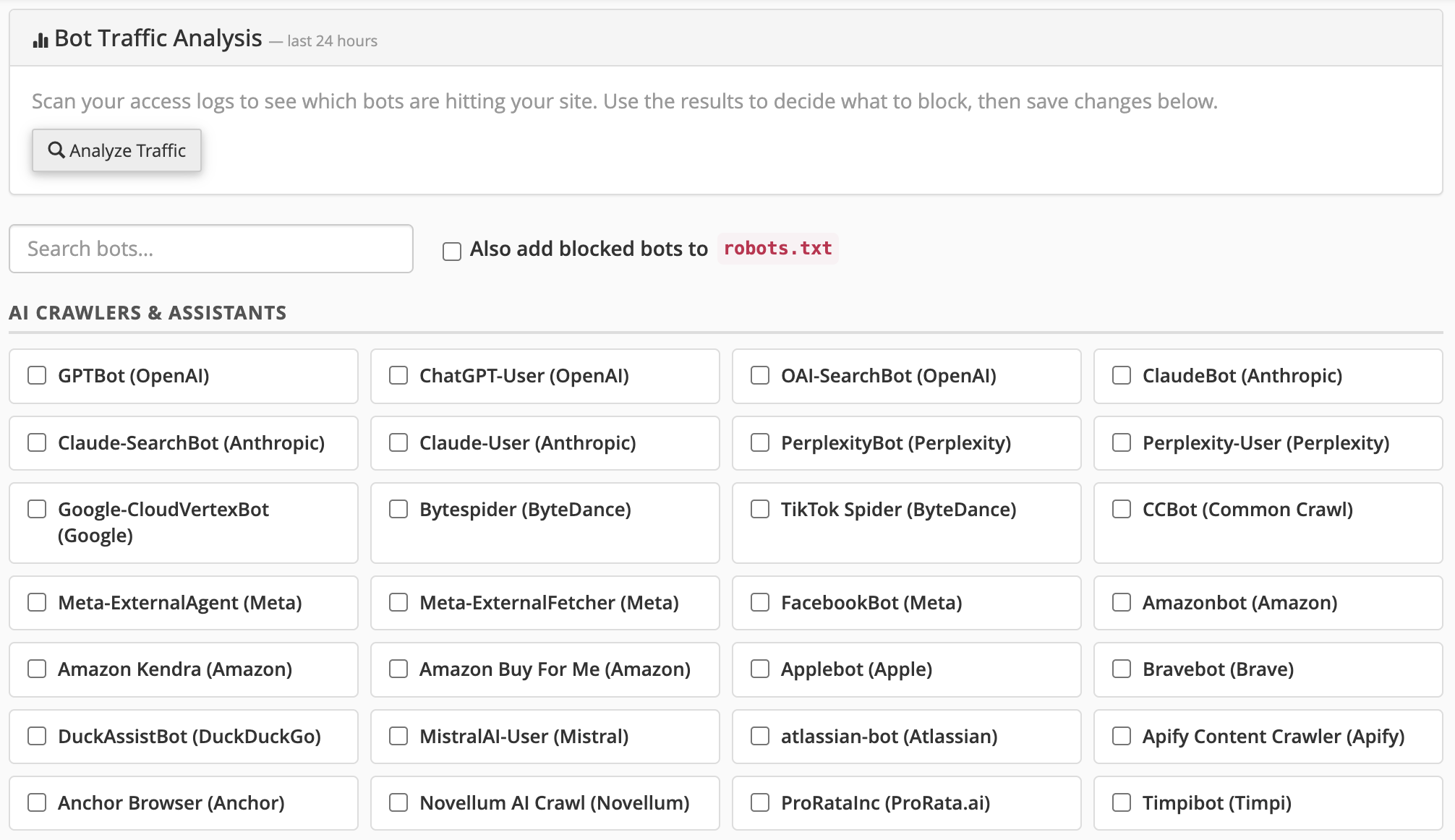
Another feature I really liked, especially in this day and age of blatant AI-led data scraping and misuse, is the ‘Bot Access Control’ feature built right within cPanel. You can easily analyze bot traffic hitting your sites, and block bots selectively (they’re conveniently categorized as AI agents, traditional search engine crawlers, SEO tool crawlers, etc.).
11. My overall experience with their support
There are two extremes in the web hosting space.
On one side you have boutique hosts that are primarily run by one or two key people. Support and overall infrastructure reliability depends a great deal on their individual availability. On the other side you have conglomerates and giant mass hosts like BlueHost and the likes, which view their customers as nothing more than numbers in their system.
Across my several support tickets, it never felt like ChemiCloud could be categorized under any of those two categories.
- Response times were always reasonably fast (always averaged around 7-8 minutes to 15-16 minutes, irrespective of how difficult the request/question was).
- They handled my site migration (which they had to perform manually from my uploaded database and file backups) very fast (within 40 minutes) and smoothly. Everything worked perfectly out of the box post-migration, no permalink / .htaccess related drama, no 404 errors.
- Responses felt personal, retaining the human touch that’s missing in the AI-generated or copy-pasted boilerplate responses.
- They have a very functional knowledgebase, which the support reps refer to for guiding users in a frictionless way.
- Their chat support is just as effective for simpler queries. For example, I asked them how to enable Redis (object caching) and didn’t have to deal with an AI bot at any stage. Their human support staff redirected me to this knowledgebase article which clearly demonstrated how to get it done.
- Their support isn’t just limited to ‘ensuring that your website loads fine’. For example, when I asked them about the ‘zero’ scores in the WP Hosting Benchmark plugin, they could’ve simply dismissed it by saying “what difference does it make for the day-to-day functioning of your website?”. But instead of doing that, they actually took the time to investigate the issue themselves and telling me the real reason (the I/O limit that they impose for server stability).
I’ll paste their response to my ticket about the benchmarking issue to help you gauge how professionally they handled it:
Hello Rohit,
Thank you for your confirmation.
We found that WPBenchmark’s filesystem tests are failing because the account is reaching the I/O limit of 10 MB/s imposed on our shared hosting plans.
During our testing, temporarily increasing the I/O limit allowed the filesystem benchmarks to complete successfully, confirming that the benchmark is being constrained by the account’s resource limits rather than by an issue with the underlying storage subsystem.
However, please note that the I/O limits on our shared hosting environment are fixed and cannot be increased. Hence, the filesystem benchmark results may not fully reflect the overall performance or real-world user experience of our Turbo hosting plan. These limits are intentionally enforced to ensure fair resource allocation and consistent performance across all accounts on the server.
It is worth noting that real-world website traffic generally places very different demands on the server than benchmark tools. The configured resource limits are intended to accommodate normal WordPress usage while ensuring consistent performance for all users on the server.
Please let us know if you have any further questions or concerns; we will be here to address them.
I can say from experience that at least 8 out of 10 shared hosts would’ve said, “sorry, we don’t offer support for third-party scripts” and closed the ticket.
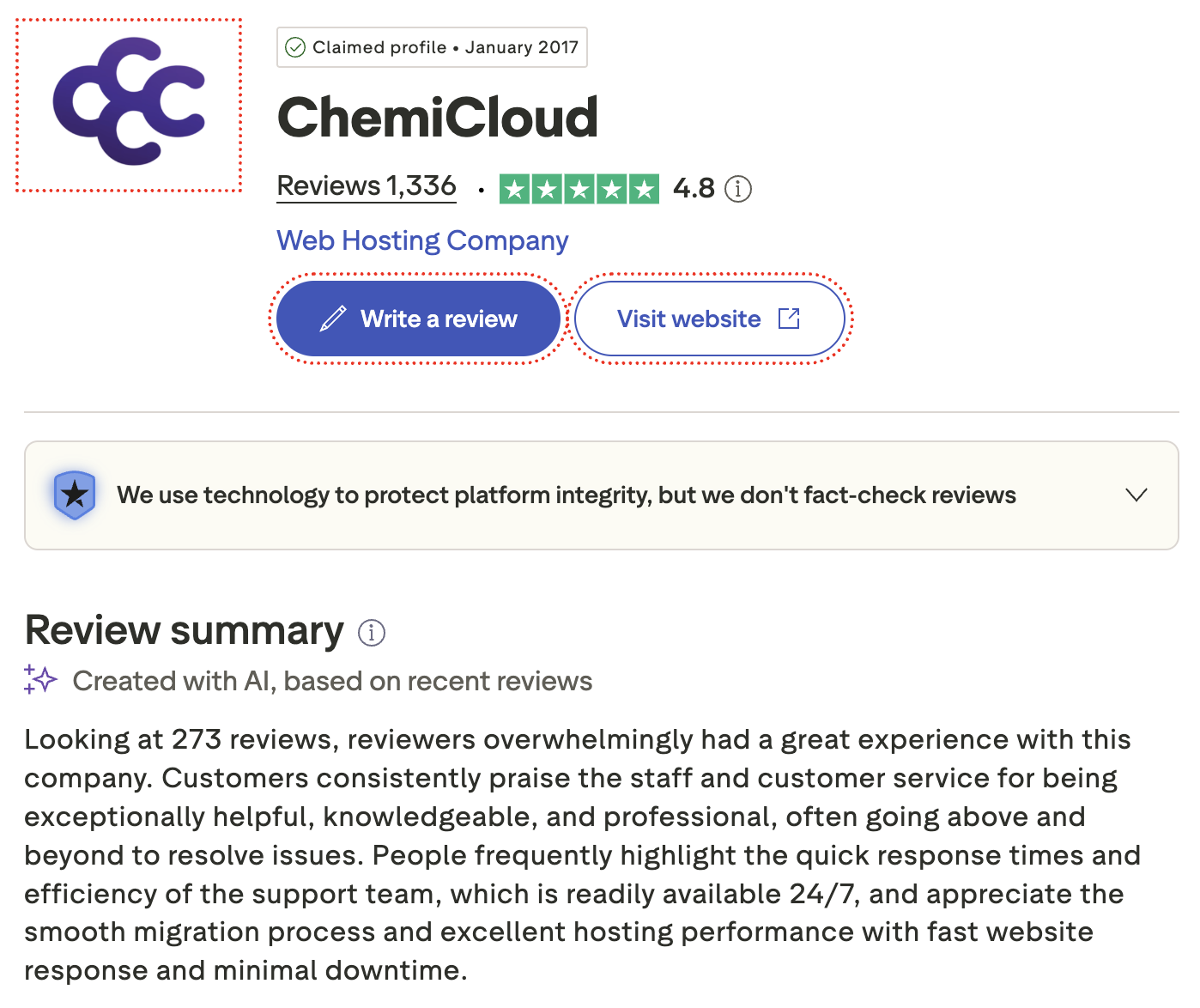
Beyond my personal experience with their support, you can browse sites like TrustPilot, where they’re rated 4.8 out of 5 stars, with plenty of user stories from people who migrated to them from SiteGround, BlueHost and even Cloudways.
12. Independently-owned (no VC / PE backing)
ChemiCloud is owned independently, free from any venture capital or private equity money so far. Why is this important? Because they tend to acquire independent hosts and turn them into trash (many such examples with hosts that got acquired by Newfold Digital and World Host Group).
ChemiCloud is owned by CCHosting, Inc. – a privately-owned company registered in the state of Delaware, US.
When asked about their primary mode of customer acquisition, they responded:
We have grown organically through customer acquisition and word-of-mouth recommendations within the hosting and WordPress communities.
Closing Thoughts (My TLDR Summary)
ChemiCloud is a no-compromise host offering high-performance shared hosting (what I personally use), VPS and managed WordPress hosting.
Their shared hosting boasts commendable specs (both hardware & software / tech stack side). The shared hosting resource limits are fairly liberal (for the money you pay) and they’re one of the few hosts offering a rather cheap add-on to boost the allocated resources like memory and CPU cores.
This ensures unparalleled scalability within the shared hosting infrastructure. This means you don’t need to change plans / hosts even if your sites suddenly start getting way more traffic.
The performance that they offer is impressive and should be more than enough for 99% of WordPress sites (that can benefit from caching). I could get sub-100ms TTFBs within the same continent as the origin server, without any CDN.
Uptime and overall reliability were never a concern. Tech support is always fast, transparent and actually useful. You don’t have to deal with any AI chat bots or low-knowledge level 1 support people.
Thanks for taking the time to read my experience with ChemiCloud!
- Visit: ChemiCloud.com
- Money-back guarantee: 45 days (no strings attached)
- Promotions & discounts: usually displayed on their website
Have you used ChemiCloud? Share your own experience below!